
Follow this step-by-step guide to register, verify your details, and start selling on TikTok Shop to French customers.
Step 1: Sign-Up on TikTok Shop #
Register with your phone, email, or by linking an existing TikTok account at TikTok Shop Seller Center for French sellers. Verify with the one-time code sent to you. Each phone or email can only be linked to one shop account.
Step 2: Select Your Business Type #
The French sellers can choose among two options:
- Sole trader;
- Legal entity (registered company).

Screen source: TikTok Shop Registration
Step 3: Enter Primary Representative Info #
For legal entities, make sure your business is registered in the same country you're applying from. Submit the following for the primary representative:
- Full name and role (Owner, Director, or Authorized User with a signed letter);
- Indicate if they are a UBO (Ultimate Beneficial Owner);
- Valid ID (Passport, National ID, or Residence Permit; Driver’s license accepted in FR/IT/DE);
- Selfie video holding the ID;
- Scans of both ID sides;
- Proof of address (e.g. utility bill or bank statement for Germany/France).
Your complaint address will be visible to buyers and can match your business address or be a separate one.
For sole traders
To complete your TikTok Shop registration as a sole trader, provide:
- Valid ID (Passport, National ID, or Residence Permit; Driver’s license accepted for FR/IT/DE);
- A selfie video clearly showing you holding the ID;
- Scans of both sides of the ID;
- Registration number (if applicable);
- Proof of address (bank statement or utility bill from the last 3 months);
Your proof of address must match the country where you're registering your business.
Accepted proof of address documents:
The French sellers can submit one of the following:
- Utility bill (water, electricity, gas, mobile, or internet);
- Bank statement (RIB not accepted);
- Home insurance certificate;
- Certificate of contract holder;
Ensure the document is recent (within the last 3 months) and clearly shows your name and address.
Step 4: Upload Your Business Information #
Provide your registered business name and registration number. You may use your residential address or enter a different one.
Add a complaint address - this can match your business address or be different. It will be publicly visible to customers.
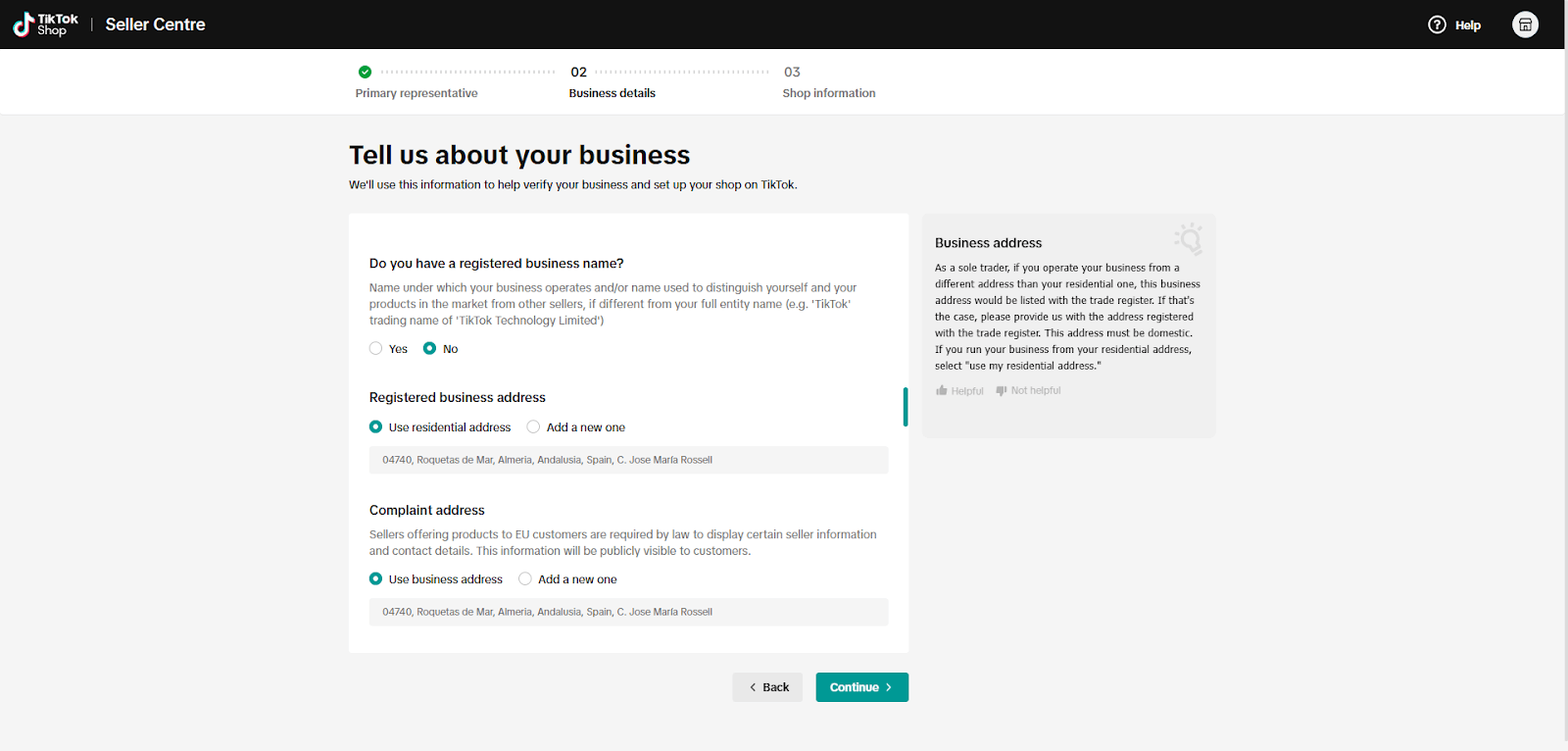
Screen source: TikTok Shop Registration
Step 5: Set Up Your Shop #
Shop Name: Pick a name that customers will see;
- Logo: Upload a logo to boost brand visibility;
- Contact info: Enter your email and phone for shop updates;
- Identity check: If you're registering for a company, submit legal details;
- Submit application: Review everything and send - approval takes 2-3 days.
Step 6: Provide UBO Information #
If applicable, you’ll need to provide details of any Ultimate Beneficial Owner (UBO) - individuals who own or control more than 25% of the business. This includes their full name, date of birth, nationality, and residential address.
Provide the following details for each Ultimate Beneficial Owner (UBO):
- Legal full name;
- ID number;
- Date of birth;
- Nationality;
- Type of ID (e.g., Passport, National ID);
- Expiration date of the ID;
- Current residential address.
Step 7: Enter Shop Configuration #
- Shipping & returns: Enter pickup and return addresses;
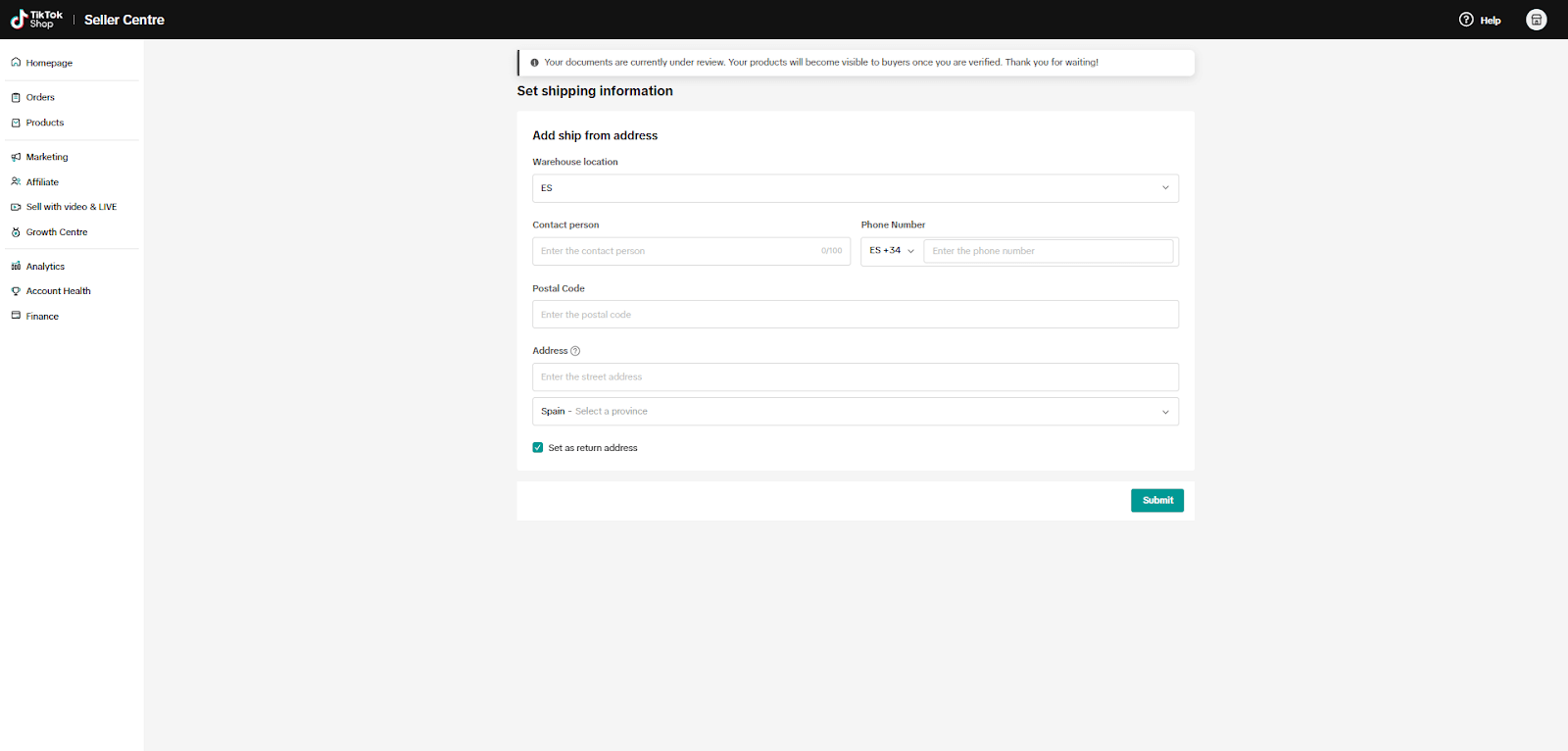
Screen source: TikTok Shop Registration
- Customer support: Add an email and phone number for buyers to reach you.
- Bank info: Submit IBAN, BIC, country, email, and a bank statement if needed - must match your registered business name;
- Product listing: Add your first product to go live;
- TikTok account: Link your TikTok profile to enable shoppable videos and livestream selling.
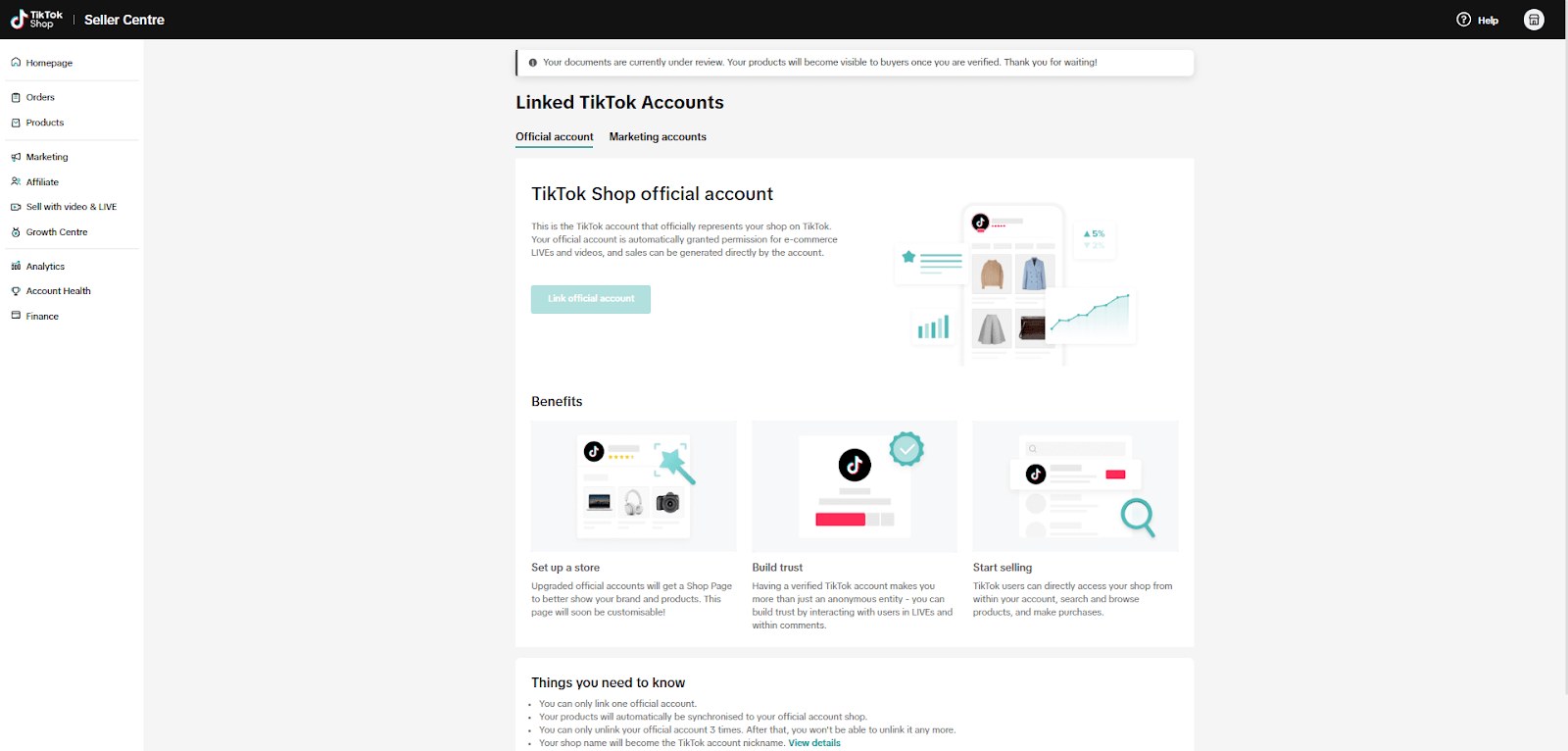
Screen source: TikTok Shop Registration
FAQs #
FAQ 1: Can I Use a Bank Account with a Different Name than My Shop? #
No. Your bank account must be under the exact same name as your registered shop entity. Parent or subsidiary companies are not accepted, and the account must be valid at the time of submission.
FAQ 2: Who Can Act as the Company Representative During Registration? #
Only an Owner, Director, or a Primary Authorized User (with a signed authorization letter) can complete the registration on behalf of the company. Be sure the selected role matches what's listed in your business registry.
FAQ 3: Why Do I Need to Submit a Video with My ID? #
Due to legal verification rules, you must upload a selfie video clearly showing your face and your ID. Blurry, altered, or unclear videos will be rejected. This step ensures authenticity and prevents identity fraud.
Need more info about how to sell on TikTok Shop? Remember to check out our documentation.
For more information, read the official TikTok Shop guide for French sellers.


Hi there,
Some great & helpful information on here. I just had a question lets say my entity was called “Entity” and with that entity i got an EU trademark called “product” Could my entity apply for tiktok shop but my shop page say “product” instead of entity?
Hello!
Thanks for your question and for the positive feedback. Glad you found the information helpful!
Yes, your entity can apply for a TikTok Shop using its legal name, and set the shop name as “product” – the name of your EU trademark. The shop name shown to customers doesn’t have to exactly match your legal entity name, but TikTok does require proof that you own the trademark or have the rights to use it.
So as long as you upload valid trademark documentation during registration, you should be able to use “product” as your public-facing shop name.
Let us know if you have any more questions!
Quick question, setting up on French tik tok with an authorized user (as we are in the UK, they are a French resident who will handle shipments, customer contact, etc.). We have added their passport and utility, both seem to be verified but it is still rejecting the registration saying they cannot verify the authorized user. I’m wondering if it’s to do with the question “Are you an agent or representative of a brand for any of the products you want to sell on TikTok?” She is representing us and we’ve agreed commission rates for that. If I say ‘yes’ they want a legal business name and address. Would that be our company details again or a separate business that she owns? She has a freelance company but this wasn’t how we wanted to set up. If you can shed any light on this, that’d be great, thanks.
Hi Rebecca,
Thank you for reaching out. Unfortunately, we don’t have direct experience with this type of case, so we recommend contacting TikTok Shop Support for the most accurate guidance. We’re sorry we couldn’t be of more help here.
That said, if you need assistance with integrating your store and TikTok Shop, we’d be more than happy to help:
https://m2ecloud.com/tiktok-shop
Best regards,
M2E Team