
Before you start fixing a specific Kaufland listing error in M2E Multichannel Connect, you first need to locate all products impacted by it. This helps you focus only on the listings that require attention.
Step 1. Open your Kaufland listings #
Go to the Listings page in M2E Multichannel Connect and select your Kaufland account.
Step 2. Filter items by errors #
Click the Groups icon (folder icon) in the top-right corner of the Listings page.

Select the Action Required group.

Then click Errors to display all Kaufland listings currently affected by any issue.

Step 3. Select a specific error #
Click on the specific error message to group and review all Kaufland products affected by that exact problem.
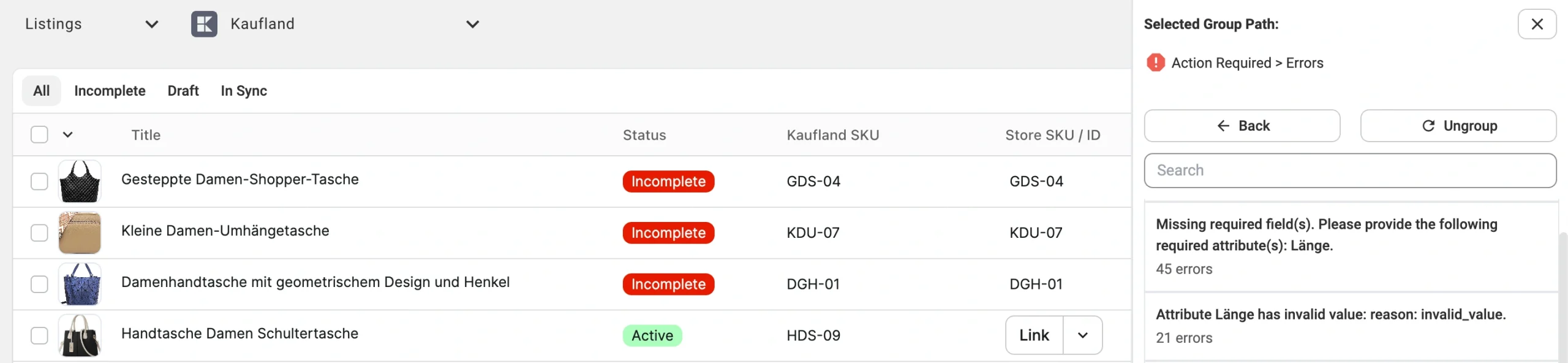
From here, you can start resolving the issue for each item individually or for all affected items in bulk.
ℹ️ If multiple errors are shown, repeat the process for each error group to resolve them one by one.


