
This September, M2E Cloud rolled out essential features to help you reduce listing errors, protect your stock, and streamline the way you manage marketplace orders.
What’s new in M2E Cloud #
Quantity Reservation for Pending Orders in BigCommerce #
Overselling popular products is one of the fastest ways to disappoint customers. To prevent this, we’ve introduced the ability to reserve product quantity for Pending orders in BigCommerce.
When a Pending order arrives from the Channel, M2E reserves the ordered quantity in BigCommerce and reduces the available inventory level. This way, the same item cannot be oversold while the order is still awaiting confirmation.

If the order is canceled, the reserved quantity is automatically returned to your catalog.
If the order is confirmed (moves from Pending to Unshipped), the reservation is cleared, and the actual order is created in your BigCommerce store.
This workflow keeps your stock levels accurate in real-time and prevents you from selling items you can’t fulfill. You can enable the option in Settings > Orders > Inventory Reservation for each Channel account.
ℹ️ The quantity reservation feature is also available for orders imported to Shopify.
Prepare eBay & Walmart listings for success #
Every seller wants their products to go live quickly and stay live. The new M2E Listing Validator Assistant helps you achieve that by ensuring your eBay and Walmart listings are compliant before they’re published.
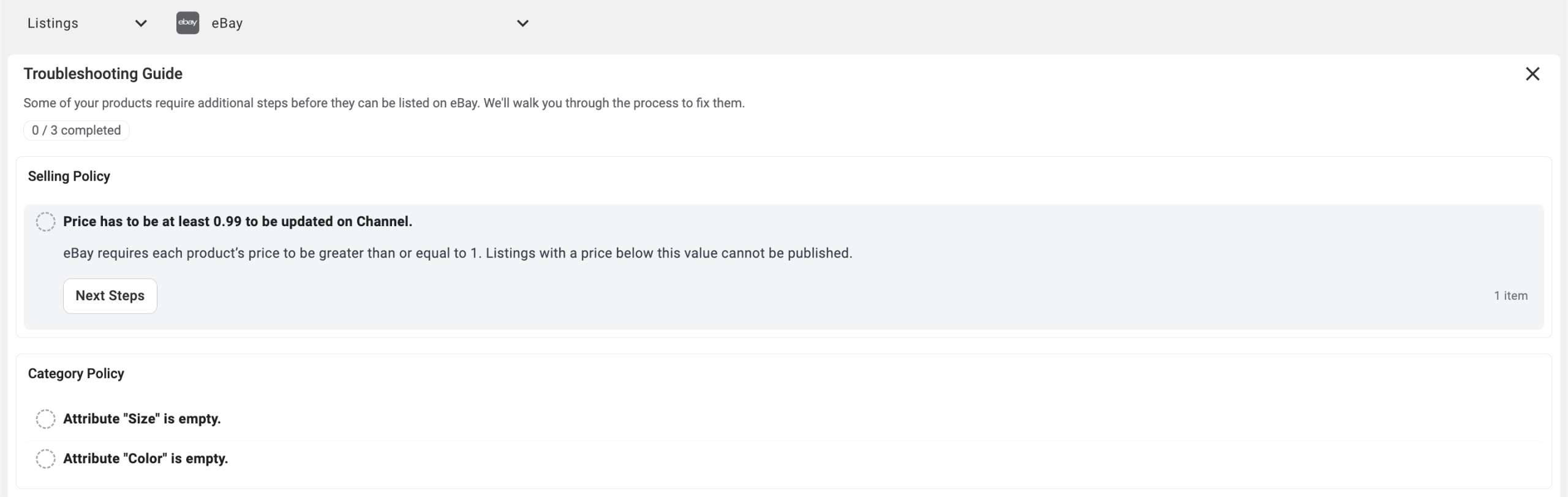
Before you submit a listing, the Assistant reviews your data and highlights anything that needs attention. It checks mandatory details, such as brand, images, and item attributes, so every listing is aligned with marketplace standards from the start.
ℹ️ The same Listing Validator Assistant is already available for TikTok Shop and Temu.
Manage Temu order refunds #
When a Temu order needs to be refunded (whether before delivery, after a return, or partially) M2E Multichannel Connect now keeps your Shopify, BigCommerce, and WooCommerce stores in sync.

Here’s how it works:
- Refund only – If Temu issues a refund without requiring the product to be returned (for example, when items are low-cost or arrive damaged), M2E creates the refund in your store but leaves inventory unchanged.
- Return & refund – If the buyer is required to return the product, M2E creates the refund once the return is confirmed. At the same time, your inventory is automatically updated to reflect the returned items.
- Partial refunds – Both refund-only and return & refund scenarios are supported. For multi-item orders, M2E updates status and stock only for the refunded product, while all other items remain unchanged.

In all cases, M2E records the refund details in both Channel order logs and Store order details, giving you complete visibility.
Control Temu order amounts #
Every seller tracks performance differently. Some want to see exactly what the buyer paid, while others need to know their net revenue after deductions. To give you that flexibility, M2E now lets you choose which order total should be synced to your store for Temu orders.You can set your preferences in M2E under Store Settings > Orders > Order Summary:

- Total paid by the customer – the exact amount the buyer paid, calculated as Retail price × Quantity + Tax + Shipping total − Discount from seller − Discount from Temu − Refunds.
- Estimated seller revenue – the estimated amount you’ll receive, calculated as Base price × Quantity + Shipping total + Tax total (after discount) − Estimated revenue deduction.
This way, your store reflects the numbers that are most relevant to your business – whether you’re tracking customer spend or focusing on actual revenue.
Specify bullet points for Temu listings #
On Temu, buyers make quick decisions. That’s why bullet points are so valuable – they bring the most important features of your product front and center.
With M2E, you can now define bullet points directly in your Description Policy. Enter the key details you want to highlight in your Temu listings.

Bullet points are also available for Amazon, where sellers use them to showcase a product’s main benefits. Now, Temu sellers can take advantage of the same approach.
By specifying bullet points, you can help your Temu listings stand out, reduce pre-purchase questions, and give buyers the confidence to click “Buy” faster.
Create new listings on Shein #
Last month, we introduced the first stage of our Shein integration with basic functionality. Now, we’ve expanded it to support listing creation.
You can list both Simple and Variational products directly from your store to Shein. The process follows the familiar M2E workflow: apply your Policy settings, pick products, select a category, and define attributes.

If you have questions about selling on Shein from Shopify, we invite you to watch the recording of our recent webinar in collaboration with Shein. It covers everything you need to know to get started:
What's next in M2E Cloud #
- Sell on OTTO Marketplace
Expand your reach to the popular online marketplace in Germany from your e-commerce platform.
- Copy listings from other channels to Temu
Save time creating new Temu products by copying existing listings from your other sales channels (eBay, Amazon, Walmart).
- Add GPSR information to Temu listings
You’ll soon be able to include General Product Safety Regulation (GPSR) details, such as Brand, Manufacturer, etc. to stay compliant with EU safety standards.
If you have any questions about these updates, our support team is here to help. We’d also love to hear your suggestions for future features or integrations in the comments.


