
This guide shows how to integrate, configure, and manage Best Buy Canada within M2E Cloud.
It covers the setup required in M2E Cloud and explains how Best Buy operates as a Mirakl-based marketplace, including product data standards, pricing setup, order processing, and invoice management.
ℹ️ M2E Cloud also supports Best Buy US marketplace.
Most of the principles described here are relevant to other Mirakl marketplaces available in M2E Cloud.
What happens outside M2E Cloud #
Best Buy Canada is a leading online marketplace focused on electronics, appliances, and technology products. It allows professional sellers to reach customers throughout Canada with branded and standardized goods.
The marketplace is Canada-only and runs on the Mirakl platform. This means that product data, pricing, offers, and order handling must follow Mirakl standards and additional rules specific to Best Buy.

Before you connect Best Buy to M2E Cloud, keep the following in mind:
- Best Buy requires strict product content compliance
- Some orders may require invoice handling
- Fulfillment must follow Canadian logistics and tax rules
- Product content can be submitted in English and French
ℹ️ Mirakl handles marketplace rules, validations, and approvals. M2E Cloud connects to Best Buy only after your seller account is approved and API access is available.
Who Best Buy is a good fit for #
Best Buy Canada is a good fit for merchants selling:
- Consumer electronics
- Computers, laptops, and mobile devices
- Cameras and audio equipment
- Home and kitchen appliances
- Furniture and interior items
- Video games, games, and toys
- Music, films, and books
- Office and professional equipment
- Sports equipment
- Jewelry and watches
- Musical instruments
- Shoes, bags, and luggage
- Refurbished products (subject to additional requirements)
Best Buy focuses on branded, standardized products with clear technical specifications.
It is generally not suitable for handmade, custom-made, or non-branded goods.
Requesting a Best Buy seller account #
To sell on Best Buy Canada, you must apply directly through Best Buy before configuring the marketplace in M2E Cloud.
Where to apply: Submit your application through the Best Buy Canada seller onboarding process on their website.

During the application, Best Buy may require:
- A registered business in Canada (Chambre de Commerce du Canada)
- A valid return address within Canada
- Readiness to provide customer, inventory, and pricing support
ℹ️ Account approval is handled entirely by Best Buy. Approval timelines may vary.
Once approved, you receive access to the Mirakl Seller Hub, which is required to connect Best Buy to M2E Cloud.
Fees and commercial terms #
Best Buy Canada uses a fixed fee model with category-based commissions:
- Setup fee: CAD 29.99
- Monthly fee: CAD 29.99
- Commission: varies by product category
- Payment schedule: bi-weekly
These fees cover access to the marketplace and order processing.
ℹ️ Best Buy defines product category access, selling permissions, and additional requirements, which may vary by product type.
What happens inside M2E Cloud #
By connecting Best Buy Canada to M2E Cloud, you can manage products, offers, orders, and shipments from a single central interface.
The M2E Cloud Mirakl integration lets you:
- Connect Best Buy Canada using Mirakl API credentials
- Select and export products from your store
- Map categories and required attributes
- Control pricing, inventory, and discounts
- Synchronize orders, shipments, and invoices
This section covers what you can configure in M2E Cloud to prepare your catalog and control the data flow between your store and Best Buy.
Requirements before you start #
Before setting up Best Buy Canada in M2E Cloud, make sure all requirements below are met. Missing any of these may block product exports or order processing.
ℹ️ Make sure your store runs on a supported platform such as Shopify, BigCommerce, PrestaShop, etc. All M2E apps are available in the official app listings. For example, a Shopify Hygi.de integration by M2E requires installing the Shopify app first.
You need:
- An approved Best Buy Canada seller account
- Active access to Mirakl Seller Admin
- A valid Mirakl API key
- Products with valid UPC or EAN identifiers
- Prices available in CAD
- The ability to provide invoices, if required by your configuration
- Product content in English
- Product content in French if you sell in Quebec or other French-speaking regions
💡 If your store uses a different currency, you can configure currency conversion in M2E Cloud.
Connecting Best Buy to M2E Cloud #
Best Buy is a Mirakl-based marketplace that connects to M2E Cloud via API.
To connect the marketplace, you need access to your Mirakl Seller Admin and an active API key.
Connection steps
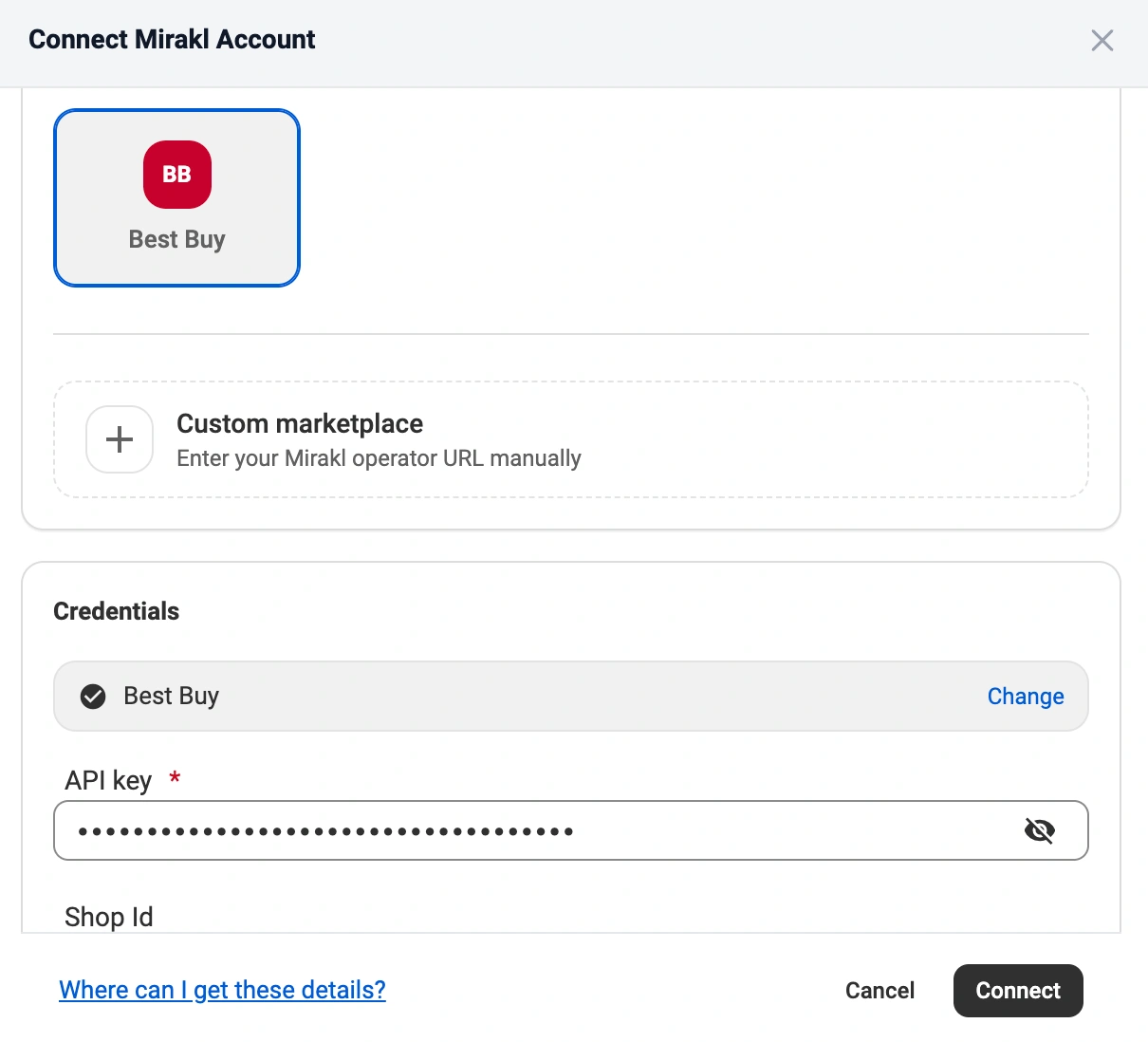
- In M2E Cloud, go to Connect Mirakl Account.
- In the Select marketplace section, choose Best Buy (use the Search marketplaces field to find it quickly).
- Log in to your Mirakl Seller Admin and generate or copy your API key.
- Back in M2E Cloud, paste the key into the API key field.
- Enter your Shop ID if you manage multiple shops.
- Click Connect.
✅ For full step-by-step instructions, visit this page.
Once connected: What happens next? #
After the marketplace connection is active, you configure how products and orders behave in M2E Cloud.
1. List new products on Best Buy #
Select the products you want to sell on Best Buy from your store and export them as new listings.
M2E Cloud sends both product content and offer data to the marketplace. After export, the listings appear on Best Buy and are managed from your store data.
2. Link existing marketplace listings with store products #
If products already exist on Best Buy and use the same SKUs as your store, M2E Cloud can automatically link them.
You can also link listings manually using a CSV file, if needed.
Linking is required so M2E Cloud knows:
- Which store product controls each marketplace listing
- Which price and quantity values are synchronized
3. Map categories and required attributes #
Category mapping is mandatory before product data can be exported.
In this step, you assign:
- A Best Buy category for each product
- All required and category-specific attributes
ℹ️ Best Buy categories are listed in English. Some categories support product variations, such as color or size, and require additional attributes to be mapped.
4. Configure pricing and currency rules #
Pricing behavior is controlled through Selling Policies in M2E Cloud.
At this stage, you control pricing, inventory, and other key listing settings. Selling Policies ensure your listings meet Best Buy requirements while allowing different rules for specific product groups.
M2E Multichannel Connect lets you create multiple Selling Policies, so you can apply different pricing and inventory logic where needed.
This includes:
- Base price sources
- Quantity available for sale on Best Buy Canada
- Discount and strike price rules
- Currency conversion, if your store uses a different currency
5. Configure order settings and status mapping #
Define how Best Buy orders are imported and processed.
This step controls:
- When Best Buy orders are imported into the M2E Cloud
- How marketplace order statuses map to your store statuses
- When shipment data is exported back to Best Buy
Correct status mapping prevents order conflicts and keeps order flows consistent.
6. Set up shipping rules and invoice settings #
Shipping behavior is controlled through Shipping Policies.
In this step, you configure:
- Available shipping methods
- Shipment confirmation and tracking export
7. Monitor listings and resolve issues #
After setup, you can monitor listing behavior directly in M2E Cloud.
From the Listings page, you can:
- Track product export and validation results
- Identify pricing, mapping, or policy issues
- Fix problems without disconnecting the marketplace
💡 All M2E Multichannel Connect features are described here.
What happens in the marketplace back-end? #
Best Buy Canada is a Mirakl-based marketplace with its own validation rules, feature set, and operational limits. Understanding what happens on the marketplace side helps prevent listing errors and failed exports.
Best Buy marketplace features #
Supported
- Product content and offers
- Orders (no order splitting)
- Shipments and tracking
- Carrier mapping
- Manual product variations (category-dependent)
- Refurbished products
Not supported
- Marketplace-managed fulfillment
- Automated repricing tools
- Pickup point delivery
- Volume or tiered discounts
- Multiple stock locations
ℹ️ All orders on Best Buy are processed as single shipments.
Product and offer requirements #
To list products successfully, all required data must meet Best Buy and Mirakl validation rules.
Product content #
Mandatory fields
- UPC / EAN. Unique product identifier. Accepted formats include UPC-A and EAN13.
- Product title
- Maximum length: 126 characters
- Recommended structure: [brand] [sub-brand] [series or model] [key specifications] [color]
- Avoid repeated words, special characters, and unnecessary capitalization
- Main image
- Minimum size: 500 × 500 px
- Maximum file size: 10 MB
- Formats: JPG, PNG, GIF
- Background: pure white
- Square images recommended
- Brand name. Must match the official brand spelling used by the manufacturer.
- Manufacturer part number (MPN). Manufacturer’s unique product reference.
- Model number. Required for many electronics and technical products.
- Shop SKU. Internal product identifier used for linking and synchronization.
- Web hierarchy location. Best Buy-specific category identifier that defines where the product appears on the website.
Language support
- English product content is required
- French content is optional
- French content becomes mandatory if products are sold in Quebec or other French-speaking regions
Product variations
Best Buy supports variations only for selected categories. Each supported category requires a specific variation attribute, such as color or size.
Offers #
Required
- Price. Sale price in CAD, excluding tax.
- Warranty (parts and labor). Provided in days.
Optional
- Discount pricing and date ranges
- Environmental and eco fees
- Sales tax codes
- Stock and alert thresholds
Offer data must follow Mirakl pricing logic. Invalid values block exports or hide offers on Best Buy.
Pricing, taxes, and Mirakl-specific attributes #
Pricing rules
- All prices must be submitted in CAD
- Currency conversion must be configured if your store uses another currency
Discounts
- Discount price must be lower than the base or strike price
- Discount dates must be valid and correctly formatted
Pricing behavior depends on your pricing version:
- Pricing v1: base price + discount price with date fields
- Pricing v2: strike price (regular) + price (discounted)
Taxes and eco fees
- Supported tax codes: GST, PST, HST
- Eco fees and EPR attributes may be required, depending on the product and province
Additional Mirakl attributes
- Lead time to shipment – number of days required to prepare and dispatch the order
- Offer state – current condition of the product
- Product tax code – applicable tax classification
- Minimum quantity alert – notification when stock falls below a set threshold
Shipping, logistics, and carrier mapping #
Shipping behavior on Best Buy Canada follows Mirakl logistics rules with marketplace-specific constraints.
Logistic class codes
Logistic classes define how products are shipped. Use marketplace codes, not labels.
- LETTER – envelope products (under 0.5 kg)
- SMALL – small boxes (0.5–3 kg)
- MED – medium boxes (3–15 kg)
- LARGE – large boxes (15–30 kg)
- HEAVY – heavy items (over 30 kg)
- LTL – scheduled delivery
Delivery expectations
- Fulfillment must follow Canadian shipping standards
- Delivery timelines must match the configured lead time
FAQ #
What image requirements does Best Buy enforce? #
Best Buy validates all product images. Images must be at least 500 × 500 px, use a white background, and be under 10 MB. Non-compliant images block product approval.
Do I need French product content for Best Buy Canada? #
French content is optional unless you sell in Quebec or other French-speaking regions. In those cases, French attributes must be provided and correctly mapped.
Why is my product not listed on Best Buy? #
Common reasons include missing UPC/EAN, invalid category mapping, missing web hierarchy location, incorrect pricing, or failed image validation.
Can I sell refurbished products on Best Buy? #
Refurbished products are supported but must be clearly flagged and meet Best Buy’s condition and content rules.
✅ If you need help with setup or have any questions, reach out to our team.


Does this work with Bestbuy US as well?
Yes, M2E Cloud supports the Best Buy US marketplace.
To connect to the US marketplace, enter your Best Buy US account details during the setup.