
The Kaufland Listing Validator Assistant in M2E Multichannel Connect helps you confirm that your product data meets Kaufland’s listing rules before you submit your items. The Assistant flags incomplete or incorrect details and explains how to correct them so your listings can go live without interruptions.
This guide covers where to find the Assistant, how it operates, and how to use it to prepare your catalog for the Kaufland marketplace.
When the M2E Validator Assistant steps in #
You’ll run into the Assistant during the final step of the Kaufland listing process. After choosing the products you want to publish and clicking List Now, the system begins reviewing the selected items.
During the validation process, the Assistant:
- Checks whether essential product data, such as identifiers, price, handling time, and quantity, has been provided in the proper format.
- Matches your product identifiers with existing Kaufland catalog items.
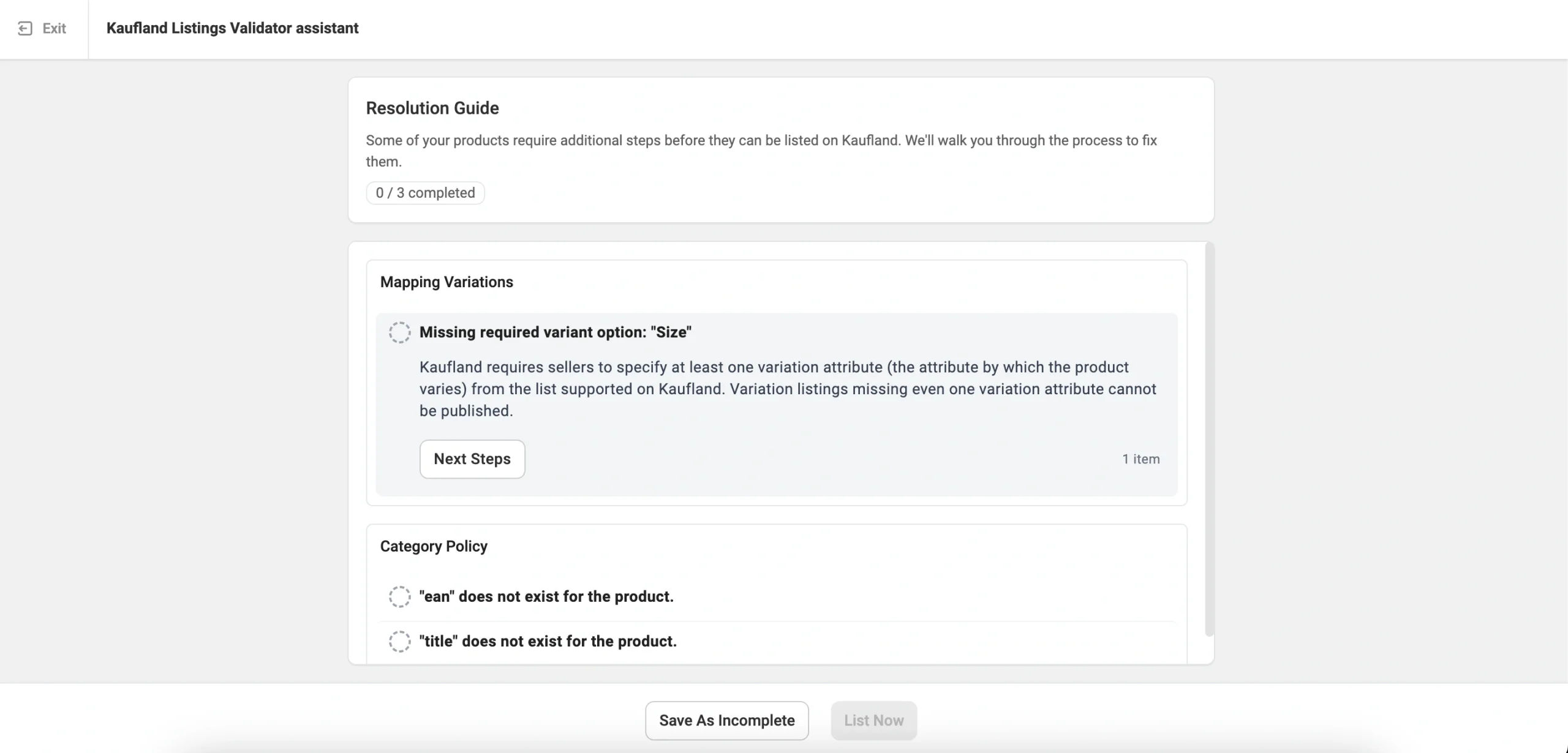
If the system detects problems, the Assistant will appear and display an overview of the issues.
✅ If all product data is in order, the Assistant doesn’t show up. Your products move forward with the listing process, and you can track their status on the Listings page.
Review validation feedback #
Inside the Assistant, all issues are sorted by category. Each issue shows a short description of what’s wrong, the number of products affected, a note explaining why Kaufland requires this information.
For example, if your product uses a barcode that Kaufland cannot validate, you may see a message such as: “EAN doesn’t exist for the product.” It means that the system cannot use your provided EAN or GTIN to identify the item, and you need to supply a valid code to list the product on the Channel.
Follow the suggested fixes #
Each issue contains a Next Steps option. When you click it, the Assistant provides detailed guidance on how to fix the problem.

Depending on the issue, you may:
- Adjust the data in M2E Multichannel Connect, or
- Update the product information in your Store or M2E Catalog

For example, the Assistant may ask you to select a different field as the barcode source or correct the value in your Store so Kaufland can verify it.

Select the most suitable solution for your issue, make the necessary changes, and confirm them.
Some other frequent issues and suggested solutions are:
- Update product price or quantity if the value is missing or invalid (for example, below 0 or lower than 0.99).
- Assign a Kaufland product category to create a new PID if Kaufland cannot classify your item based on the provided barcode.
- Adjust Kaufland category attributes that contain missing or incorrect values.
- Provide or change titles and descriptions in your Store or Catalog for items that require clearer content before Kaufland accepts them.
- Map variation attributes between your Store and Kaufland if you’re listing variational items.
ℹ️ If you want to skip fixing a specific issue for now, select Save as Incomplete in that issue’s solution panel.
However, keep in mind that skipped issues can still affect your listing. Products with missing data won’t be accepted by Kaufland.
Re-run validation and publish items #
Once you fix all detected issues, click List Now to run another validation pass. M2E will recheck the updated product data.

Products that pass validation move to Kaufland for review. If all items are valid, the Assistant closes and returns you to the Listings page. Products with remaining issues stay inside the Assistant until you resolve them.
Save items and continue later #
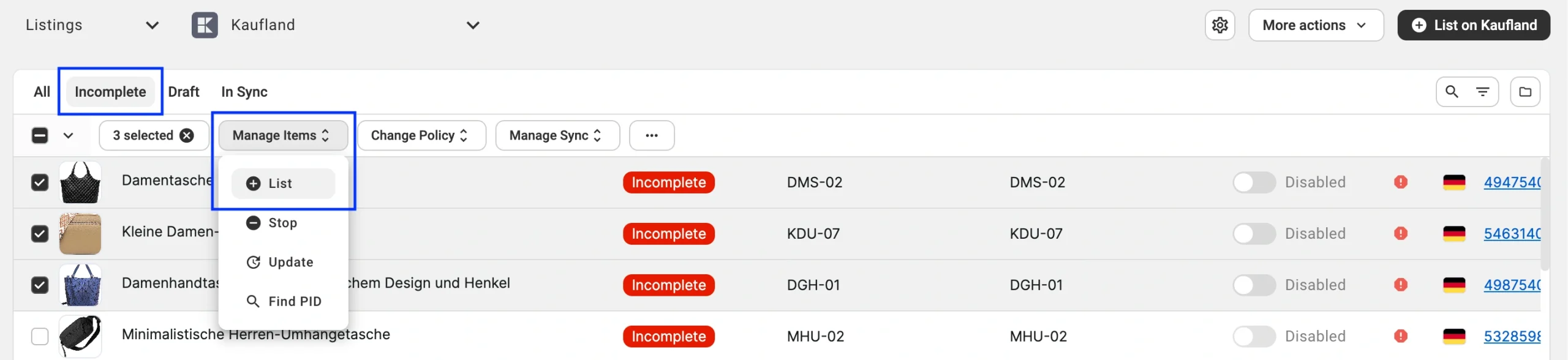
If you aren’t ready to fix all issues at once, you can save your progress by clicking Save as Incomplete. You can find the saved items with the Incomplete status on the Listings page.

To continue resolving the issues, filter your Kaufland listings to show the Incomplete items. Select them, then click Manage Items > List from the actions menu. This reopens the Assistant right where you left off.
✅ If you have questions about the validation process of Kaufland listings, our support team can assist you.


