
M2E Multichannel Connect now includes the Temu Listing Validator Assistant. It has one clear job. It helps you produce complete listings and get them ready to go in less time.
No more guesswork. The Listing Validator Assistant checks all key fields before you publish. It flags anything that could block a listing. Your products reach Temu buyers without delays or errors.
This guide shows how the Listing Validator Assistant works and how to prepare your catalog for smooth Temu launches.
Main advantages of the Temu Listing Validator Assistant #
Ensure all details are set
The Assistant shows at a glance whether your Store or Catalog items follow Temu rules. You can spot which listings are ready to go live and which ones need changes.
Get step by step hints
Each issue comes with a plain explanation and practical next steps. You know exactly what to update to meet Temu’s requirements and publish with confidence.
Make the changes your way
The Assistant gives you flexible options:
- Update product details in the Store or Catalog.
- Use M2E tools like custom attributes or groups to complete missing or invalid data.
- Add the necessary compliance details, like GPSR information, when prompted.
With the Temu Listing Validator Assistant, you stay in control, cut errors, and launch listings faster.
How to access the Listing Validator Assistant #
You’ll meet the Temu Listing Validator Assistant during listing. It appears at the end of the flow, right after you click List Now. M2E runs a quick check to confirm all required product data is present.
If some information is missing or doesn’t match Temu’s rules, the Assistant opens and shows you a clear breakdown of the issues. You’ll see exactly what needs attention before the listing can move forward.

ℹ️ If all products (or part of them) already meet Temu’s standards, the Assistant won’t appear. Those items will continue to be listed automatically in the background. You’ll be able to track their status and progress on the Listings page without any extra steps.
How to prepare your products for Temu with the Listing Validator Assistant #
Inside the Temu Listing Validator Assistant, results are sorted by issue type. For each problem, you see how many products are affected and why it matters under Temu’s listing rules.
For instance, if you try to publish items without a valid package weight, you will see a grouped alert titled Incorrect weight of the product. The Assistant also notes that every item on Temu must have a proper weight value.
View and apply solution tips #
Next to each issue, you will see a Next Steps button. Click it to open a list of fixes with clear, step by step instructions.

The Assistant will either:
- Walk you through the fix inside M2E Multichannel Connect, or
- Tell you exactly what to update in your Store or Catalog.
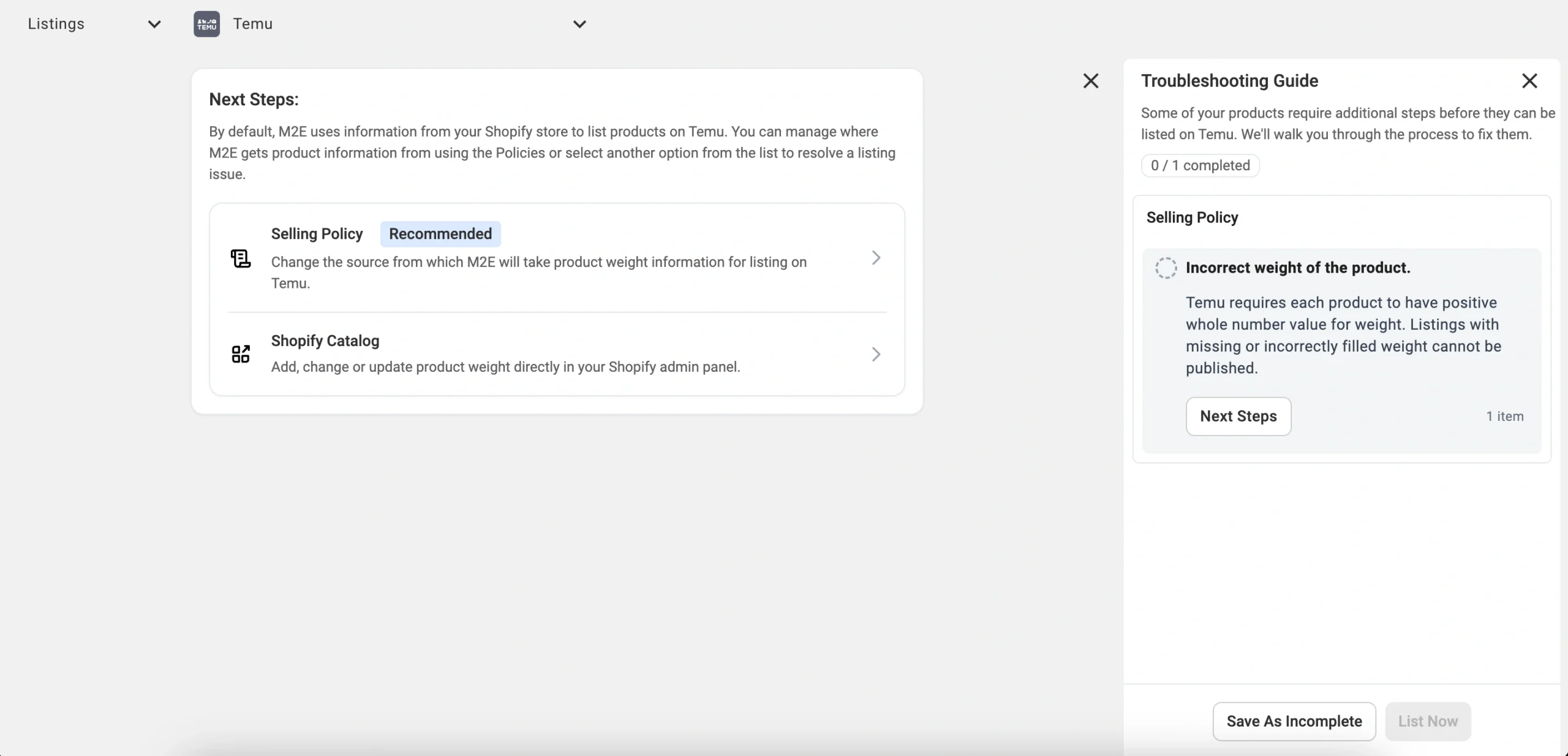
For example, if the weight is missing, the Assistant will take you to the Selling Policy with the Weight field highlighted.

From there, you can:
- Map the Weight field to an existing attribute or metafield in your Store/Catalog, or
- Enter the weight manually.
Once you confirm, M2E saves the update.
Based on the issue you faced, the Assistant may suggest several ways (you can see them in Next Steps) to solve it, such as:
- Edit the Description or the Selling Policy.
- Add the missing details directly to the product.
- Update many items at once using export and import.
- Map related attributes like Brand, Manufacturer, or GPSR data.
- Adjust the Category Policy if the chosen category or its attributes are incorrect.
In some cases, the fix is outside M2E. When that happens, the Assistant points this out and tells you what to change in your Store or Catalog, for example missing text or an invalid value.

Recheck and list products #
You must clear all errors before your products can go live on Temu. After you apply the fixes, click List Now to run Validation again. The Assistant rechecks your items and refreshes the results.
- Products that pass Validation go to Temu for review right away.
- If everything is valid, you return to the Listings page.
- Items that still have issues remain in the Assistant until you resolve them.

Save unresolved items for later #
Not ready to wrap up? Click Save as Incomplete to exit the Assistant. Your changes stay safe. Products with issues will show in Listings as Incomplete.

When you return, go to Listings, apply the Incomplete filter, and pick the items you want to update.

Click Manage Items > List.
This action reopens the Assistant so you can keep correcting errors until the items are ready to publish on Temu.

The Temu Listing Validator Assistant saves time and prevents failed listings by catching problems before they reach the marketplace. You get plain explanations, guided fixes, and flexible ways to resolve each issue.
✅ Correct items move forward at once.
✅ Incomplete ones remain visible until you add the missing details.
The result is obvious: less mistakes, faster publishing on Temu, and more time to grow your business.
✅ Still have questions about the Listing Validator Assistant? Reach out to our support team.


