
M2E Multichannel Connect integrates TikTok Shipping into your store's admin panel, so you can purchase shipping labels for TikTok Shop US orders without accessing Seller Center. The integration provides access to negotiated carrier rates and generates shipping labels, while M2E synchronizes all shipment details between your store and TikTok Shop.
Follow the instructions below to purchase and print shipping labels through M2E.
ℹ️ Important: As of January 2026, all USPS shipping labels must be purchased through TikTok Shipping. Uploading external USPS labels is no longer supported.
Before you begin #
Make sure to enable TikTok Shipping in your Seller Center in order to purchase shipping labels through M2E. Note that this shipping option is selected by default for new sellers. To check or adjust your settings, go to Logistics > Shipping > Delivery in TikTok Seller Center. Refer to TikTok Shop documentation for detailed instructions.
✅ This guide is for US sellers. If you are selling in the EU, refer to the TikTok Shop EU Buy Shipping guide.
Purchase TikTok Shipping label #
To purchase a TikTok Shipping label in M2E Multichannel Connect:
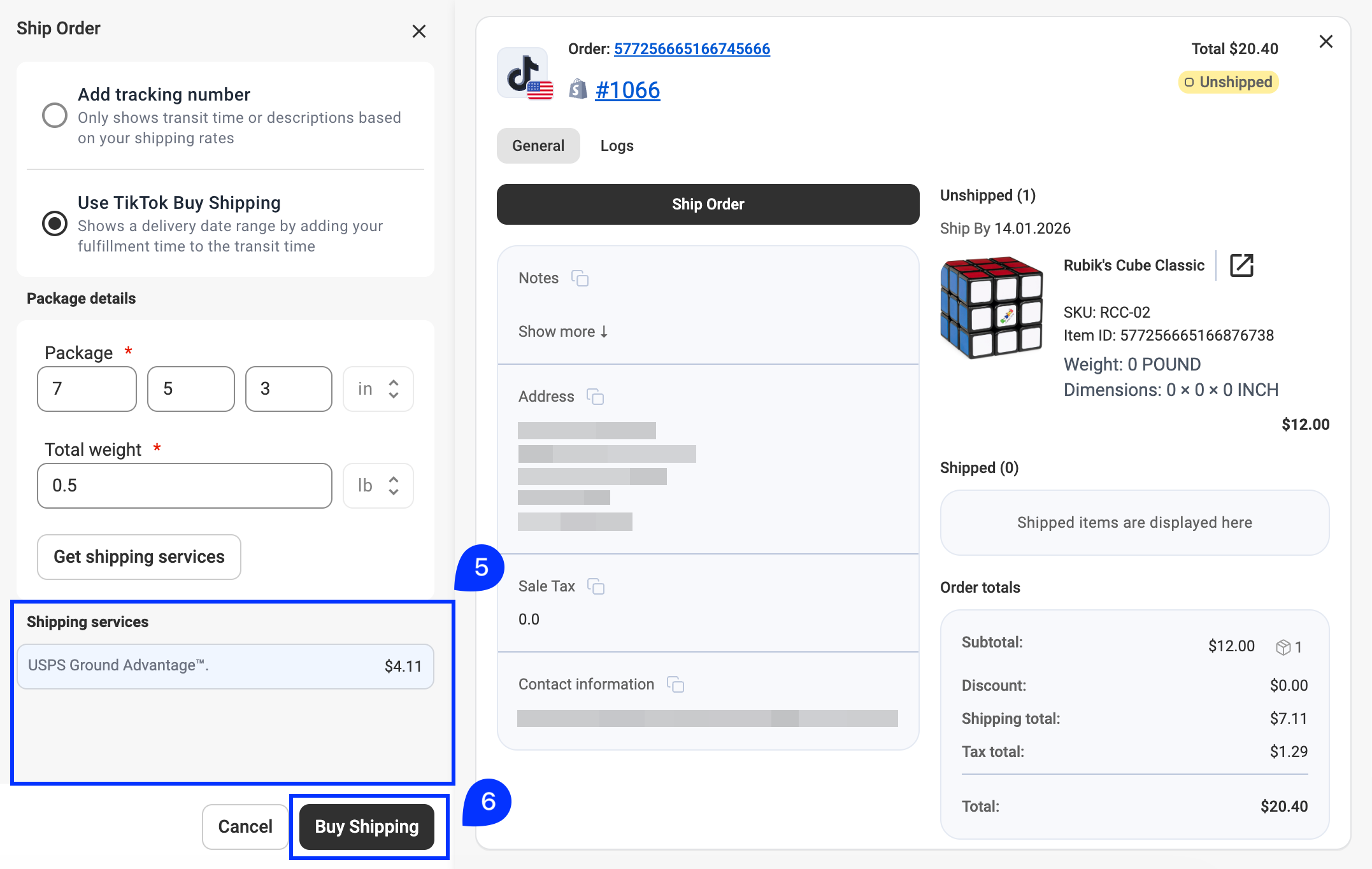
1) Open the order card of the Unshipped TikTok Shop order. Click Ship Order.
2) In the pop-up window, choose Use TikTok Buy Shipping.

3) Enter package details. Fill in the package dimensions in the format Length × Width × Height (in inches) and the total weight (in pounds).
4) Click Get shipping services.

5) Review the available shipping services and their rates based on your package details. Select the service that best fits your needs.
6) Click Buy Shipping to finalize the purchase.
After label purchase, TikTok Shop updates the order with shipping label and tracking details. M2E automatically syncs this information to your marketplace order and store, including tracking number and shipment status. The order is marked as Completed on both platforms.
Print TikTok Shipping label #
To view or print a TikTok Shipping label in M2E Multichannel Connect:
1) Open the order card of a Completed TikTok Shop order.
2) Find the Shipped item section.
3) Click the eye icon next to the tracking number.

The shipping label will open in a new browser tab as a PDF, ready to download or print.
Once printed, attach the label to your package and ship it according to your selected carrier's requirements (pickup or drop-off).
Need help? #
If you experience any issues buying TikTok shipping labels in M2E, please contact our support team.


