
When selling on eBay through M2E Multichannel Connect, it’s important to understand how tax information is processed during order creation. M2E ensures that tax data from eBay is handled correctly and sent to your store based on your specific tax setup. This way, you can generate accurate invoices, provide clear tax information to buyers, and stay compliant with tax regulations.
Basic tax handling #
When calculating taxes, M2E takes into account:
- Tax data received from the eBay order
- Tax configurations set in your store
eBay tax settings #
eBay automatically applies the correct tax rate based on the buyer’s location and the product category. For example:
- In the US and Canada, sales tax is added at checkout.
- In the UK and Europe, VAT may apply depending on the product type and seller’s VAT status.
You don’t need to configure tax rules manually on eBay – the platform determines the correct tax rate automatically.
Store tax settings #
Every e-commerce platform has its own tax configurations. For example:
- Some stores always expect tax-inclusive prices.
- Some offer an option to choose whether tax should be calculated at checkout or included in catalog prices.
M2E Multichannel Connect detects these settings from your store and adjusts taxes in eBay orders accordingly.
ℹ️ If you're responsible for paying the tax on marketplace sales, you'll see the appropriate tax rate and amount in your Store orders.
But if the marketplace collects and pays the tax (like with most U.S. sales), you may prefer not to receive this tax information in your orders. M2E Multichannel Connect lets you control this with a dedicated setting, so your Store orders only include the details you actually need.
How M2E sends tax data #
M2E reads the tax details from the eBay order and aligns them with your store’s tax configuration before sending the order to your store.
Example 1: Your store calculates tax
If your store is set to calculate taxes itself:
- M2E sends the item price excluding tax.
- Tax details are sent separately, allowing your store to calculate and display the final price.
Example 2: Your store uses tax-inclusive prices
If your store expects prices to include tax:
- M2E sends the item price including tax.
- It also includes a tax breakdown, so invoices and tax reports remain accurate.
Region-specific tax handling #
M2E Multichannel Connect offers region-specific tax configurations for eBay, so your orders are processed correctly no matter where your buyers are located.
United States and Canada #
In the US and Canada, eBay is responsible for collecting and remitting sales tax to the government. This means:
- The buyer pays the tax.
- eBay handles the tax payment.
- You don’t need to calculate or collect tax for these orders.
If you prefer not to display tax information in your store for these regions, M2E allows you to exclude tax data from such orders.
How to exclude tax details for US orders:
- Go to your store account in the top menu.
- Navigate to Settings > Orders > Tax Collection.
- Enable the Exclude tax collected by US-based Marketplaces option.

This prevents tax amounts from being shown in your store invoices where it’s not required.
VAT support for the United Kingdom and Europe #
In the UK and Europe, sellers are often required to show VAT-inclusive prices or apply reduced VAT rates depending on product type or seller status.
Common examples include:
- Reduced VAT for certain goods (e.g., children’s clothing).
- Legal requirement to show gross prices (price including VAT).
To help with this, M2E lets you manually set VAT rates in your eBay Selling Policy:
- Open your Selling Policy.
- Go to the Price > VAT, % section.
- Enter the applicable VAT rate for your products.
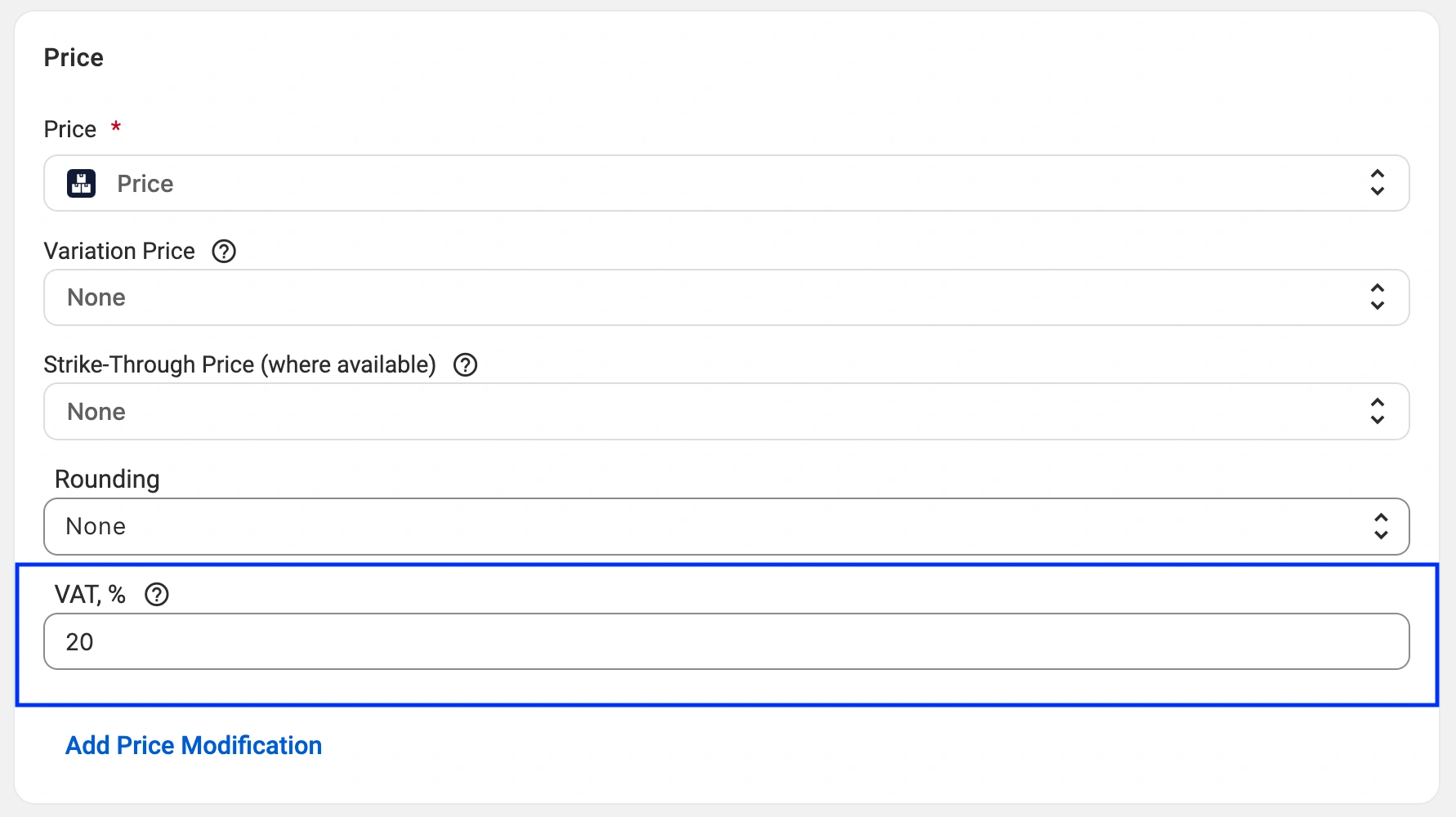
This configuration allows eBay to display the correct total (gross) price to buyers and show a clear VAT breakdown on invoices.
Since eBay’s API separates net price and tax, this step is important if your store catalog lists prices without VAT, but you want eBay to display them including VAT.
Example:
Your store catalog lists a toy for £10 (ex. VAT). You set VAT = 20% in the M2E Selling Policy.eBay displays the price as £12 (inc. VAT). M2E sends order info to your store with price = £10, VAT = £2.
The VAT rate you set also acts as a fallback. When eBay returns no VAT value for an order (or returns it as zero), M2E applies the rate from your Selling Policy instead of a country-based default. This keeps order information accurate for items that qualify for reduced or zero VAT rates. Otherwise, such items would be assigned a standard country default rate, causing accounting issues.
If you sell products with reduced or zero VAT rates, set the VAT, % field to the rate that applies, including 0 where relevant. An explicit 0 is submitted as 0% VAT.
If you leave the VAT field empty, orders fall back to the default VAT rate for the buyer's country.
ℹ️ If you're unsure about how taxes are calculated in your eBay orders, feel free to reach out to the M2E support team.
To ensure you meet all legal requirements, consult with a trusted tax advisor or accountant.


