
This month’s updates focus on more flexibility when managing product listings across multiple sales channels. Let’s dive into what’s new in M2E Cloud.
What’s new in M2E Cloud #
Map shipping methods #
When a buyer places an order on the marketplace (eBay, Amazon, TikTok Shop, etc.), they choose a shipping method from a predefined list. But on the fulfillment side, your system may use different names or logistics providers.
To avoid confusion and ensure accurate fulfillment, we’ve added a new feature to map shipping methods between the marketplace and your store. It is especially helpful if you use third-party tools for fulfillment or if your shipping methods vary across platforms.
Example:
If a buyer selects “Standard Shipping” on TikTok Shop, you can map that to “UPS Ground” on your fulfillment side, so the order is processed correctly.
To configure Shipping Methods Mapping, go to the Settings page, select your Channel account, and open the Shipping tab. Click Add Service for each shipping method you want to map and save the changes.

What if no shipping method mapping is set?
If you don’t set up shipping method mapping, M2E will try to match shipping methods by exact name. This can lead to issues in two common cases:
- From Channel to Store. When an order comes in from a marketplace (like TikTok Shop), it includes the shipping method the buyer chose. If your store doesn’t have a shipping method with the exact same name, your fulfillment system might not understand it. That could lead to delays or the wrong shipping label being created.
- From Store to Channel (after fulfillment). When you fulfill an order in your store, M2E sends the shipping method info back to the marketplace. If the marketplace doesn’t recognize the name (because there’s no match), it might reject the update or just label it as “Other”.
To avoid errors or delivery issues, we recommend setting up shipping method mapping for each Channel account.
Sell items in multipacks on TikTok Shop #
You can now sell your products in multipacks on TikTok Shop using your M2E Selling Policy. This feature was already available on eBay and Walmart (it was formerly known as Sell in Lots). Now, it’s live for TikTok Shop sellers.
A multipack is a bundle of two or more identical items sold together. It is perfect for:
- Offering value-packed sets
- Moving stock quickly
- Selling bulk items more efficiently
Example:
You sell coffee mugs. In your store’s catalog, you have a product for 1 mug, but you want to sell a set of 3 on TikTok Shop. With Multipack, you can define a “Pack of 3” directly in the TikTok Shop listing, without changing your catalog.
When a buyer purchases 1 pack of 3 items, your store will receive an order for 3 units (e.g., 3 coffee mugs).
Enable this option in your Selling Policy under “Multipack” and specify the unit count (the number of items in the pack):

ℹ️ If you’re selling in packs, make sure your listing price reflects the full pack, not a single item.
You can set this up in the Price section of the Selling Policy. Look for Price Modification and adjust the total pack price there.
💡 Check out this guide to understand how to sell multipacks and what’s required for each marketplace.
Add product condition to Kaufland listings #
You can now define the product condition when creating listings on Kaufland (at step 1).
Whether your items are brand new, used, or refurbished, this option helps buyers understand what they’re purchasing. It also improves your chances of showing up in the correct filters on the Kaufland marketplace.

💡 If you're new to Kaufland, check out step-by-step instructions for listing products from your store to Kaufland using M2E.
Use Shopify Metaobjects for Channel listings #
M2E Multichannel Connect now supports Shopify Metaobjects, a flexible way to manage structured, reusable data across your product catalog.
Metaobjects are custom content types in Shopify that store grouped fields of information. Instead of entering the same data for each product, you can create a centralized object and reference it wherever needed.
For example, a “Brand” Metaobject might include:
- Name: Nike
- Origin: USA
- Logo: Image URL
If you’ve already set up Metaobjects in your Shopify store, you can now use them as a data source when configuring Channel attributes, category specifics, or Selling Policy rules in M2E. This feature is especially helpful for large catalogs with repeated brand, material, or care information.

How to sync Shopify Metaobjects
Before you can use Shopify Metaobjects in your listings, you’ll need to sync them with M2E:
- Navigate to Settings > Sales Channels.
- Find your connected Shopify account. Click the three-dot menu next to it.
- Click Retrieve Metaobjects.

Use Shopware Custom Fields for Channel listings #
You can now use Shopware Custom Fields when setting up your product listings on marketplaces via M2E.
Custom Fields in Shopware let you store and manage non-standard product data, from technical specs to regulatory or supplier information. These fields have a high level of flexibility and are useful for merchants who want to go beyond the default product structure.
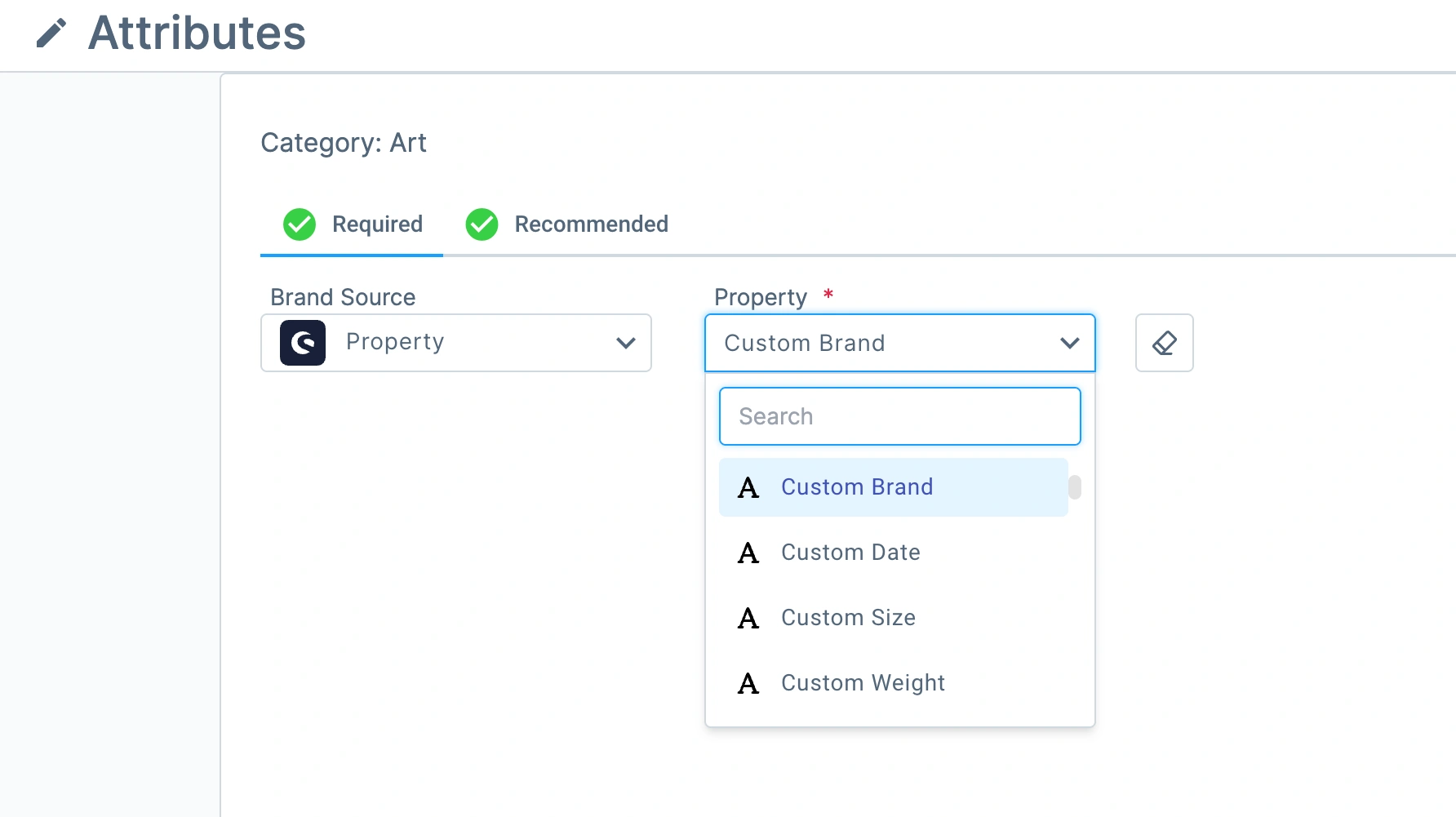
Now you can use the Custom Fields as a source for Channel-specific attributes or Selling Policy rules. This means the extra information you’ve already configured in Shopware can now be included in your eBay, Amazon, TikTok Shop, and other marketplace listings.
What’s next in M2E Cloud: Amazon MCF for Shopify & Walmart #
Amazon MCF for Shopify
Now in its final stages, this Amazon Multi-Channel Fulfillment (MCF) integration will let you fulfill orders from Shopify and other connected channels like eBay and TikTok Shop using your FBA inventory.
Amazon MCF for Walmart
Soon, you’ll be able to connect your store to Amazon MCF and automatically fulfill both Walmart and store orders through Amazon’s fulfillment network.
💡 Useful links:
Our team is always here to support you, so reach out if you need help with the latest updates. And if you have suggestions for new integrations or features, let us know in the comments!


