
If an eBay item runs out of stock or you decide not to sell it anymore, you can easily cancel the listing, either directly on eBay or using M2E Multichannel Connect. This guide walks you through both options step-by-step.
How to cancel a listing on eBay #
For fixed-price listings
You can cancel at any time before the item is sold:
1) Go to Seller Hub or My eBay.
2) Open the Active Listings section.
3) Find the item.
4) Click the dropdown next to it and choose End listing or End Item.
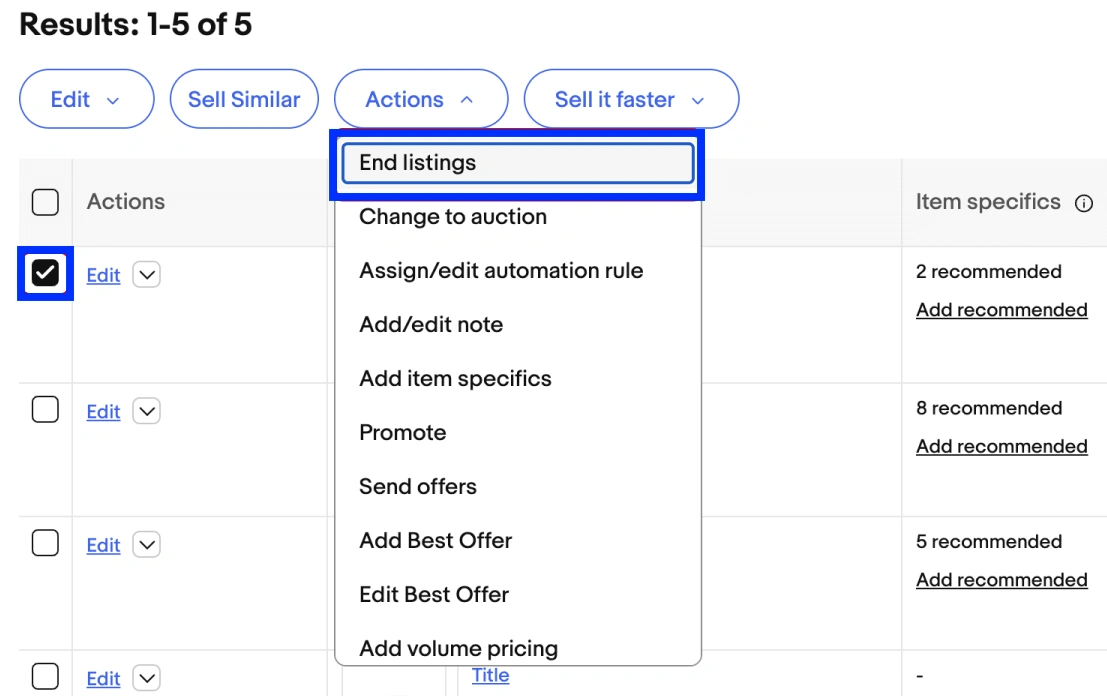
For auction listings
- You can cancel an auction-style listing if there are no bids or if more than 12 hours remain.
- If there are bids and less than 12 hours, you can only cancel to sell to the current highest bidder.
To cancel multiple listings
1) Select the checkboxes next to the items.
2) Click Actions > End.
ℹ️ eBay discourages canceling listings unless absolutely necessary. If possible, consider revising your listing by updating the title, price, or description instead of ending it.
Valid reasons for ending a listing early include:
- The item is lost, broken, or no longer available.
- There was a mistake in the listing (e.g., incorrect starting price).
You may be asked to provide a reason when ending the listing.
How to cancel an eBay listing in M2E Multichannel Connect #
If you use M2E Multichannel Connect to sell on eBay, here’s how to cancel listings from the app:
1) Open the Listings tab and choose your eBay account.
2) Use the search field, filters, or groups to find the Active item(s) you want to cancel.

3) Select the listings using checkboxes.
4) Click Manage Items > Stop in the mass actions menu.

5) Confirm the Stop action in the pop-up.

Once stopped, the listing will be ended on eBay as well. The sales history of an item will be lost, and if you relist the item later, it will receive a new eBay item ID.
ℹ️ If you have any questions about stopping eBay listings in M2E, feel free to reach out to our support team.


