
This guide shows you how to connect, set up, and run Debenhams Marketplace in M2E Cloud.
You will learn what to configure in M2E Cloud and what to expect from Debenhams as a Mirakl marketplace. By the end, you will be ready to set up your account, publish products, and manage orders with minimal manual effort.
ℹ️ Most of the rules in this guide also apply to other Mirakl marketplaces supported by M2E Cloud.
What happens outside M2E Cloud #
Debenhams is a UK-based marketplace headquartered in London. Founded in 1778, it launched its online marketplace in 2021 and serves customers only in the United Kingdom.
The marketplace is built on the Mirakl platform. This means Debenhams follows Mirakl standards for product content, offers, pricing, and order handling.
What this means for merchants
Mirakl validation rules apply to:
- Product data and content
- Offers, prices, and discounts
- Orders, shipments, and tracking
Seller onboarding, category permissions, and content approval are handled outside M2E Cloud by Debenhams. M2E Cloud connects to the marketplace only after your seller account is approved.

Who Debenhams is a good fit for #
Debenhams is a strong option for merchants selling consumer goods, especially in these categories:
- Fashion, shoes, bags, and accessories
- Beauty and healthcare
- Home, furniture, and kitchen
- Electronics, cameras, and telecom
- DIY and gardening
- Kids, toys, games, and video games
- Jewelry and watches
- Office and professional equipment
- Sports equipment
- Pet supplies
- Books and musical instruments
Debenhams works best for merchants who:
- Already sell on marketplaces
- Have strong product data and clear images
- Can fulfill orders on time and consistently
- Provide tracking for every shipment
Requesting a Debenhams seller account #
To sell on Debenhams, you must apply directly through the Debenhams seller form. Debenhams operates a curated marketplace, and all applications are reviewed before approval.
What Debenhams reviews
During the application process, Debenhams may assess:
- Marketplace performance on platforms like Amazon or eBay
- Trustpilot score (a score of 4 or higher is recommended)
- Existing website and brand presence
- Marketplace and technical experience
Some requirements may be flexible if Debenhams considers your business a strong fit.

Additional requirements
To sell on Debenhams, you must:
- Operate a UK-registered legal entity
- Have a UK bank account
- Include a return slip in every parcel
- Provide tracking information for all shipments
Approval notes
Account approval is handled entirely by Debenhams, and timelines may vary.
Once approved, you will receive access to the Mirakl Seller Admin, which is required to connect Debenhams to M2E Cloud.
Fees and commercial terms #
Debenhams uses a simple and predictable fee structure.
- Setup fee: none
- Monthly fee: GBP 25.00 (waived for the first year)
- Commission: approximately 20%, depending on product category
- Payment schedule: twice per month, on the 14th and 28th
The monthly fee and commission cover:
- Access to the Debenhams marketplace
- Order processing and settlements
What happens inside M2E Cloud #
After connecting to Debenhams, M2E Cloud becomes the central system for managing your marketplace activity.
M2E Cloud acts as a single hub for:
- Inventory management
- Prices and stock levels
- Orders and shipments
Instead of working in multiple systems, you manage all marketplace data from one place.
What you can do
With the M2E Cloud Mirakl integration, you can:
- Connect Debenhams using Mirakl API credentials
- Export product content from your store to the marketplace
- Map categories and required attributes
- Control pricing, discounts, and currency conversion
- Synchronize orders, shipments, and tracking data
This section explains how to configure these steps and keep data in sync.
Requirements before you start #
Before setting up Debenhams in M2E Cloud, make sure all requirements below are met. Missing any of them can block product exports or order synchronization.
ℹ️ Make sure your store runs on a supported platform such as Shopify, BigCommerce, PrestaShop, etc. All M2E apps are available in the official app listings. For example, a Shopify Hygi.de integration by M2E requires installing the Shopify app first.
Mandatory requirements
- An approved Debenhams seller account
- Access to the Mirakl Seller Admin
- A valid Mirakl API key
- VAT registration
- Products with valid EAN / GTIN codes
- Prices available in GBP
💡 Enable currency conversion in M2E Cloud if your store uses a different base currency.
Connecting Debenhams to M2E Cloud #
Debenhams is a Mirakl-based marketplace connected to M2E Cloud via an API key.
Connection steps
- In M2E Cloud, go to Connect Mirakl Account.
- In the Select marketplace section, choose Debenhams (use the Search marketplaces field to find it quickly).
- Log in to your Mirakl Seller Admin and generate or copy your API key.
- Back in M2E Cloud, paste the key into the API key field.
- Enter your Shop ID if you use multiple shops within the same Mirakl marketplace.
- Click Connect.
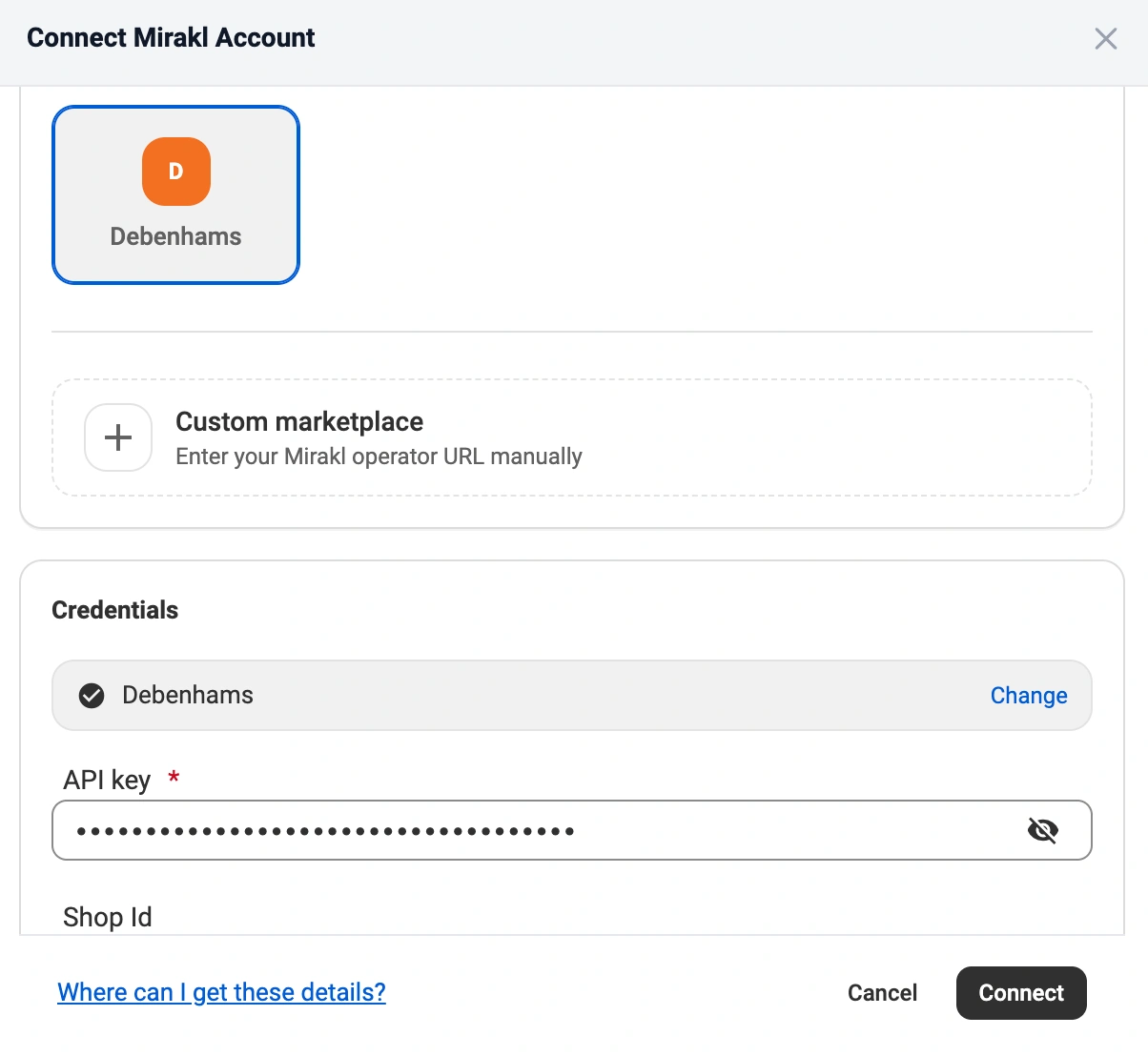
After confirmation, M2E Cloud validates the credentials. Once validation is successful, data synchronization becomes available.
ℹ️ Check out the full instructions in the Mirakl M2E integration guide.
Common connection issues
If the connection fails, check the following:
- Incorrect or expired API key
- Missing API permissions in Mirakl
- Debenhams account is not fully approved
ℹ️ If you regenerate the API key later, you must update it in M2E Cloud. Otherwise, synchronization will stop.
Once connected: What happens next? #
After the connection is established, you configure how products and orders are managed inside M2E Cloud.
1. List new products on Debenhams #
Select the products you want to sell on Debenhams and export them as new listings.
Once exported, M2E Cloud manages:
- Product availability
- Stock levels
- Prices
2. Link existing marketplace listings with store items #
If products already exist on Debenhams, M2E Cloud can link them to store products.
- Automatic linking works when SKUs match
- Manual linking is available via CSV
Linking is required for synchronization. It defines which store product controls price and quantity on the marketplace.
3. Map categories and required attributes #
You must assign each product to a B&Q category and fill in all required attributes. Category mapping is required before you can export any product data.
This includes:
- Assigning products to Debenhams categories
- Mapping required content attributes
- Completing Debenhams-specific fields
ℹ️ For details on how product data syncs between your store and the marketplace, see the Synchronization Policy guide.
4. Configure pricing and currency rules #
Pricing behavior is set in M2E Cloud Selling Policies.
This is where you control price, stock, and other key listing settings. Selling Policies help you meet marketplace rules and apply different logic to different product groups.
In M2E Multichannel Connect, you can create as many Selling Policies as you need. Use them to define:
- Price source
- Quantity to publish to B&Q
- Discount and promotion rules
- Currency conversion, if your store uses a different currency
5. Configure order settings and status mapping #
Order policies define how Debenhams orders are handled in your system.
This step controls:
- When and how orders are imported
- How marketplace statuses map to store statuses
- When shipment confirmations are sent back to Debenhams
Correct mapping prevents order conflicts and status errors.
6. Set up shipping rules and carrier mapping #
Shipping in M2E Cloud is managed through Shipping Policies. They define how Debenhams orders are fulfilled and what shipping details are sent back to the marketplace.
In this step, you set up delivery rules and synchronization for Debenhams. This includes:
- Available shipping methods for Debenhams orders
- Carrier mapping (required)
- Shipment confirmation and tracking sent to Debenhams (required for every order)
If your carrier is not available in the Debenhams carrier list, request it directly from the marketplace.
7. Monitor listings and resolve issues #
After setup, you can monitor listing activity directly in M2E Cloud.
The Listings page shows:
- Export and synchronization status
- Marketplace validation errors
Most issues can be fixed by adjusting mappings or policies, without disconnecting the marketplace.
💡 Learn more about M2E here.
What happens in the marketplace back-end? #
Debenhams operates on the Mirakl platform, which defines how orders and content are processed after export.
- Orders are auto-accepted by the marketplace
- Order cancellations aren’t allowed before shipment
- If an item is out of stock, the order must be refunded using the appropriate reason code
Because of this behavior, stock accuracy and timely updates are critical to avoid refunds and penalties.
Debenhams marketplace features #
Debenhams supports a defined set of marketplace features.
Supported
- Product content and offers
- Orders and shipments
- Carrier mapping
- Merchant-managed returns
- Discounts and strike pricing
- Advertising options, such as banner placements
Not supported
- HTML content formatting
- Refurbished products
- Multiple stock locations
- Product bundles
- Marketplace-managed returns
- Automated repricing tools
ℹ️ Feature availability is controlled by Debenhams and may change over time.
Product and offer requirements #
To list products successfully, all required data must meet Debenhams and Mirakl validation rules.
Mandatory product data
- EAN (13-digit) as the main product identifier
- Product title, up to 70 characters
- Collection (brand), selected from fixed values
- Color and Color facet attributes
- Long description in plain text (HTML not supported)
- Main image that meets Debenhams’ resolution and layout rules
- Parent product ID, used to group variants
- Product ID (SKU) as the merchant identifier
- Returns type, selected from allowed values
Missing or invalid values will block product creation.
Content approval
Debenhams has strict content rules.
Any new listing content goes through their internal review before it can be published on the marketplace. For full requirements and formatting examples, see the Debenhams marketplace copy guidelines.
Pricing and discount rules #
Pricing on Debenhams follows Mirakl pricing logic and must be configured correctly in M2E Cloud.
Pricing
- All prices must be provided in GBP
- Currency conversion must be configured if your store uses another currency
Discounts
Debenhams supports both Mirakl pricing models.
Pricing v1
- Discount price
- Discount start and end dates
Pricing v2
- Strike price (regular price)
- Price (discounted price)
Discount rules apply to both models:
- The discounted price must be lower than the base price
- Bulk discounts require a quantity threshold greater than 1
An incorrect discount configuration prevents offer export or hides promotions on the marketplace.
Shipping, returns, and Mirakl-specific attributes #
Some attributes directly affect fulfillment and order processing on Debenhams.
Shipping
- Carrier mapping is required
- Tracking information must be provided for every shipment
If a carrier is missing, it must be requested directly from Debenhams.
Returns
Returns are fully merchant-managed.
- A return slip must be included in every parcel
- Marketplace-managed returns are not supported
Common Mirakl attributes
Mirakl marketplaces use a long list of offer attributes. You must map the required ones for your category. Common examples include discount dates, discount price, and lead time to shipment.
For discounts, use fixed dates in YYYY-MM-DD HH:MM:SS in UTC. Discount price must be lower than the regular price. Lead time is the number of days before you ship.
FAQ #
What image requirements does Debenhams enforce? #
Debenhams requires high-quality portrait images with a clean background. If an image does not meet the minimum size, framing, or style rules, it can be rejected, and your product may not be published until the images are fixed.
Why is my product not listed? #
Most listing issues are caused by marketplace-side validation errors, such as missing EANs, incomplete content, incorrect category mapping, or rejected images.
Where can I see marketplace validation errors? #
If no errors appear in M2E Cloud, check the Mirakl back-end:
- Log in to the Mirakl seller portal
- Go to Catalog → Product imports
- Open the latest import report
- Download the Non-integrated products CSV
✅ If you need help with setup or have questions, contact our team.


