
Automation rules in M2E Multichannel Connect help automate the management of your Channel listings based on the conditions you specify.
Key benefits of applying automation rules #
- Automated listing management. Automatically retain or remove existing Channel listings through M2E Multichannel Connect without manual intervention.
- Seamless data synchronization. Avoid manual adjustments across multiple sales channels when changes are made in your e-commerce store or catalog.
- Customizable rules. Create tailored automation rules to suit different business needs and scenarios.
How to configure automation rules #
- Go to the Settings tab.
- Select your store account.
- Navigate to the Automation Rules section.
- Set up the automation rules based on your preferences.

Catalog product removal rule #
Currently, the app provides one automation rule that determines how products behave on connected Channels when they are removed from your Store or Catalog.
If a product is deleted from your Store or Catalog, you can choose one of the following actions:
- Retain the product for sale on the connected Channels
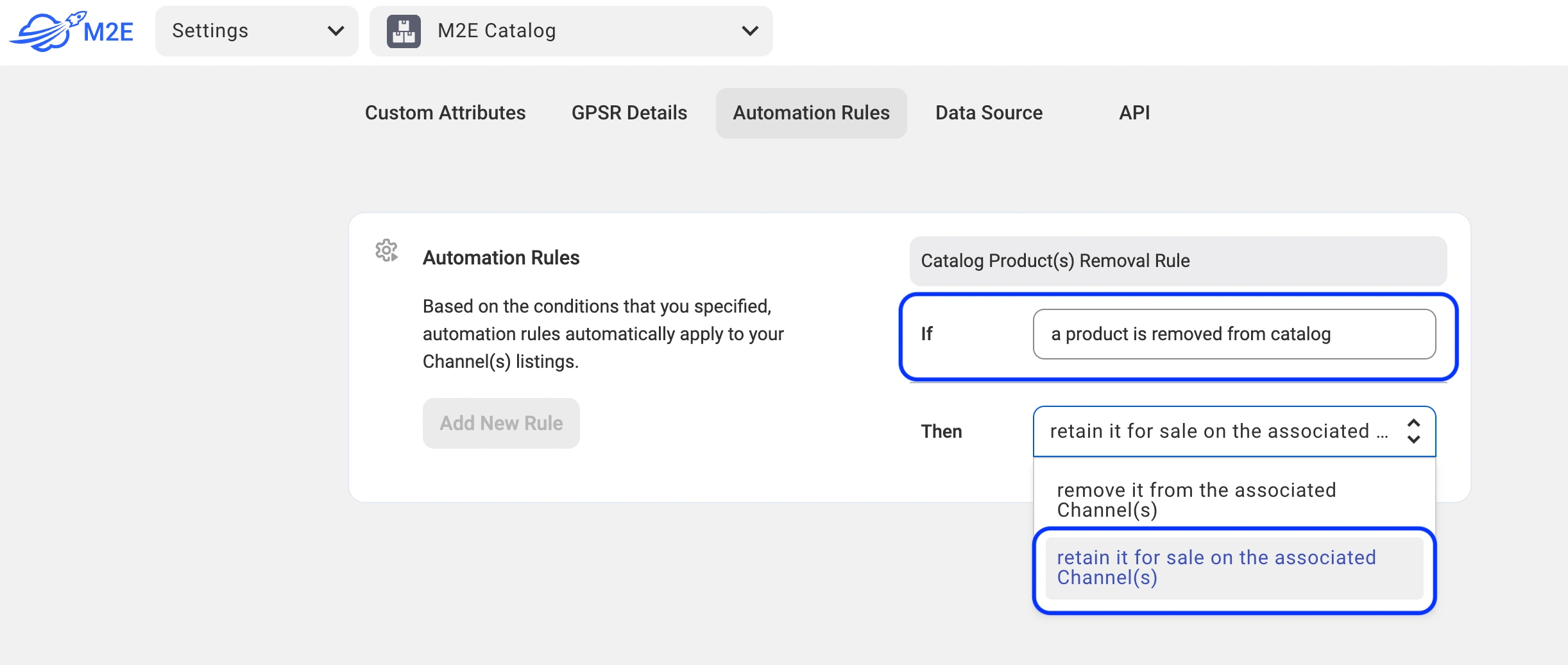
- Remove the product from the connected Channels

This rule ensures consistency across platforms while reducing manual updates.
⚠️ The automation rule applies only if the product is deleted from your Store or Catalog. If a listing is removed directly from a Channel, no changes will be applied to the product in the store.
More automation rules are coming soon! Stay tuned for upcoming updates that will enhance your automation capabilities in M2E Multichannel Connect.


