
If you're encountering issues with the M2E Multichannel Connect for WooCommerce plugin during initial setup, such as:
- The plugin appears in the backend menu but redirects to the frontend when clicked.
- The plugin cannot be opened, even though all necessary permissions have been granted.
- Settings within the plugin fail to save or update correctly.
- The plugin displays blank or incomplete pages when accessed.
These issues may stem from your WordPress Permalinks settings.
What Are Permalinks? #
Permalinks, short for "permanent links," are the URLs used to link to your content in a structured and readable way. They play a crucial role in how users and search engines navigate and understand your website's structure. Permalinks are widely used in content management systems like WordPress and WooCommerce to enhance usability and SEO performance.
Since permalinks control the URL structure of your site, certain settings can interfere with the functionality of plugins like M2E Multichannel Connect.
Identified Issue #
Using the Plain Permalink option (e.g., https://yourstore.com/?p=123) can cause WooCommerce to misinterpret URLs as simple pages, leading to:
- Plugin authorization errors, preventing proper access to the plugin.
- Incompatibility with REST API endpoints, which are essential for WooCommerce and many of its extensions.
- Broken internal links, affecting the navigation of both plugins and themes.
- Failed AJAX requests, leading to errors when saving plugin settings or performing certain actions.
- Issues with URL routing, causing plugins to fail when attempting to process requests or load specific pages.
Steps to Fix the Issue #
To resolve these issues, follow these steps:
1) Log in to your WordPress Admin Panel.
2) Navigate to Settings > Permalinks in the left-hand menu.

3) Under Common Settings, select one of the following options:
- Post name (Recommended)
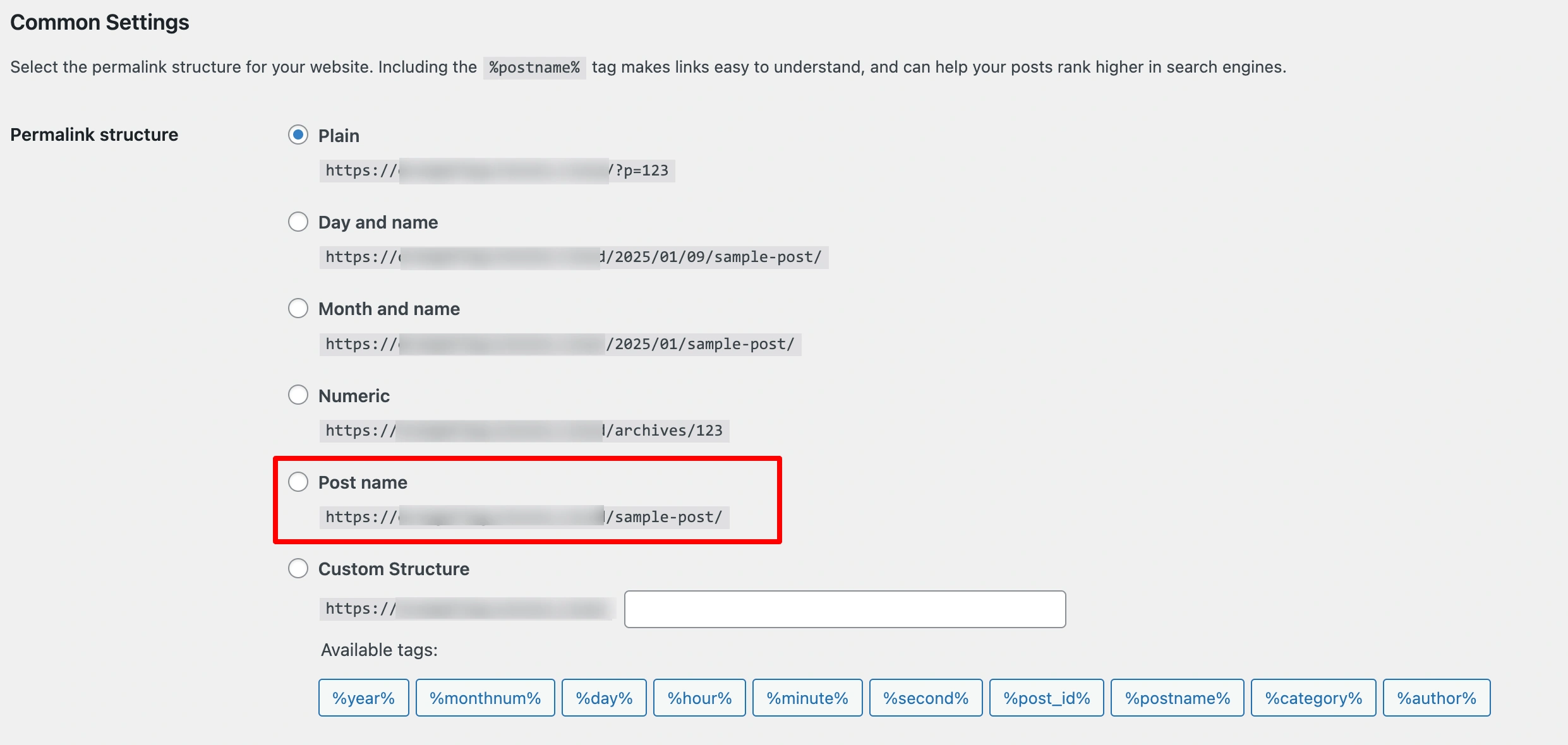
- Day and name

4) Scroll down and click Save Changes to apply the new settings.
ℹ️ Ensure these settings are updated to maintain plugin functionality.
After making changes, test the plugin to confirm that the issue has been resolved.
Downsides of Using Plain Permalinks #
If you feel hesitant to change permalink settings due to familiarity with their current structure, make sure that you are aware of the drawbacks of using plain permalinks:
- Poor User Experience
URLs like https://yourstore.com/?p=123 are not descriptive, making it difficult for users to understand the content or context of the page. - Negative SEO Impact
Plain Permalinks do not include keywords or structured paths, making them less attractive to search engines. This can harm your site’s ranking and reduce visibility. - Unmemorable Links
Plain URLs are harder to remember and share, which can limit audience engagement and traffic. - Compatibility Issues
Many plugins and themes rely on structured permalinks for routing and processing data. Plain URLs can cause conflicts, resulting in broken functionality. - Navigation Challenges
Plugins and extensions that depend on hierarchical URL structures may fail to display content correctly, leading to incomplete navigation or errors.
By optimizing your permalink settings, you create opportunities to enhance your website’s performance, attract more customers, and grow your business.
💡 For a complete overview of setting up and using M2E Cloud with WooCommerce, please refer to our WooCommerce user guide.


