
This guide breaks down everything you need to get started with TikTok Shop Italy - from account setup to business verification and shop activation.
Step 1: TikTok Shop Registration #
Sign up with your phone, email, or link an existing TikTok account at seller-it.tiktok.com. Verify with the OTP sent to you. Each phone or email can only be used for one TikTok Shop account.
ℹ️ You can connect your store to TikTok using M2E TikTok Shop integration. A 30-day free trial and guided onboarding are available. Choose your region to get started.
Step 2: Select Your Company Category #
Select the structure that fits your business:
- Sole trader;
- Legal entity (registered company).

Screen source: Registrazione a TikTok Shop
Step 3: Enter Primary Representative Details #
For legal entities:
- Registration number;
- Full name of the representative;
- Role (Owner, Director, or Authorized User with signed letter);
- Indicate if you are the Ultimate Beneficial Owner (UBO);
- Valid ID (Passport, National ID, or Residence Permit; Driver’s License accepted in FR, IT, DE);
- Selfie video holding the ID;
- Scans of both sides of the ID;
- Proof of address (Italy: residency certificate, utility bill, or bank statement).
Your complaint address will be publicly visible and can match your business address or be different.
For sole proprietors:
- Valid ID (Passport, National ID, or Residence Permit; Driver’s License accepted in FR, IT, DE);
- Selfie video holding the ID;
- Scans of both sides of the ID;
- Business registration number;
- Proof of address (recent utility bill or bank statement).
Important:
- The proof of address must be issued within the last 3 months;
- The address must match the country of registration.
Step 4: Give Your Business Info #
Provide your registered business name and registration number. You can use your residential address or add a different one.
Add a complaint address - it can be the same as your business address or a new one. This address will be publicly visible to customers.

Screen source: Registrazione a TikTok Shop
Step 5: Configure Your Shop #
- Name your shop: Pick a name that will appear to buyers;
- Upload logo: Strengthen your brand visibility;
- Confirm contact info: Add an email and phone number for updates;
- Verify identity: If you're applying for a company, provide legal rep details;
- Submit application: Review and submit - approval typically takes 2–3 days.
Step 6: Upload Ultimate Beneficial Owner Details #
Some sellers may need to submit UBO details. Required information includes:
- Full legal name;
- ID number;
- Date of birth;
- Nationality;
- ID type;
- Expiration date;
- Residential address.
Step 7: Add Shop Configuration #
Set up shipping and returns by entering your pickup and return addresses.
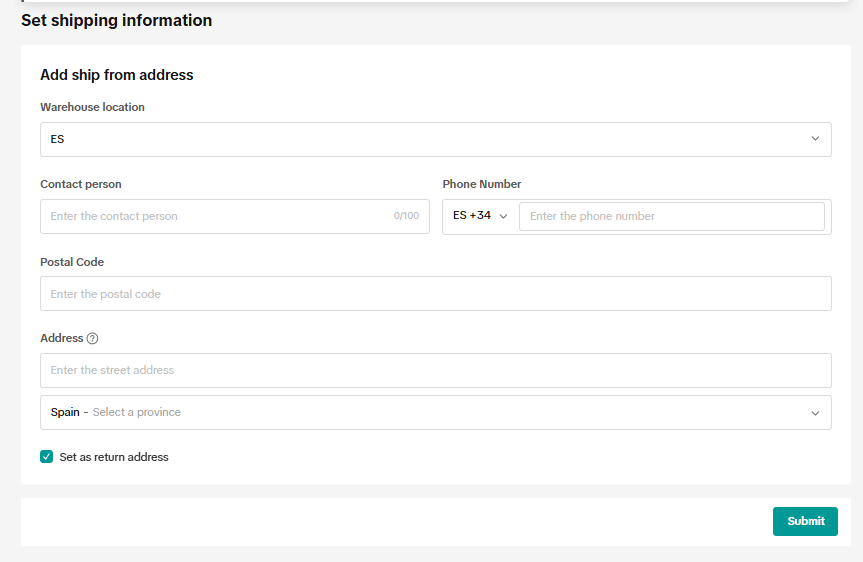
Screen source: Registrazione a TikTok Shop
Step 8: Complete Your Shop Setup #
- Customer support: Add your service email and phone number;
- Bank details: Enter IBAN, BIC, country, email, and a bank statement if required - must match your registered business name;
- List products: Start adding items to your shop catalog;
- Link your TikTok account: Connect your TikTok profile to enable shoppable videos and go LIVE - a powerful way to drive more sales.

Screen source: Registrazione a TikTok Shop
FAQs: #
#1: How Do I Choose the Right Representative Type? #
Choose:
- Owner if you're the only director listed;
- Director if you're listed but not the only one;
- Primary authorized user if you’re an employee with a signed authorization letter.
#2: Can I Open Shops in Multiple EU Countries? #
Only registered companies can apply to open shops in other EU countries after their first shop is approved. You’ll need to prove you can manage orders and returns locally in each country.
#3: How Do I Enter the Correct Company Address? #
Use TikTok’s address auto-fill tool to avoid errors. If needed, edit it manually. Make sure it matches your business license and is located in the same country you're registering from.
For more information, check out the official TikTok Shop registration guide for Italian sellers.


