
Multichannel selling gets more complex as you scale. More warehouses, more marketplaces, more SKUs, and more opportunities for things to go wrong. This January, we released features that will help you scale your business without the chaos. Here's the full rundown.
What’s new in M2E Cloud #
Reuse category attributes for marketplace listings #
The more products you list, the more time you spend filling in identical category attributes. Our new Category Policies and Attribute Mapping features eliminate this repetitive work.
Category Policies let you define default attribute values for specific marketplace categories. Attribute Mapping connects your store's product data to marketplace attributes. Together, they speed up listing creation and keep your channel data consistent.

ℹ️ Category Policies and Attribute Mapping are now supported on eBay, Amazon, Walmart, Kaufland, Temu, and TikTok Shop. Check out our detailed guide to get started.
Reserve quantity for Pending orders (WooCommerce & PrestaShop) #
Overselling is one of the fastest ways to lose customer trust. Our new quantity reservation feature for WooCommerce and PrestaShop helps you avoid it.
When a Pending order arrives from the channel, M2E reserves the ordered quantity in your store and reduces available inventory. This way, the product can't be oversold while awaiting confirmation.
If the order is canceled, the reserved quantity automatically returns to your catalog. If it's confirmed and moves to Unshipped status, the reservation clears, and the actual order is created in your store.
Enable this feature in Settings > Orders > Inventory Reservation for each channel account:
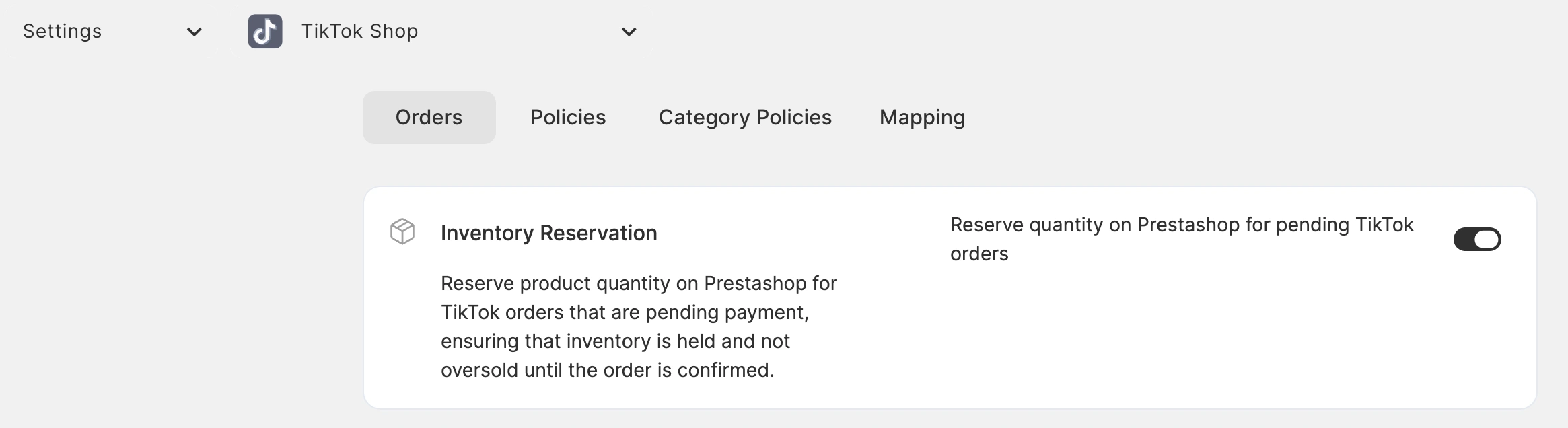
ℹ️ Quantity reservation is also available for orders imported to Shopify and BigCommerce.
Amazon Multi-Location Inventory support for Shopify #
When you store inventory across multiple Amazon warehouses, Amazon needs to know what's in stock at each location to show accurate delivery times. Without this, buyers see delivery promises that don't match reality, which may lead to missed deadlines, SLA violations, and potential account suspension.
Amazon's Multi-Location Inventory feature solves this issue, but only if Amazon receives location-specific inventory from your store. M2E Multichannel Connect now supports it and can send stock levels for each warehouse from Shopify to Amazon. This way, your Amazon listings will show delivery times based on actual availability at each location.
How to set it up:
1) Configure your ship-from locations (supply sources) in Amazon Seller Central if you haven't already.
2) In M2E, create a new Selling Policy. In the Quantity settings, enable the Multi-location inventory toggle.
3) Select the Shopify locations you want to use.
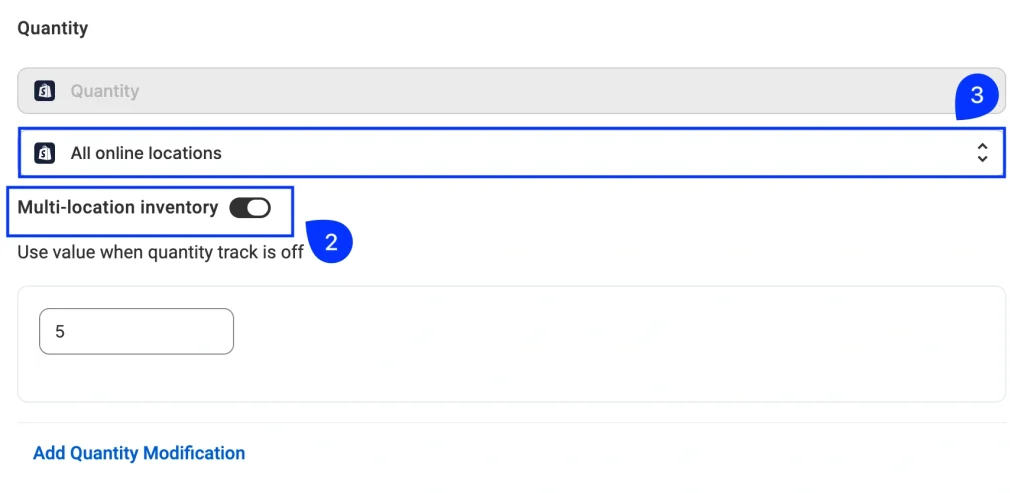
4) Go to Settings > Mapping > Locations to map Shopify warehouses to Amazon ship-from locations. Make sure to map all locations you selected in step 3.

5) Once mapping is complete, assign the Selling Policy to your Amazon products.
ℹ️ If you manage multiple Amazon accounts, set up location mapping for each one.
Reserve store inventory for Amazon FBA orders #
If you manage Amazon FBA inventory in your store, you may need to reserve quantities for Pending FBA orders to prevent overselling during the order confirmation.
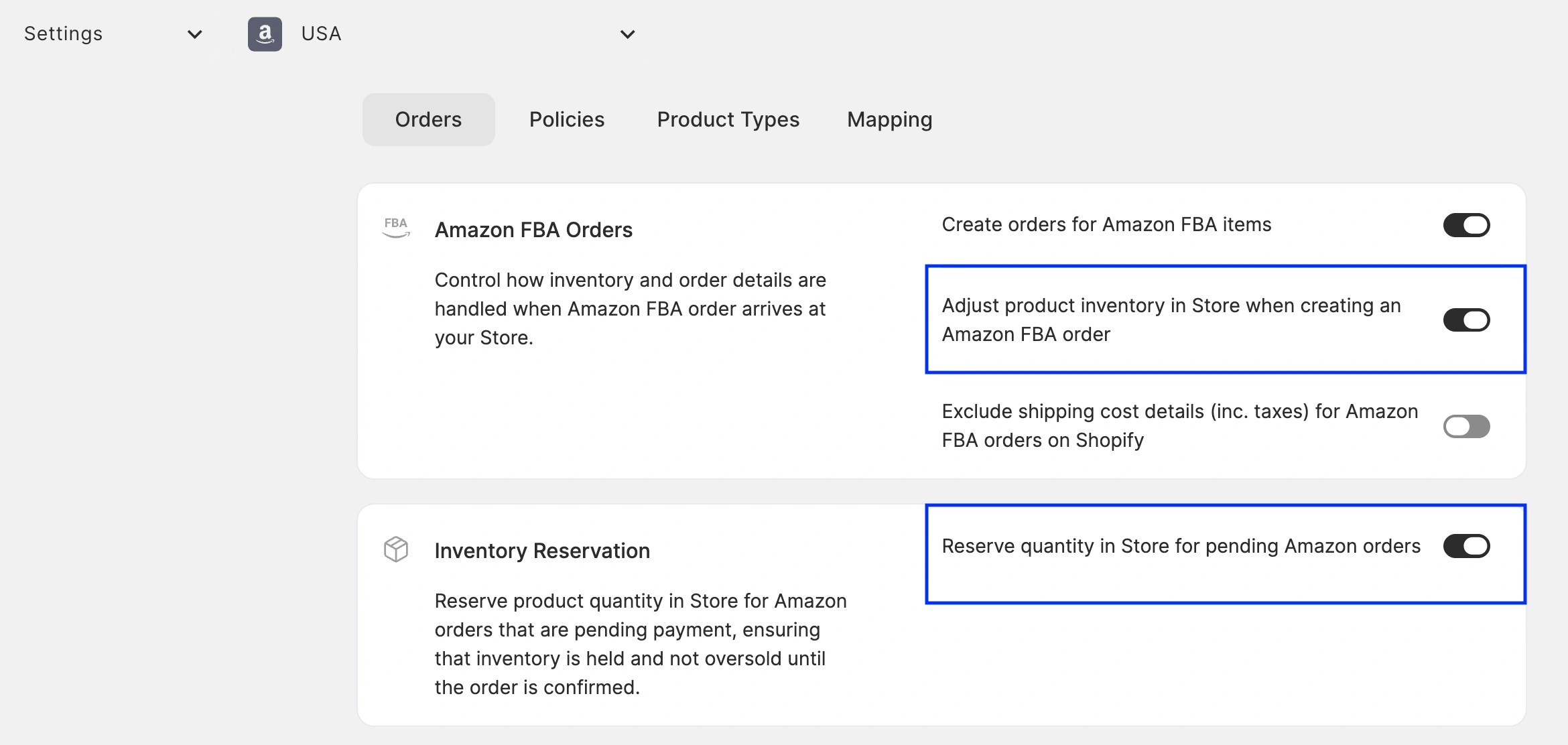
M2E Multichannel Connect now supports this. When both “Adjust product inventory for Amazon FBA orders” and “Inventory Reservation” are enabled, the app automatically reserves quantity in your store for Pending FBA orders. The reserved quantity returns to available stock if the order is canceled, or the reservation clears when the order is confirmed and processed.
For the reservation to work, make sure that these options are enabled in Settings > Orders for each of your Amazon accounts:
Manage pre-sale Temu orders #
Temu's pre-sale feature lets you keep selling products with zero regular inventory when you're expecting a restock. This keeps sales flowing during inventory transitions instead of showing items as out of stock.
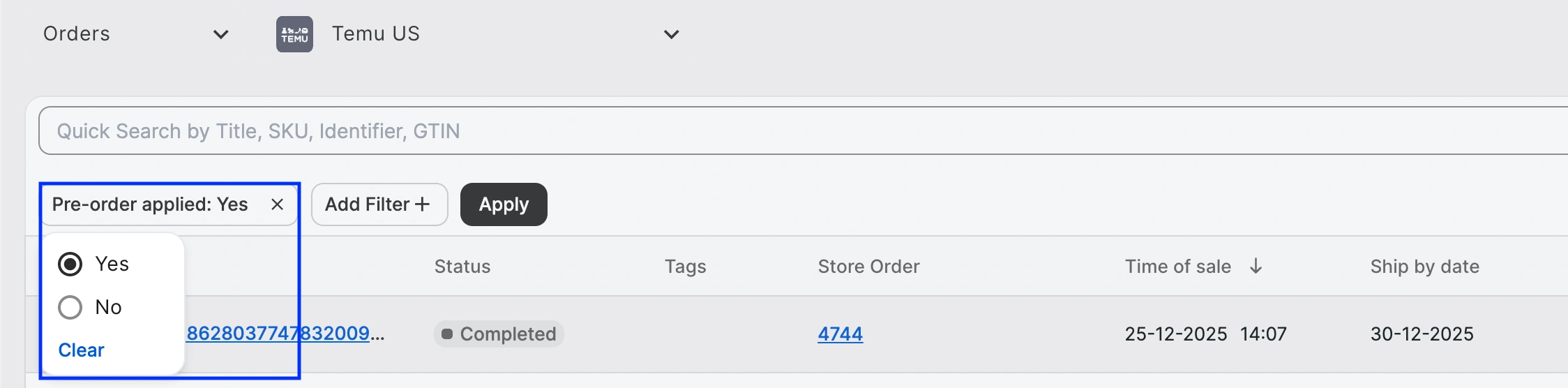
M2E Multichannel Connect now supports Temu pre-sale orders. When a pre-sale order arrives, M2E tags it appropriately in the app and in your imported store orders.

Use the “Pre-order applied” filter to identify and manage these Temu orders:
What's next in M2E Cloud #
We’re developing new features to support your multi-channel selling:
- Create and manage Amazon listings with variations
- Gain control over promotional campaigns on Temu
- Stay competitive on Walmart Marketplace with automated repricing
Have questions or need help? Our support team is always here for you.
Also, feel free to share feedback or feature ideas in the comments.


