
M2E Multichannel Connect provides a Copy to TikTok tool that lets you transfer your active eBay listings to TikTok Shop.
Follow this step-by-step guide to publish your eBay items on TikTok Shop.
Step 1. Confirm that your accounts and listings meet the prerequisites #
Before you begin copying items, verify that your channel accounts and product data meet the requirements below.
1. Your channels are connected and regions match
- Your eBay seller account and TikTok Shop seller account are linked to M2E Multichannel Connect.
- The eBay site corresponds to the region of the TikTok Shop account you are copying to (for example, eBay DE → TikTok Shop DE).
2. Your listings are eligible
Each eBay product you want to copy must be:
- active on eBay (inactive or ended items need to be listed first)
- linked to a Store/Catalog product in M2E Multichannel Connect
- not yet listed on TikTok Shop under your seller account.
3. All listings belong to one eBay marketplace
You can only copy items from a single eBay marketplace, such as eBay US, eBay UK, etc.
If these prerequisites aren’t fulfilled, you won’t be able to copy eBay products to TikTok Shop.
Step 2. Open your eBay listings #
Go to Listings in M2E Multichannel Connect and choose the eBay account that contains the items you want to move to TikTok Shop.
Step 3. Choose which items to copy #
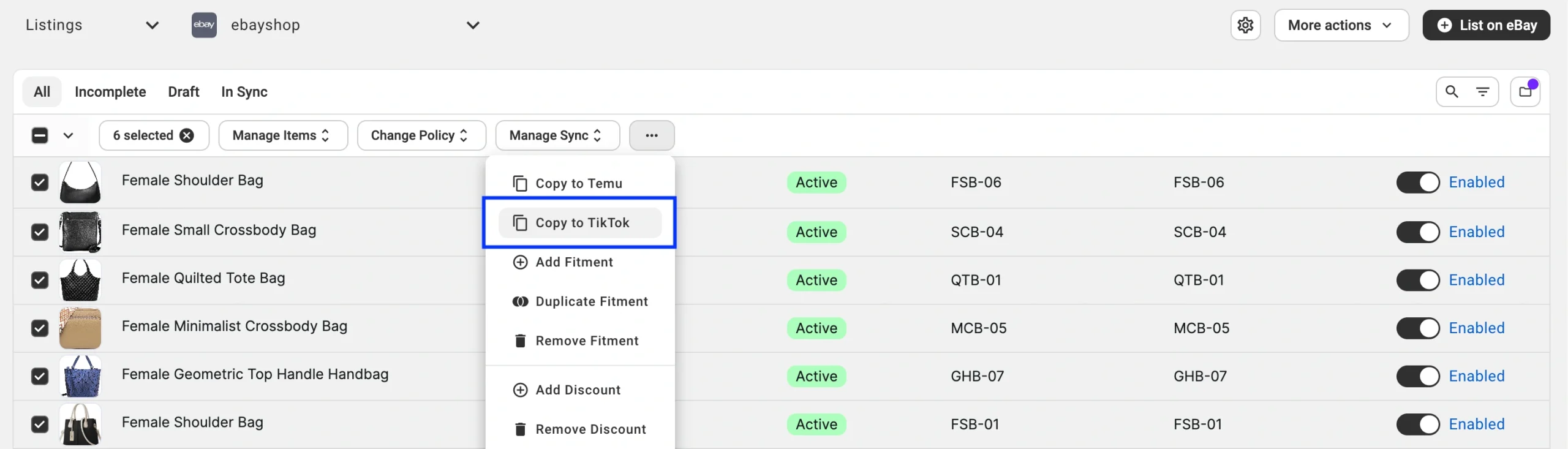
Check the boxes next to the eligible eBay listings you want to upload to TikTok Shop. Use filters or the search bar to narrow the list.Once your products are selected, open the action menu (three dots) and click Copy to TikTok.
A confirmation window will appear showing the TikTok Shop account you’re copying to and how many items are ready for transfer.
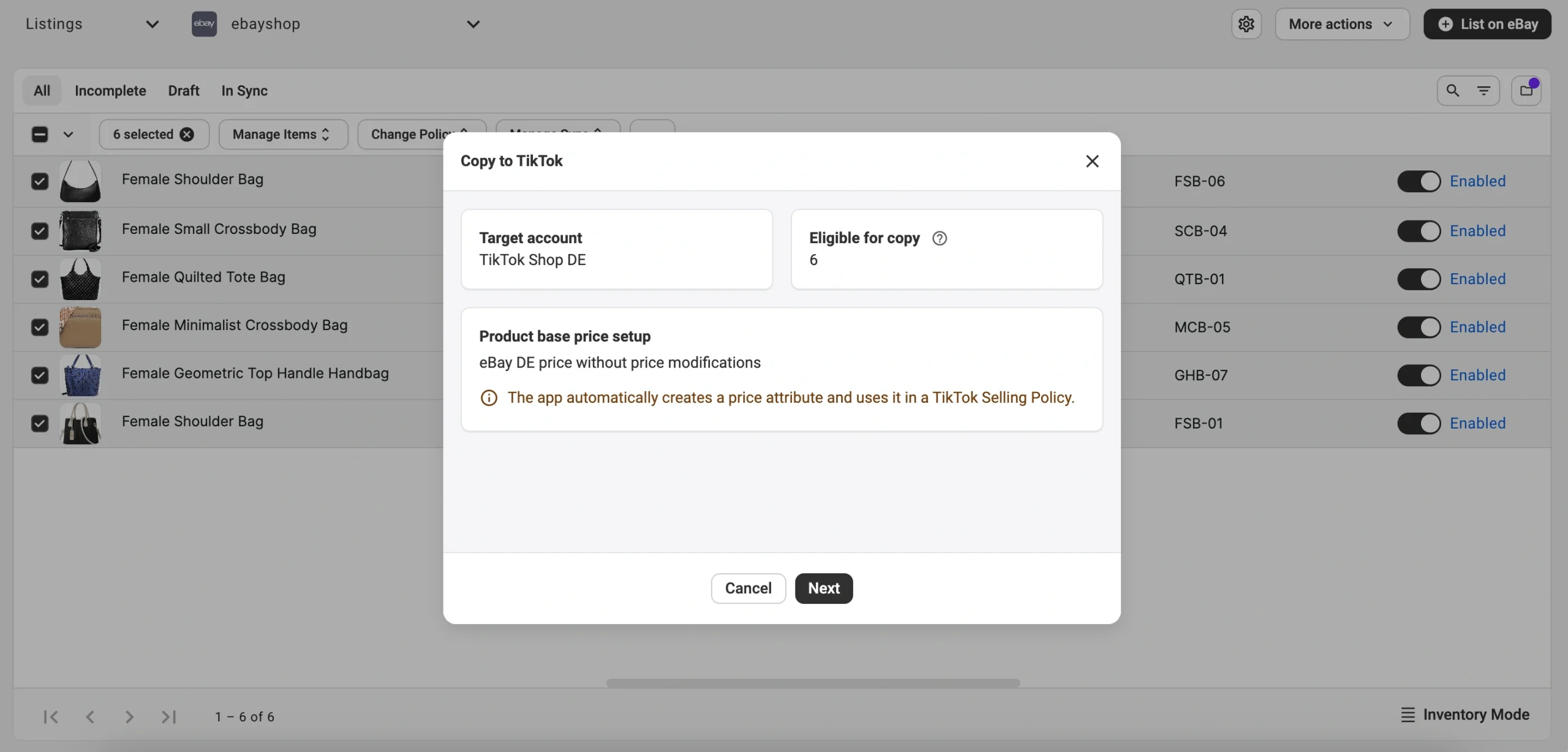
Click Next to proceed.
When you start the copying process, M2E automatically prepares the product information TikTok Shop requires:
1. Price
By default, M2E uses the current eBay product price as the price source for TikTok Shop. The price will be saved in a separate M2E Catalog attribute (for example, “eBay DE Price”). This way, M2E can maintain consistent pricing on TikTok Shop even if the source price changes.
You can adjust the price source you want to use in your TikTok Shop Selling Policy.
2. Quantity
M2E uses product quantity from your Store/Catalog, so TikTok Shop products have the correct available stock.
3. Titles and descriptions
M2E takes product titles and descriptions from your Store/Catalog when creating TikTok Shop listings.
4. Synchronization rules
M2E applies default synchronization rules to your TikTok Shop listings. This way, if you change prices, quantities, or other listing details, M2E will update your TikTok Shop products accordingly.
You can adjust the sync rules in your TikTok Shop Synchronization Policy.
Step 4. Select TikTok Shop categories and fill attributes #
Choose the appropriate TikTok Shop category for your items. M2E automatically recommends a category based on your Store/Catalog data. Hover over the suggestion to accept it or choose a different category.
Then, fill in all required and recommended category-specific attributes. Review the details and click Copy to continue.

Step 5. Validate your listings #
M2E will run the Listing Validator Assistant, which checks your product information according to TikTok Shop listing rules. If all data is valid, M2E will submit the items to TikTok Shop for review.
If issues are found, the Assistant will list them along with instructions for fixing each issue.
After you make the necessary corrections, click List Now to submit your eBay products to TikTok Shop.

Once submitted, you can monitor listing statuses from the TikTok Shop Listings page. Your items will appear on TikTok Shop as soon as they pass the marketplace review.
✅ If you have questions or experience any issues while transferring your listings, feel free to contact the M2E support team.


