
To create and manage TikTok Shop Ads in M2E Multichannel Connect, you need to link a TikTok Business account. It is separate from your TikTok Shop account and gives you access to TikTok's advertising features, including Product GMV Max campaigns.
This guide covers the steps to link your TikTok Business account with M2E Multichannel Connect.
Requirements #
Before you begin, make sure that:
- Your TikTok Shop account is linked to M2E Multichannel Connect. This is the account you use to list products and manage orders on TikTok Shop.
- You have a TikTok Business account that is authorized to run GMV Max ads for your TikTok Shop. This is a separate account used to create and manage TikTok ads.
ℹ️ Don't have a TikTok Business account yet? Create one in TikTok Ads Manager and link it to your TikTok Shop through Seller Center or Business Center.
Connection steps #
Follow these steps to connect a Business account to a TikTok Shop account:
1) In a new browser tab, sign in to your TikTok Business account at ads.tiktok.com. Make sure you are logged in to the right account, as switching accounts mid-flow can break the connection.
2) In M2E Multichannel Connect, navigate to Settings > Sales Channels.
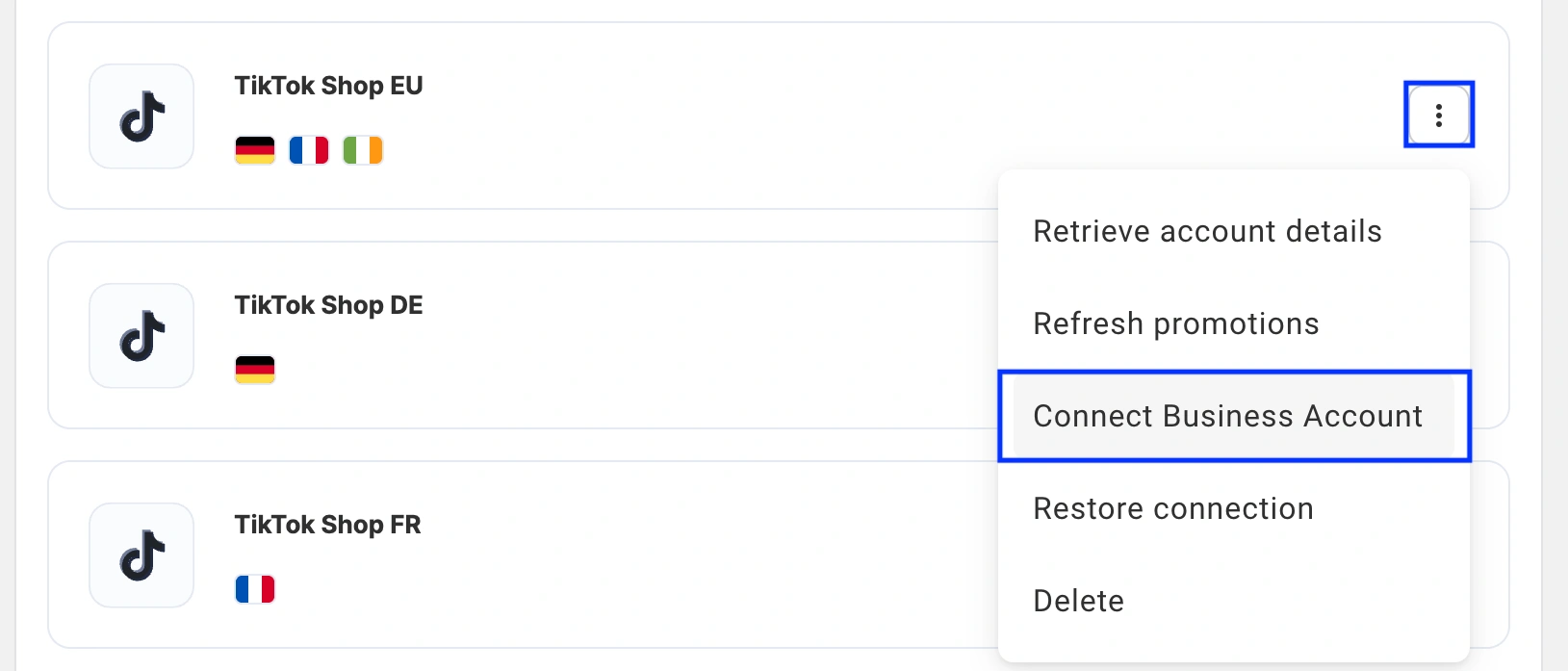
3) Find the TikTok Shop account you want to connect the Business account to. Click the three-dot menu on its card.
4) Select Connect Business Account. On the TikTok authorization page that opens, review and approve the requested permissions.
5) You will be returned to M2E Multichannel Connect. Your TikTok Shop account card will show the Business account as connected.
ℹ️ If you have multiple TikTok Shop accounts linked in M2E, repeat these steps for each one.
Once the Business account is linked, you can add your TikTok Shop listings to Product GMV Max campaigns in M2E Multichannel Connect.
Troubleshooting #
- The connection stopped working
In M2E, click your profile icon in the top-right corner and select My Connected Accounts. Open the three-dot menu on the TikTok Shop account card and select Restore connection.

If that doesn't resolve the issue, or if you have a different issue, contact our support team for help.


