
This month's updates give you more fulfillment flexibility, better inventory visibility, and faster ways to manage listings and promotions across channels. Here is a closer look at what's new in M2E Cloud and how to start using it.
What’s new in M2E Cloud #
Save and reuse filter presets #
You may regularly check the same subset of listings, for example, all active products with a particular category and quantity, or all unshipped orders from the past week. Until now, it meant reapplying those filters from scratch each time. Custom Views put an end to that.
Save any combination of filters as a View and return to it in one click. You can customize which columns appear within each View and set a View as your default. Views are available on the Listings, Catalog, Orders, and New Listing pages.

How to create a View:
Option 1 – Apply the filters you need, then click "Save as" and enter a name.
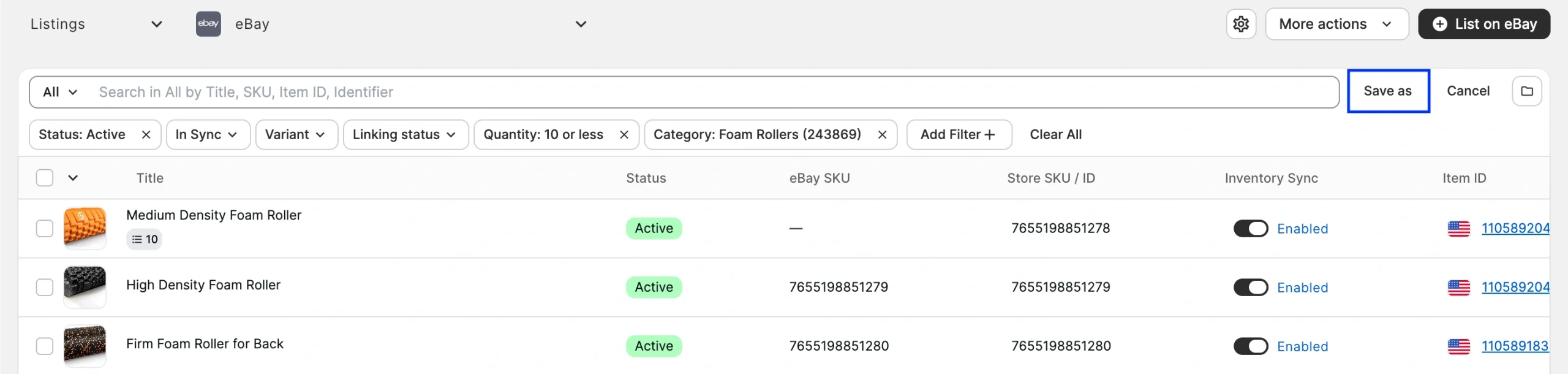
Option 2 – Click the "+" icon next to your existing Views to create a new one and then apply filters.

Saved Views appear at the top of the grid. You can update the filters within a saved View and save your changes at any point.
Create listing batches from multiple searches #
If you have a large catalog, you know that a single search often can't capture all the products you want to list. The new Batch tool in M2E Multichannel Connect solves this problem. It lets you gather products from multiple searches and pages for further listing.
When creating new listings, use search and filters to select the items you need, then add them to your batch. Then adjust your criteria, find more products, and add those too. Once your batch is complete, you can continue listing all the products from it on the marketplace.
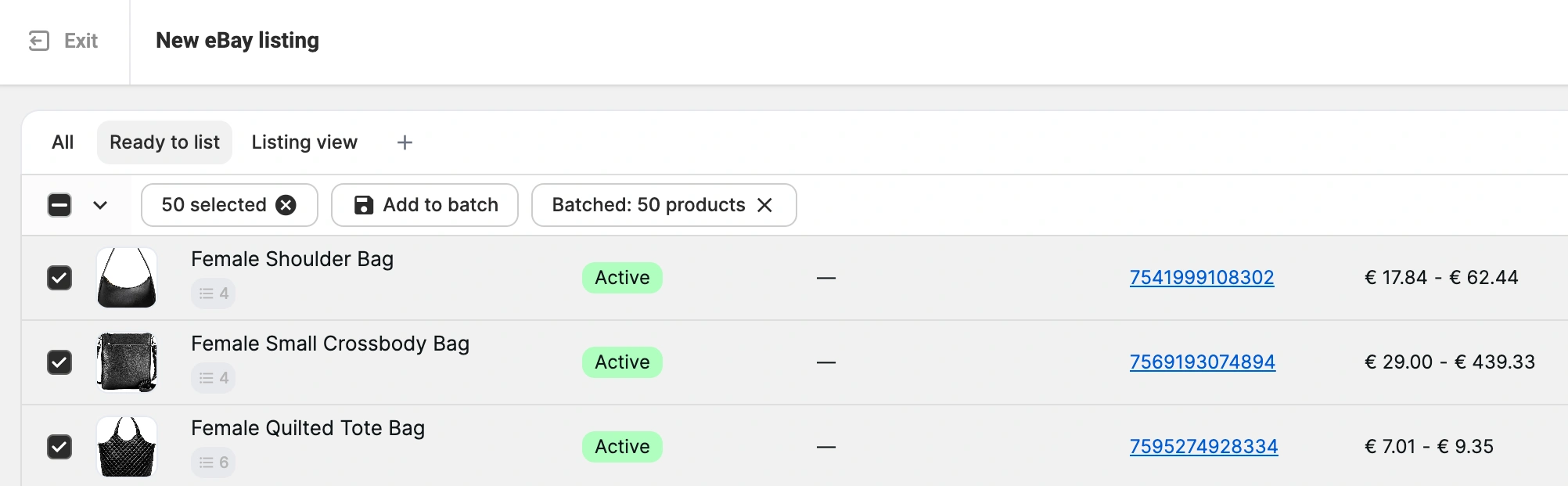
💡 Check out the brief guide on how to create and use Listing Batches.
Manage TikTok Shop & Temu promotions #
Promotions are one of the fastest ways to boost visibility and drive sales on marketplaces. But switching between platforms to manage promotional activity is often inconvenient. Now you can run promotions for TikTok Shop and Temu products right from M2E Multichannel Connect.

You can assign ongoing and planned promotions to your listings, and define the price and quantity conditions under which your products will participate in the promotion.
💡 For step-by-step instructions, refer to the dedicated guides for TikTok Shop and Temu.
Sync Walmart WFS orders to your store #
Last month, we introduced support for Walmart Fulfillment Services (WFS) products. Now we are extending it to WFS orders. M2E can now import WFS orders and create corresponding orders in your connected store.
Having WFS orders in your store gives you a more complete picture of your business. You can build your customer base from WFS order data and track sales analytics to evaluate whether fulfilling through Walmart is cost-effective. Also, it helps keep your store stock up-to-date as WFS orders are fulfilled.
To set up WFS order import, go to Settings > Orders. You can enable two options in the WFS orders section:

- Create orders for WFS items in Store – M2E generates a matching order in your store when a WFS order comes in.
- Adjust product inventory in Store when creating a WFS order – M2E updates your store's stock levels to reflect WFS sales.
WFS orders are tagged both in your store and the M2E app, and you can use filters to track them separately.

Route multi-channel orders to Walmart fulfillment #
M2E Multichannel Connect now integrates with Walmart Multichannel Solutions (MCS). If you store inventory with WFS, you can use it to fulfill orders placed on your Shopify store and sales channels connected to it – eBay, TikTok Shop, and others. M2E automatically routes orders to MCS, and your WFS stock stays in sync with your store to prevent oversells.
Here is how you can integrate Walmart MCS using M2E:
1) Install the Amazon MCF / Walmart MCS by M2E app into your Shopify store.
2) Connect your Walmart account that has active WFS listings.
3) Link your Walmart listings to Shopify products. Linking happens automatically when product IDs match, or you can link items manually.
4) In the M2E Amazon MCF app, go to Settings > Orders and enable the option to "Create Walmart MFS orders from Shopify orders only for linked items”.
5) Enable the option to "Sync quantity from Walmart Fulfillment to Shopify" to keep your store inventory up to date with MCS.
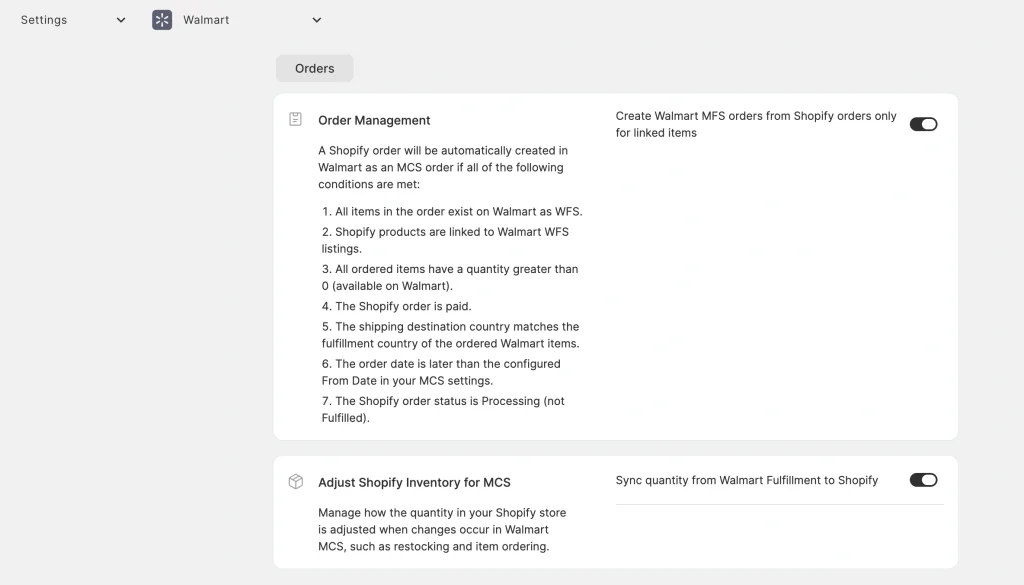
✅ M2E will route the order to Walmart MCS if the following conditions are met:
- The shipping destination matches the Walmart item's country (US).
- The ordered item is linked to a Shopify product.
- The ordered item is in stock and has an Active status.
- The incoming order is paid and not yet fulfilled.
Reuse category attributes for OTTO listings #
Good news for OTTO sellers – Category Policies and Attribute Mapping are now supported, so you can stop re-entering the same attributes for every listing.
Define your default values once per OTTO category with Category Policies, and use Attribute Mapping to connect your store's product data to OTTO attributes. From there, every new listing in that category gets the correct values applied automatically.

What's next in M2E Cloud #
Here is a sneak peek at the features you can expect in the next months:
- Run TikTok Ads campaigns for your listings
- Sync and manage Shopify product bundles
If you need help with any of these updates, our support team is happy to assist. Got a feature request or an idea for improvement? Drop it in the comments – we are always listening.


How much do I pay for the store later know how I can sign up thank you
Thank you for your interest. Please contact us via the form on our website, and our support team will reach out to you shortly.