
Since August 2026, eBay accepts only standardized values in the Size item specific for Apparel and Footwear listings. If a listing contains a custom, missing, or unsupported Size value, eBay may block the listing or prevent it from being revised until the value is corrected.
The Size Standardization view in M2E Multichannel Connect helps you find listings with invalid Size values and correct them according to eBay requirements.
This guide explains how to validate eBay Size values in bulk, identify listings that require changes, and resolve invalid values in M2E.
💡 See how the eBay Size Standardization view works in the video guide.
Where to find the eBay Size Standardization view #
If you sell in the Clothing, Shoes & Accessories category on eBay, the Size Standardization view is available on the Listings page in M2E Multichannel Connect.

How to validate eBay size values #
M2E Listings Validator Assistant checks whether the Size values in your listings match the values eBay allows for the category.
For multi-variation listings, M2E validates the Size value of each variation option separately.
To validate Size values in bulk:
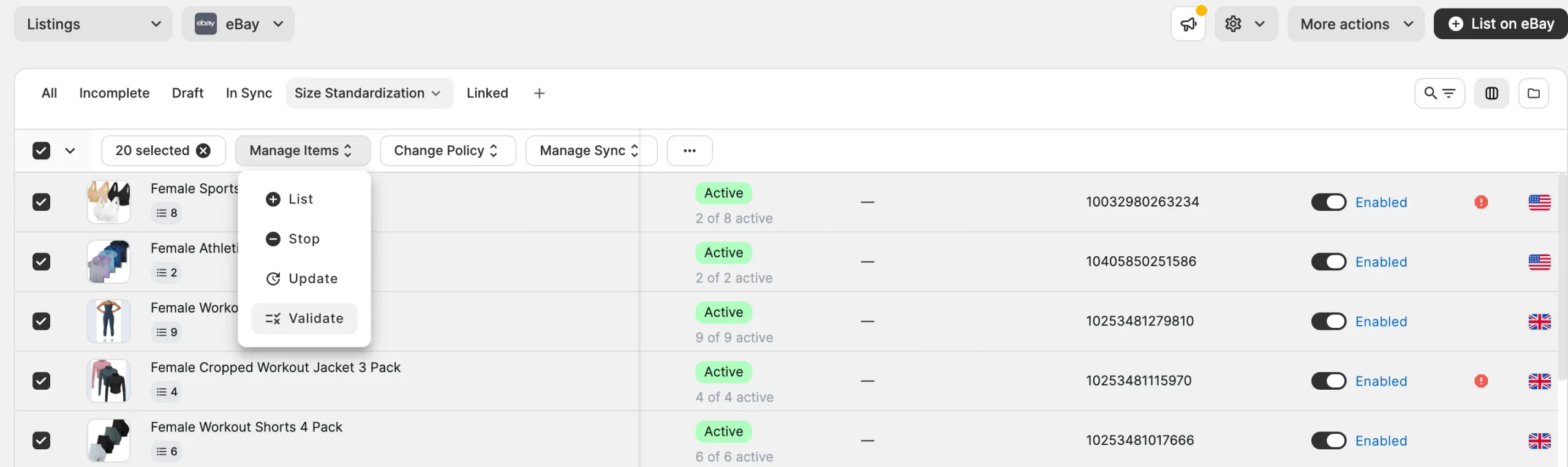
1) Go to the eBay Listings page.
2) Open the Size Standardization view.
3) If needed, use the filters to narrow down the listings you want to validate.
4) Select the filtered listings.
5) In the mass actions menu, click Manage Items > Validate.
5) Wait until validation is complete.
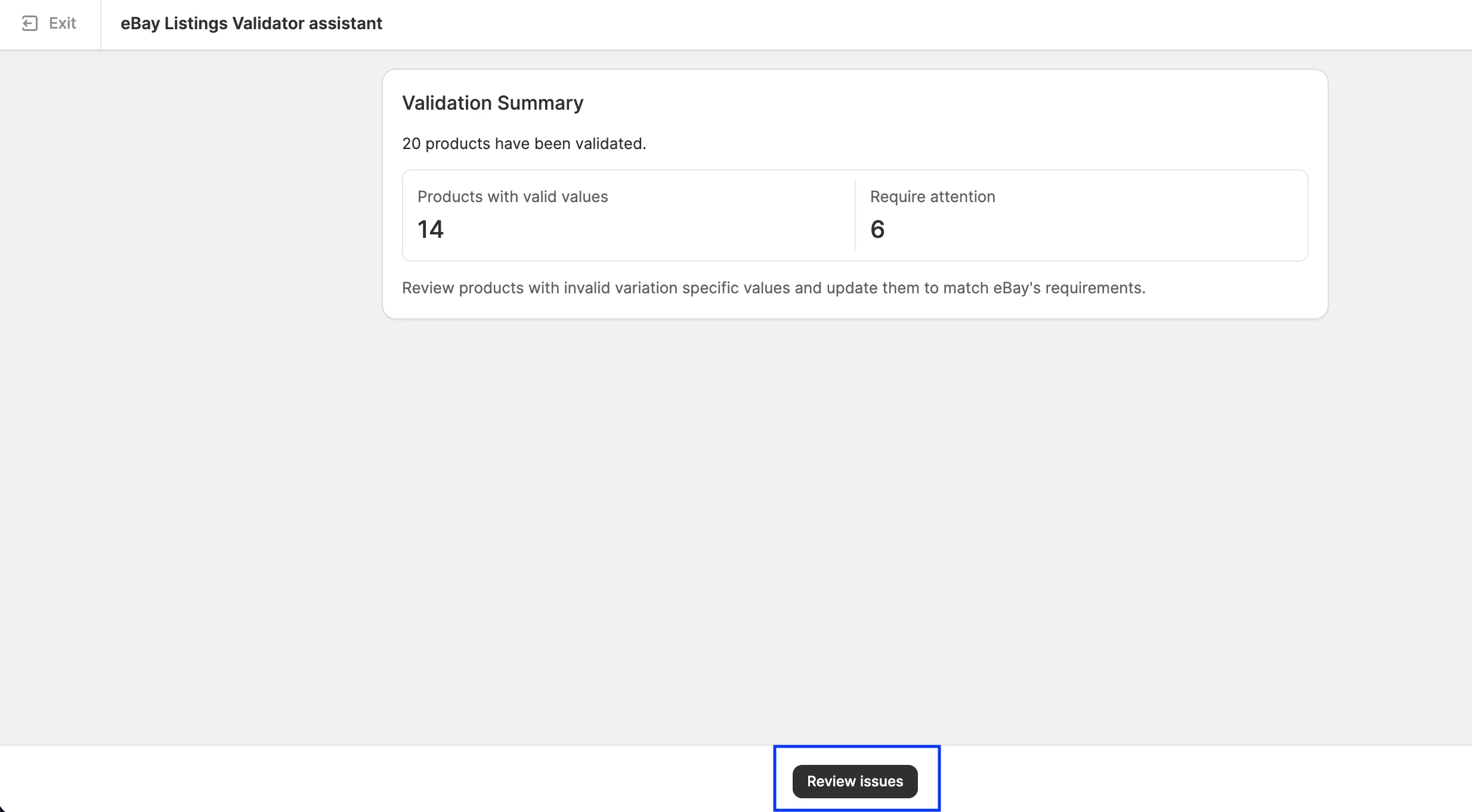
M2E displays a validation summary showing how many listings were validated, how many have valid Size values, and how many require attention.

If all validated listings have valid Size values, no further action is required. If the validation summary shows listings that require attention, click Review issues and resolve the invalid values as described below.
eBay rejects an invalid Size value with the following error: “{incorrect value} is not a valid value for Size. Select a value from the available options.”
In M2E, the error displayed depends on how Size is used in the eBay listing:
- Size item specific – Size has one value for the entire listing. M2E shows: “Size: {incorrect value} must contain one of the following: {allowed values}.”
- Size variation detail – Size has different values for individual variations, such as S, M, and L. M2E shows: “Size: {incorrect value} value mapping is required.”
Fix invalid Size variation details #
For multi-variation listings, M2E validates the Size values currently available on eBay.
M2E compares each Size variation value with the standardized values eBay accepts for the category. For example, if the current eBay value is UK Size 12, but eBay accepts 12, M2E identifies UK Size 12 as invalid.
To resolve invalid Size variation values:
1) In the validation summary, click Review issues.
2) Next to the issue, click Recommended action.
3) For each invalid value, select the corresponding standardized value accepted by eBay. This creates a mapping that tells M2E which valid eBay value should replace the current invalid value.
Current eBay value: UK Size 12
Mapped eBay value: 12
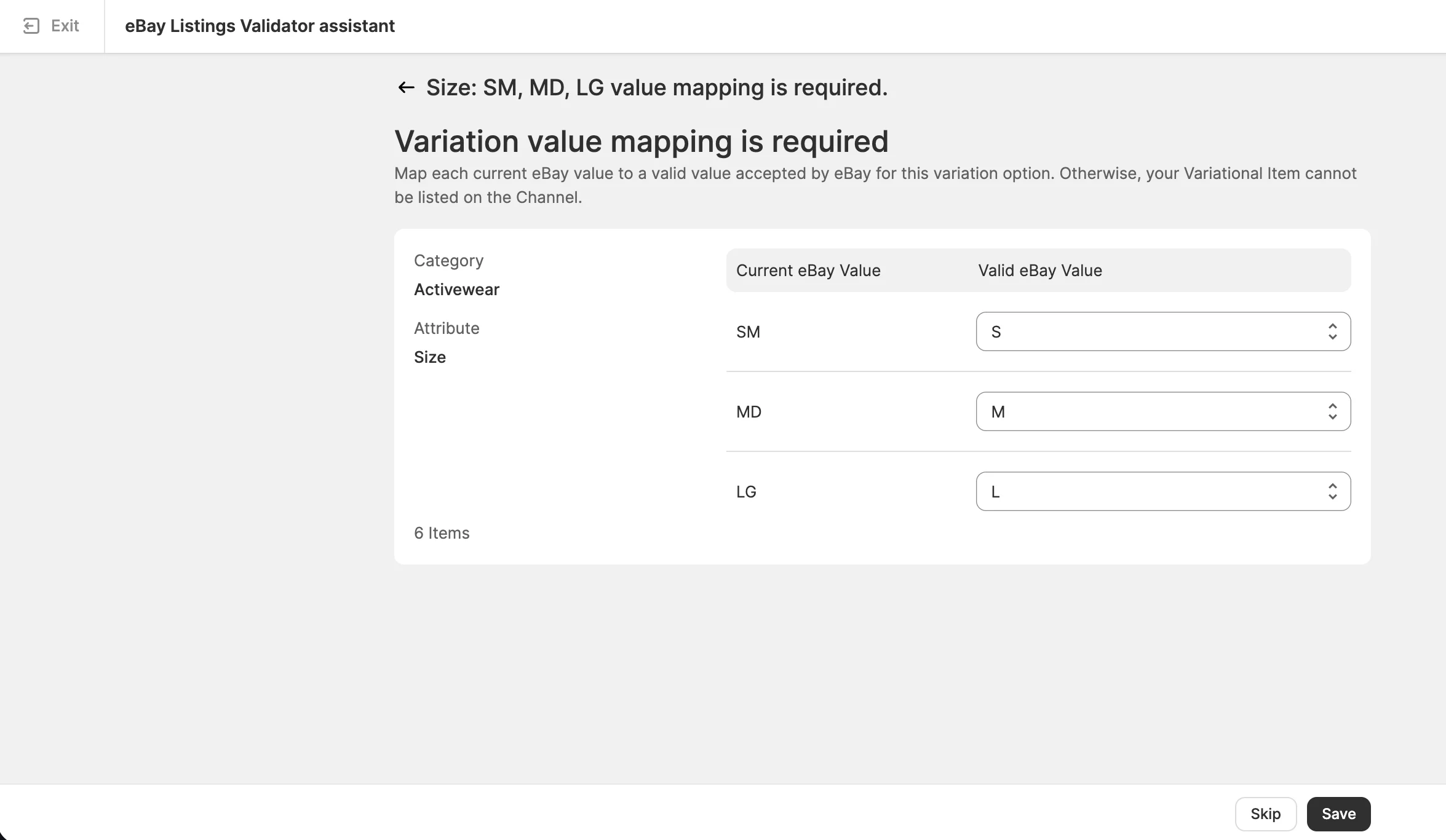
If the same invalid value appears in several eBay listings included in the current validation, you only need to map it once. M2E applies the mapping to all affected listings in that validation.
4) Complete the mapping for all invalid Size variation values and save the changes.
M2E uses the mappings to replace the invalid values on eBay with the selected standardized values.
⚠️ The mapping is not saved globally. It applies only to the listings included in the current Listings Validator Assistant check. If you validate other eBay listings later, you may need to map the same invalid value again.
How M2E replaces an invalid Size variation on eBay #
eBay does not allow the Size value of an existing variation to be changed directly.
When you resolve an invalid Size variation value, M2E removes the existing variation with the invalid value and creates a new variation with the mapped valid value within the same multi-variation listing.
For example, if UK Size 12 is mapped to 12, the variation with UK Size 12 is removed, and a new variation with 12 is created in the same eBay listing.
ℹ️ If a variation has an invalid Size value, eBay may prevent that variation from being sold. Make sure all invalid Size values are mapped to valid eBay values.
Fix invalid Size item specifics #
For listings where Size has one value for the entire listing, M2E validates the Size value currently available on eBay.
M2E compares the current eBay Size value with the standardized values eBay accepts for the category. For example, if the current eBay value is 5 ft x 7 ft, but eBay accepts 5' x 7', M2E identifies 5 ft x 7 ft as invalid.
To resolve an invalid Size value:
1) In the validation summary, click Review issues.
2) Find the Size issue and click Recommended action.
3) For each invalid value, select the corresponding standardized value accepted by eBay. The mapping tells M2E which valid eBay value should replace the current invalid value. For example:
Current eBay value: 5 ft x 7 ft
Mapped eBay value: 5' x 7'
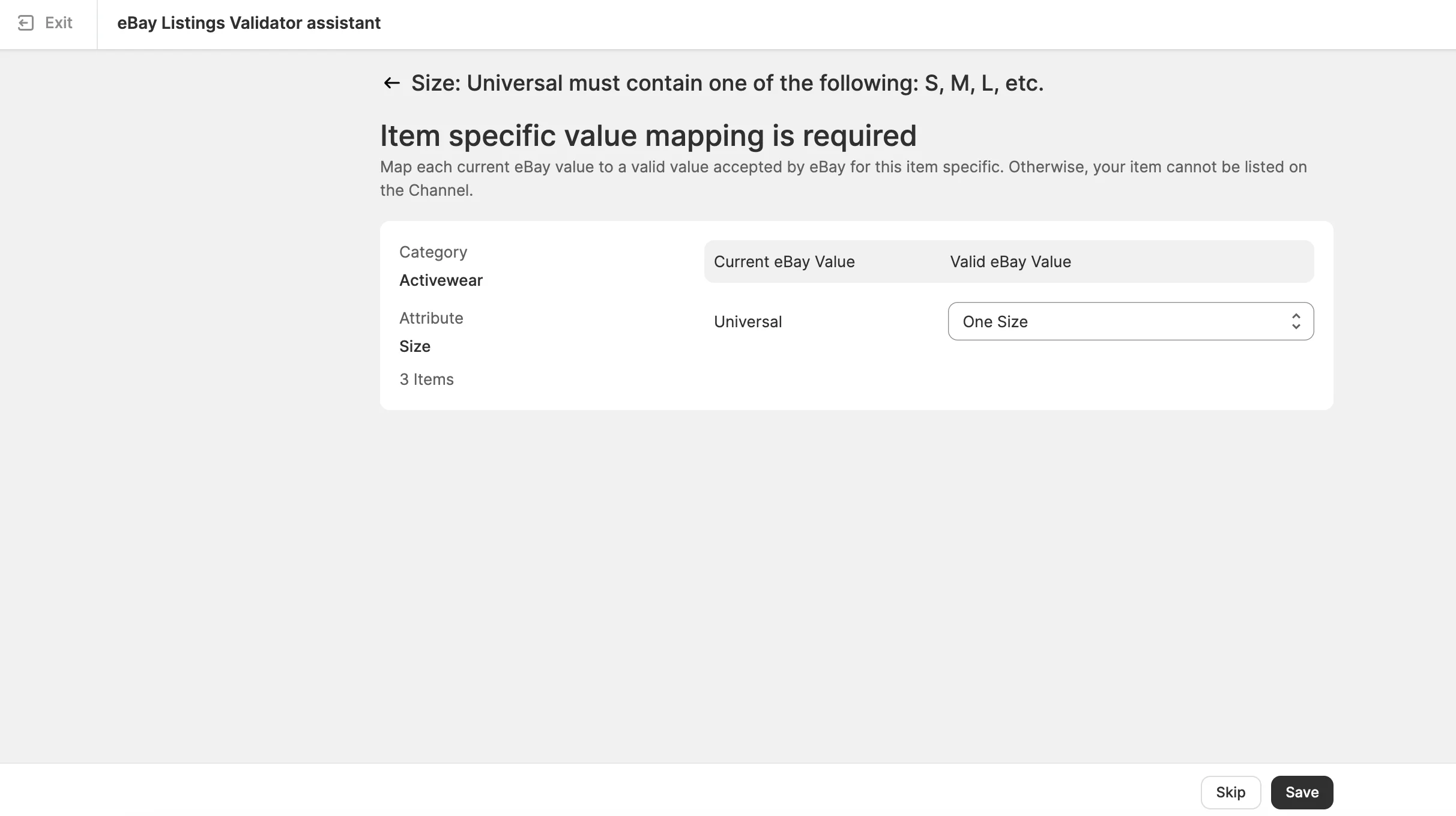
4) Complete the mapping for all invalid Size values and save the changes.
M2E uses the mappings to replace the invalid values on eBay with the selected standardized values.
If the same invalid value is used in several listings included in the current validation, you only need to map it once. M2E applies the mapping to all affected listings in that validation.
⚠️ The mapping is not saved globally. It applies only to the listings included in the current Listings Validator Assistant check. If you validate other eBay listings later, you may need to map the same invalid value again.
Need help? #
If you have questions about validating eBay size values in M2E Multichannel Connect, contact our support team.


