
As your catalog grows and you add new markets, the work behind each listing and order grows with it. This month's M2E updates automate more of that work. You can copy existing listings to new TikTok Shop markets, add vehicle fitment to Amazon parts in bulk, and validate Size values for your eBay listings.
We'll go through each new feature, explain where it helps, and show you how to set it up.
What's new in M2E Cloud #
Fix invalid eBay size values in bulk #
If you sell clothing or shoes on eBay, check your Size values. Since August 2026, eBay accepts only standardized values in these categories. Listings that have custom values like "UK Size 12" or "Medium/Large" can be blocked from sale or updates.
With the new Size Standardization view, you don't have to go through your catalog manually. M2E validates your eBay listings in the Clothing, Shoes & Accessories category and highlights the invalid Size values. You choose the correct value from eBay's standard list, and M2E updates the listings.
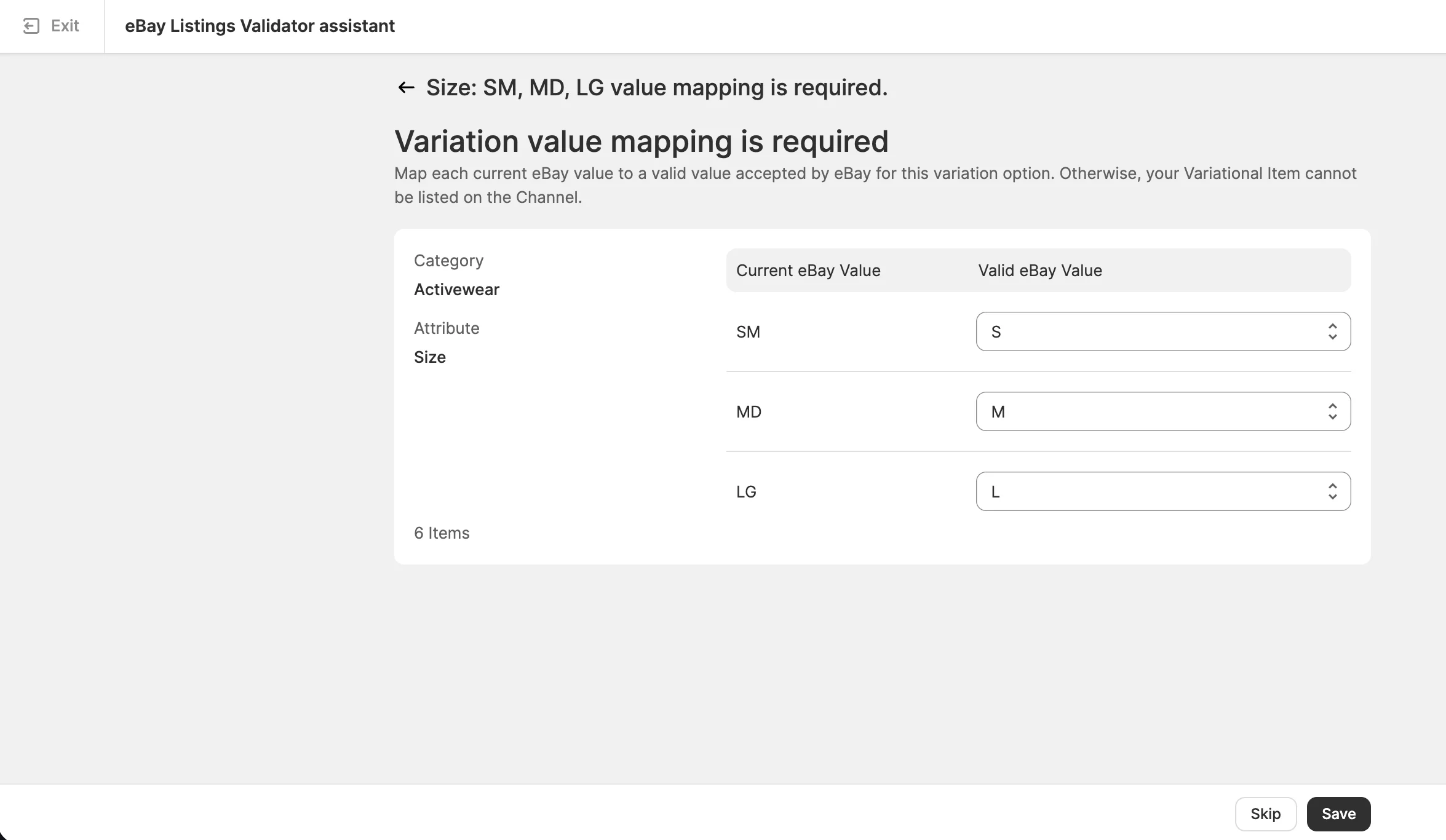
💡 Our video guide walks you through each step of size standardization. Or check the documentation guide for written instructions and examples.
Sync Shopify refunds for eBay orders #
M2E now syncs order refunds between Shopify and eBay in both directions. When you issue a refund for an eBay order in your store, M2E detects it and sends the refund information to eBay, for both Unshipped and Shipped orders.
Refunds issued in Shopify are synced when a return isn’t involved, for example, if an ordered item turns out to be out of stock, arrives damaged, or never reaches the buyer.
Refund sync is available on the Business and Enterprise plans. To turn it on, go to Settings > Orders > Return & Refund Management:

💡 Refund sync works in both directions for Amazon orders as well. See the guides on syncing eBay refunds and Amazon refunds for the details.
Add vehicle fitment to Amazon auto parts #
On Amazon, every auto part needs fitment data so buyers can check whether it fits their vehicle. Instead of adding compatible vehicles listing by listing or uploading files in Seller Central, M2E now lets you assign them to multiple parts listings in bulk.
To assign the KTYPE-based fitment to Amazon auto parts in M2E:
1) Go to the Amazon Listings page and filter the listings by marketplace. The list of available vehicles differs between Amazon marketplaces, so fitment is assigned to items from one marketplace at a time.
2) Select the items you want to add fitment to.
3) In the mass actions menu, click the three-dot icon and select Add Fitment.
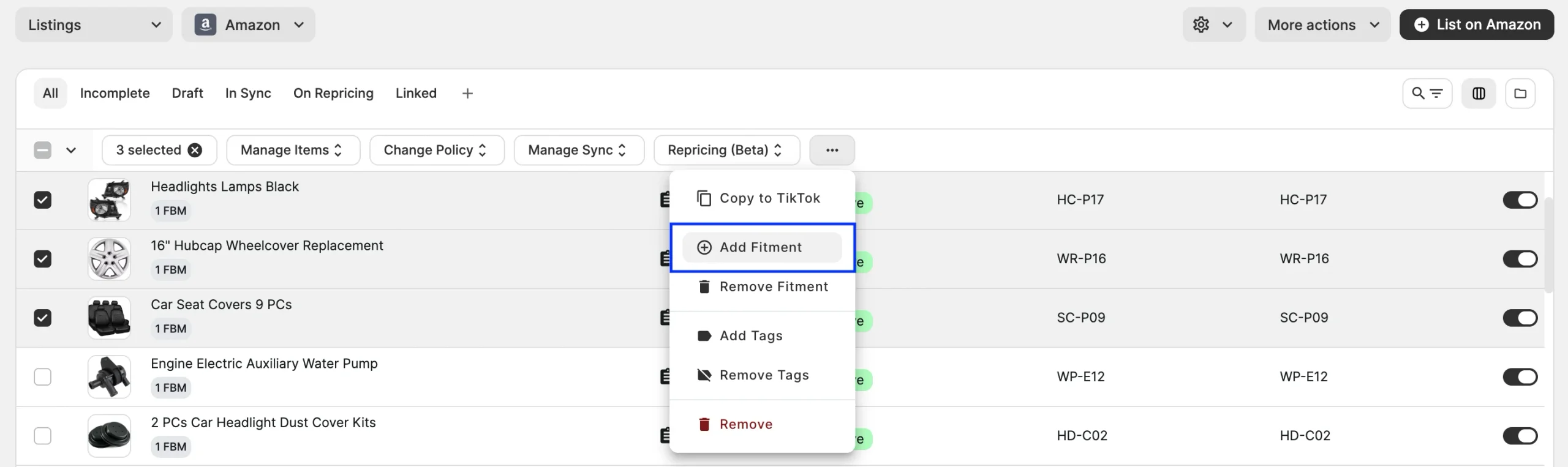
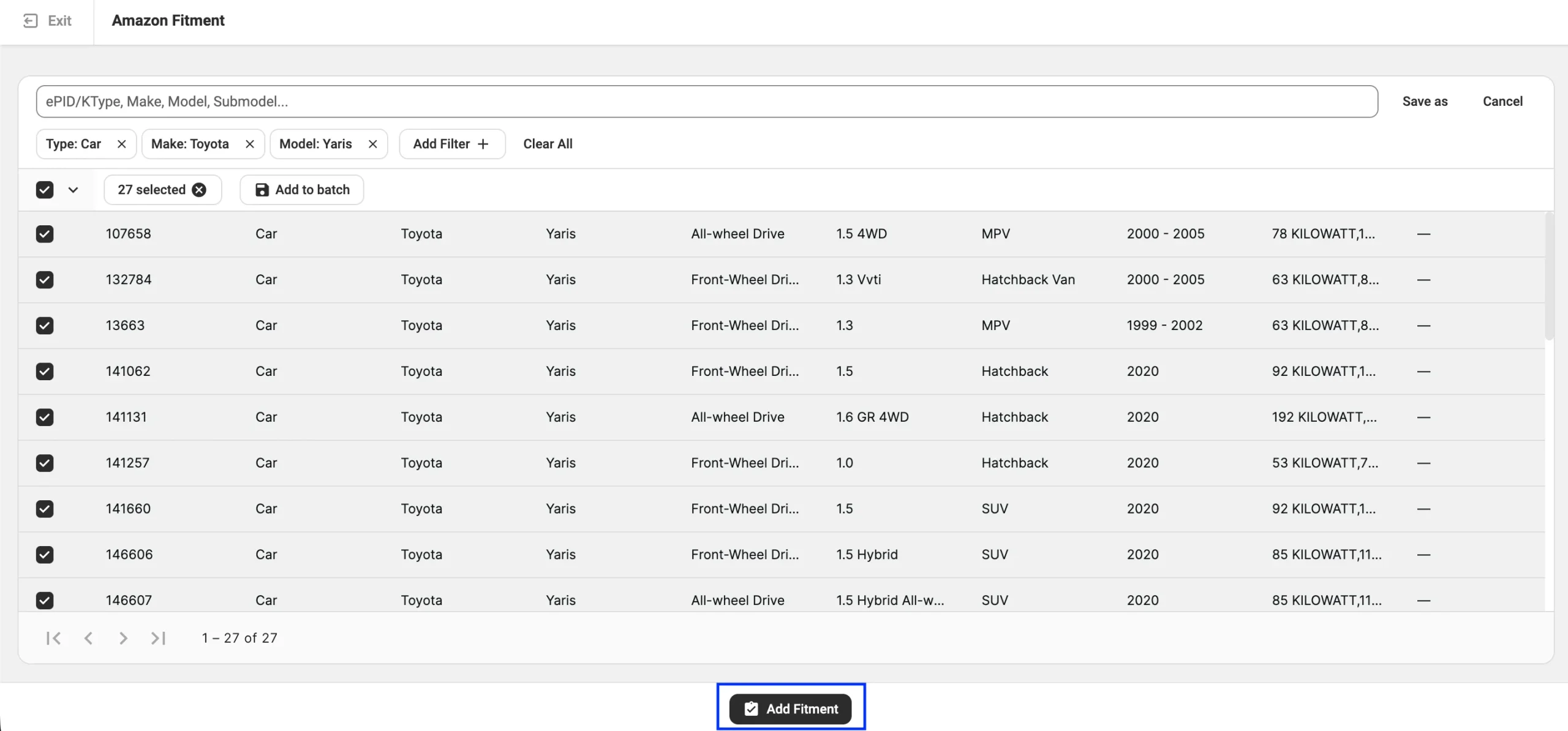
4) Filter the vehicle list by make, model, type, and other details.
To combine vehicles from different searches, add each selection to a batch before you continue. If you need to reuse a set of filters later, save it as a custom view.
5) Once you’ve selected all the vehicles your parts fit, click Add Fitment.
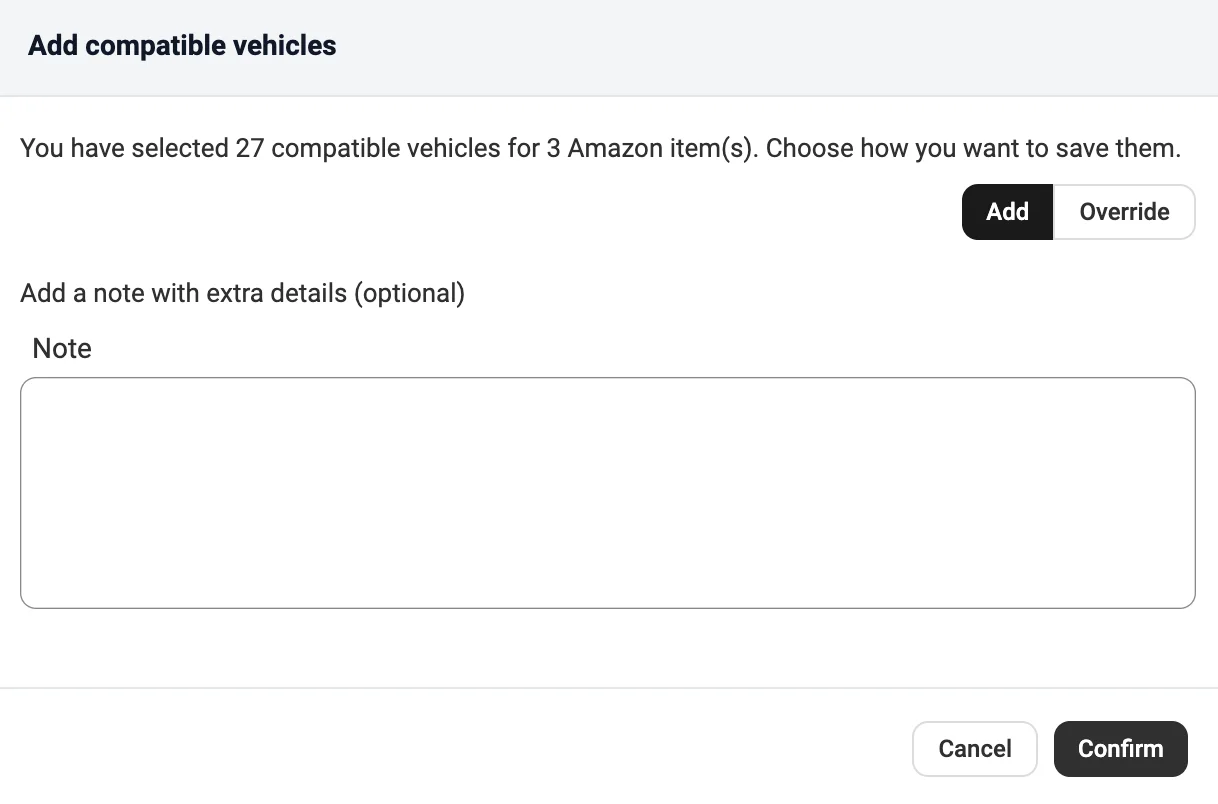
6) Choose how to save the selected vehicles. Add keeps the fitment your items already have and adds the new vehicles. Override replaces the existing fitment.
7) Optionally, add a note with extra details, then click Confirm. M2E will submit the fitment information to Amazon.
💡 If you also sell auto parts on eBay, see how to add parts compatibility for eBay listings.
Copy TikTok Shop listings to other EU markets #
M2E allows you to list new products on several TikTok Shop EU markets at once. Even though that option is convenient, it only works when you publish a listing for the first time. To add an already listed product to another TikTok region, you had to list it again from scratch: assign the policies, pick the category, and fill in the attributes.
Now, with M2E, you can replicate existing TikTok Shop listings from one EU market to one or more others in a few clicks. You don’t need to go through the repetitive listing flow. Follow the steps below:
1) Go to the TikTok Shop Listings page and select the listings you want to copy. All selected listings must be on the same marketplace.
2) In the mass actions menu, click Manage Items > Replicate.

3) Select the target regions from the list and click Next. The list shows the active shops in your connected TikTok Shop account.
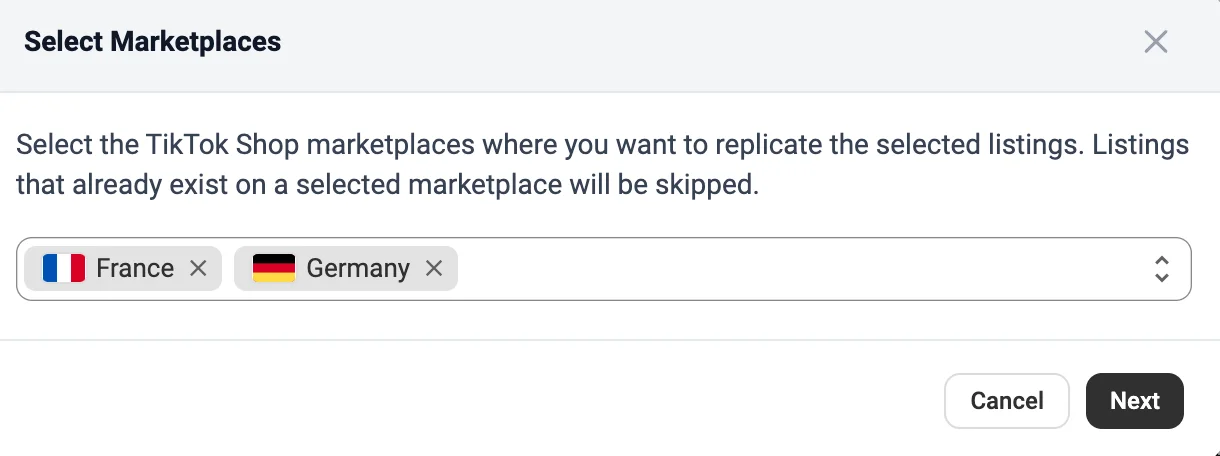
4) Review the summary. M2E shows how many listings are eligible for each target marketplace.
5) Click Replicate. M2E creates the eligible listings on the selected markets.
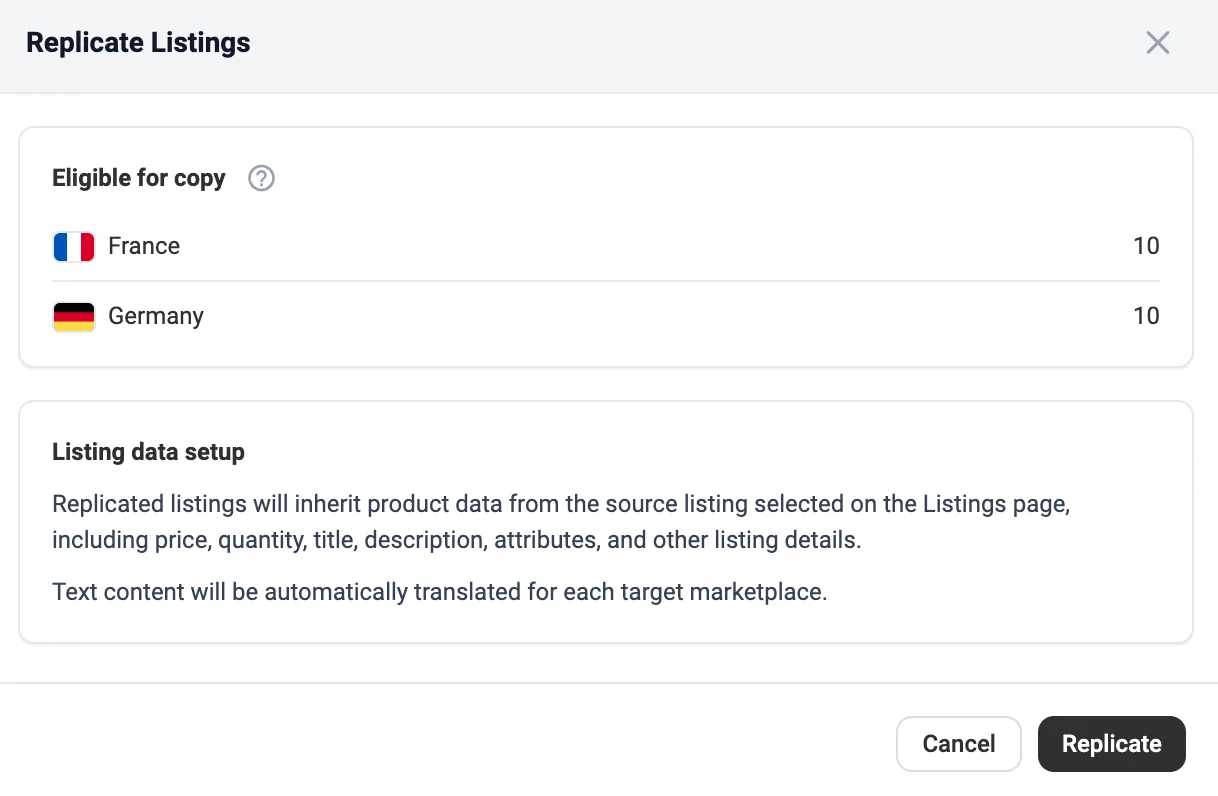
Replicated listings use price, quantity, title, description, attributes, and other details from the source listing. Text is translated automatically for each target marketplace.
✅ Not selling on all European markets yet? One TikTok Shop EU account covers 13 regions: Germany, France, Italy, Spain, Ireland, Poland, the Netherlands, Belgium, Austria, Portugal, Hungary, the Czech Republic, and Greece.
To expand to these markets, enable Sell Across EU in your TikTok Seller Center. Then, restore the connection to your TikTok Shop account in M2E (Settings > Sales Channels). M2E will retrieve the new markets, so you can replicate your listings to them.
Set image sources for TikTok Shop listings #
You can now choose where your TikTok Shop listings get their images, separately for the main image and the additional images. This is useful if you prepare a separate set of images for TikTok Shop, host some images outside your store, or want a different main image on TikTok Shop than on your other channels.
In the Images section of your TikTok Shop Description Policy, choose one of three sources for each image type:
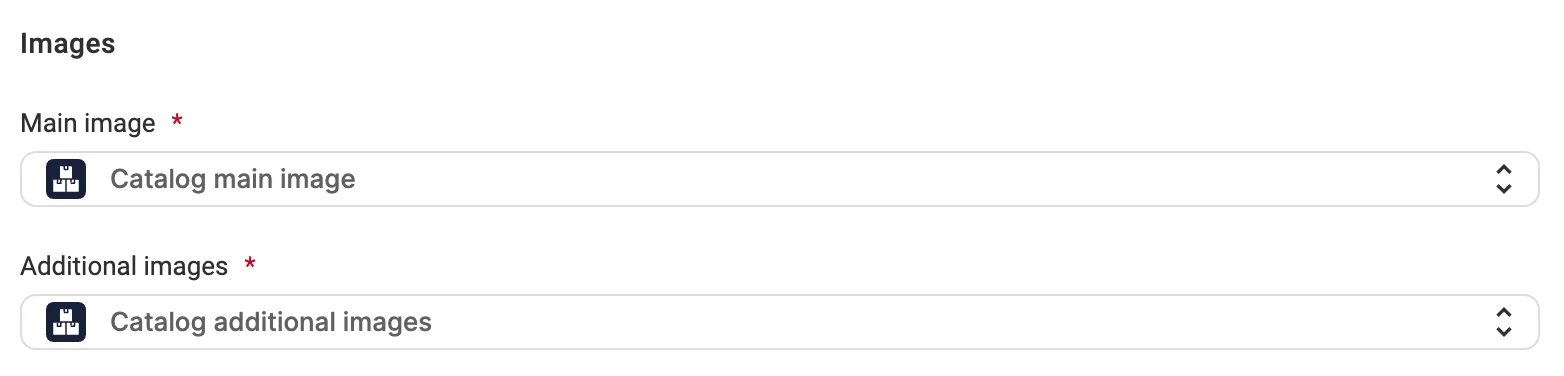
- Catalog – product images from your store's catalog, used by default.
- Attribute – a store attribute or metafield that contains the image URLs. For additional images, this can be a field with several URLs, such as a multi-line text field.
- Custom – URLs you enter yourself. You can add several URLs for additional images.
ℹ️ If the Images option is enabled in your Synchronization Policy, M2E updates your TikTok Shop listings automatically when the images change.
Map store categories to OTTO categories #
If you list into the same OTTO categories again and again, choosing the category each time becomes repetitive. Category mapping, already available for eBay, Amazon, TikTok Shop, Kaufland, and other channels, now works for OTTO too.
When creating new listings, you can map your store categories to the matching OTTO categories once. Every product you list afterward is assigned to the right OTTO category automatically.
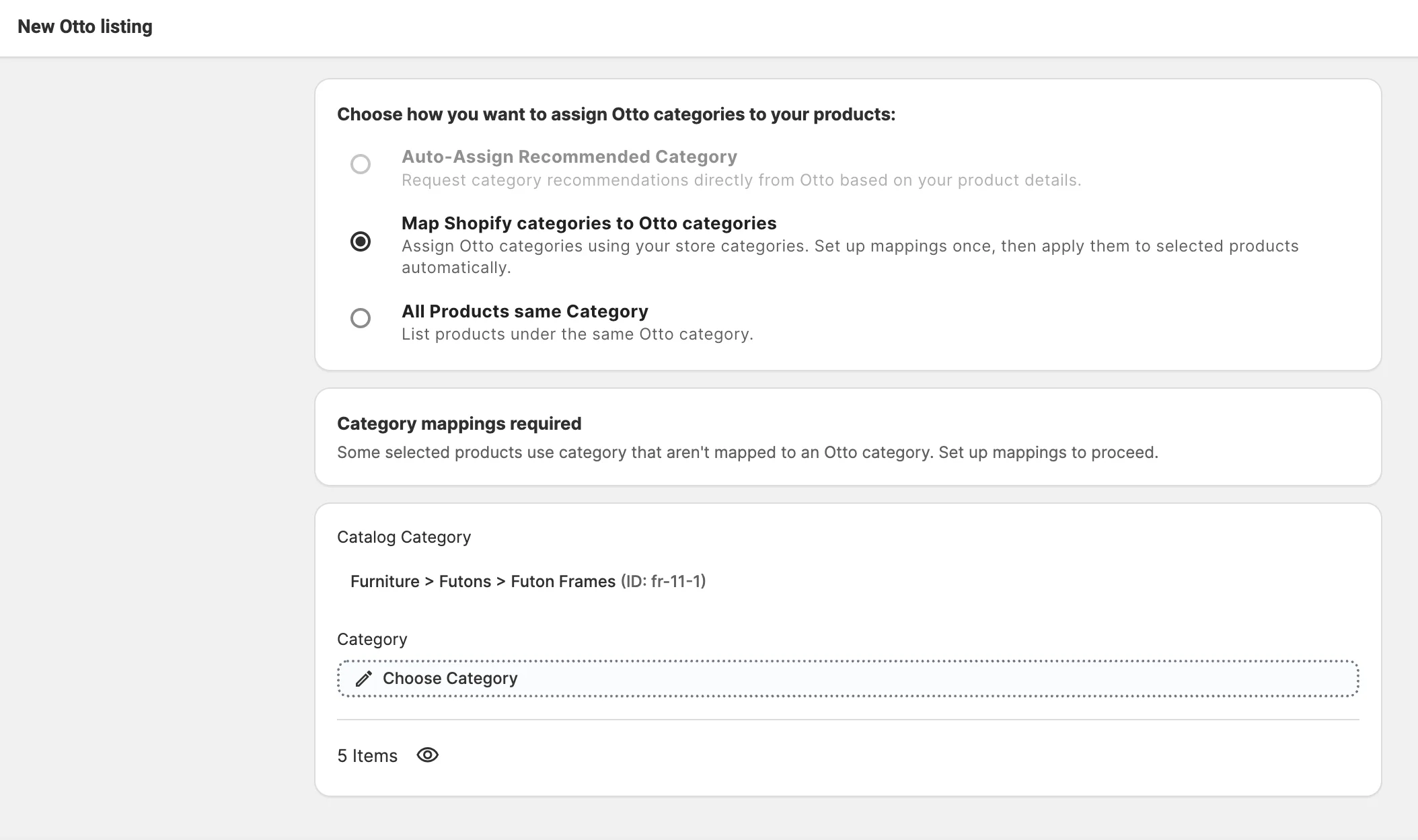
💡 See the detailed guide on how to set up the category mapping when listing products.
Reuse OTTO variation mappings across listings #
In August, we added the option to save OTTO attribute value mappings and reuse them for your listings. You can now do the same for variation options and their values.
Your catalog may name a variation option, or its values, differently from OTTO. You could already fix these mismatches while listing, but the fix applied only to the current listing. The next product with the same options needed the same mapping again.
Now, when you map variation options during listing, M2E offers to save them as a global mapping. If you confirm, M2E will apply the mapping automatically to your future OTTO listings with the same options and values.

You can review or delete saved mappings under Settings > Mapping > Attribute:

What's next in M2E Cloud #
Look out for these features in upcoming releases:
- Handle stale eBay listings in a separate view
- Sync Shopify refunds for TikTok Shop and OTTO orders
That's everything new in M2E Cloud this month. If you run into an issue or need help configuring any of these features, please reach out to our support team.


