
M2E Multichannel Connect lets you copy active TikTok Shop listings from your UK shop to TikTok Shop marketplaces in EU countries, and the other way around. The copies, called replicas, reuse the product data of the original listing. You don’t need to start a new listing for each product.
This guide walks you through the replication steps and explains how to prepare the replicas for the requirements of the new marketplace.
💡 You can also copy listings between EU marketplaces of the same TikTok Shop account.
Before you start #
Replication copies TikTok Shop listings from a source marketplace to a target marketplace.
The source marketplace is where your listings are already active, for example, Germany. The target marketplace is where the replicas are created, for example, the UK. Each marketplace belongs to a TikTok Shop seller account: your UK account or your EU account.
To prepare for replication, you have to meet the following requirements.
TikTok Shop requirements #
Set these up in TikTok Shop Seller Center:
1) Link your EU and UK shops in TikTok Shop.
Replication works only if both shops are linked on the TikTok Shop side. If you sell in the EU and don’t have a linked UK shop yet, apply for Sell in the UK in TikTok Seller Center.
TikTok Shop sets its own eligibility conditions for linked shops, so check them before you apply.
2) Add a warehouse address for the target account.
TikTok Shop requires a warehouse address to publish listings on a marketplace.
3) Add Manufacturer and Responsible Person records (only when copying listings from the UK to the EU).
EU marketplaces require this information under the General Product Safety Regulation (GPSR). In the Qualification Center of your EU account, add the required records for your products. You can skip this step when copying listings from the EU to the UK.
M2E requirements #
1) Connect TikTok Shop UK and EU seller accounts to M2E.
To add a second account, go to Settings > Sales Channels and click Connect New Account. See the guide on how to connect a TikTok Shop account for detailed instructions.
2) Check that your source listings are eligible for replication.
M2E can replicate a TikTok Shop listing only if:
- Its status is Active. Replicas take their main product data from the source listing. If the source listing is Inactive because of a policy violation or zero stock, its replicas couldn’t be sold either.
- Synchronization is enabled for it. Replicas use the same Synchronization Policy as the source listing. For example, if only price and quantity updates are enabled in the policy, M2E syncs only these details to the replicas.
- It doesn’t have a replica on the target marketplace yet. This prevents duplicate listings of the same product.
If your listings don’t meet these conditions, they will be skipped during replication.
How product data is copied to replicated listings #
When you replicate listings in M2E, TikTok Shop copies most product information from the source listing to the replica. But some details can’t be copied as is, because UK and EU marketplaces have different requirements.
The table below shows which data is copied automatically and which information you need to provide for the target marketplace.
| Listing data | Where it comes from |
|---|---|
| Price, quantity, title, description, and other product details | Copied from the source listing |
| Category | Matched to the category ID of the source listing on the target marketplace |
| Brand | Copied from the source listing |
| Manufacturer and Responsible Person (UK to EU only) | Filled in from the Manufacturer and Responsible Person mapping saved for your EU account. If there is no mapping, you provide the data during validation |
| Category attributes | Copied from the source listing when the attribute exists on both marketplaces. If some of the attributes exist only on the target marketplace, you fill them in during replication. |
| Product compliance information | You need to provide it during replication |
How to copy listings between UK and EU TikTok Shops #
Step 1. Select the source listings #
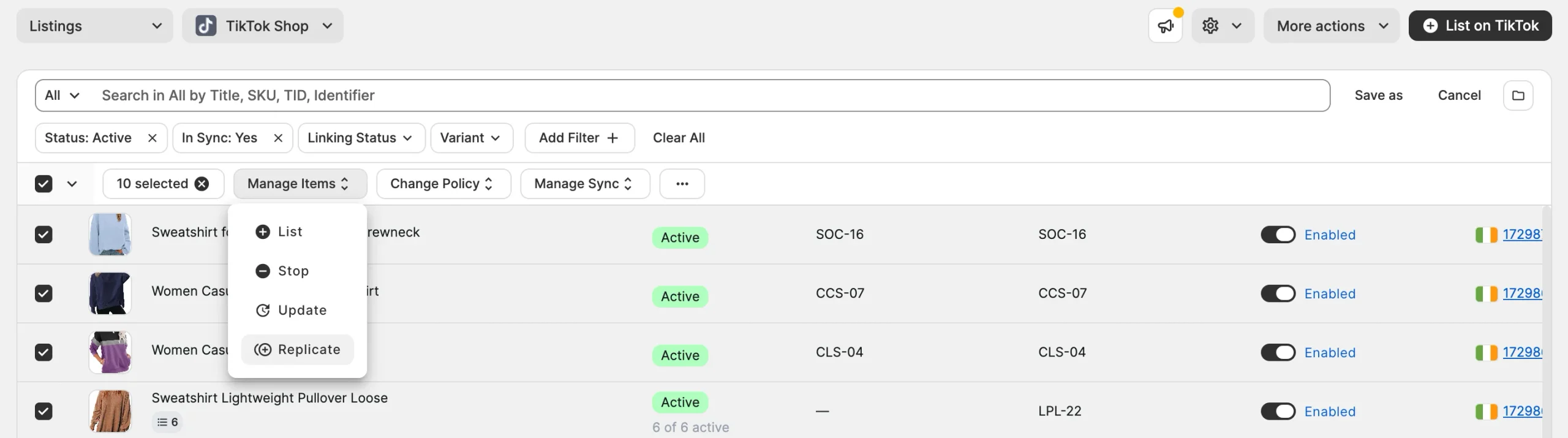
1) Go to the Listings page and select the TikTok Shop account with the listings you want to replicate.
2) Select the listings you want to copy. All selected listings must belong to the same TikTok Shop marketplace.
ℹ️ To group the listings by marketplace, click Organize by Group (folder icon) in the top-right corner of the grid.
3) In the mass actions menu, click Manage Items > Replicate.
Step 2. Choose the target marketplace #
In the pop-up, choose the TikTok Shop marketplace where you want to create the replicas and click Next. You can select one target marketplace at a time.
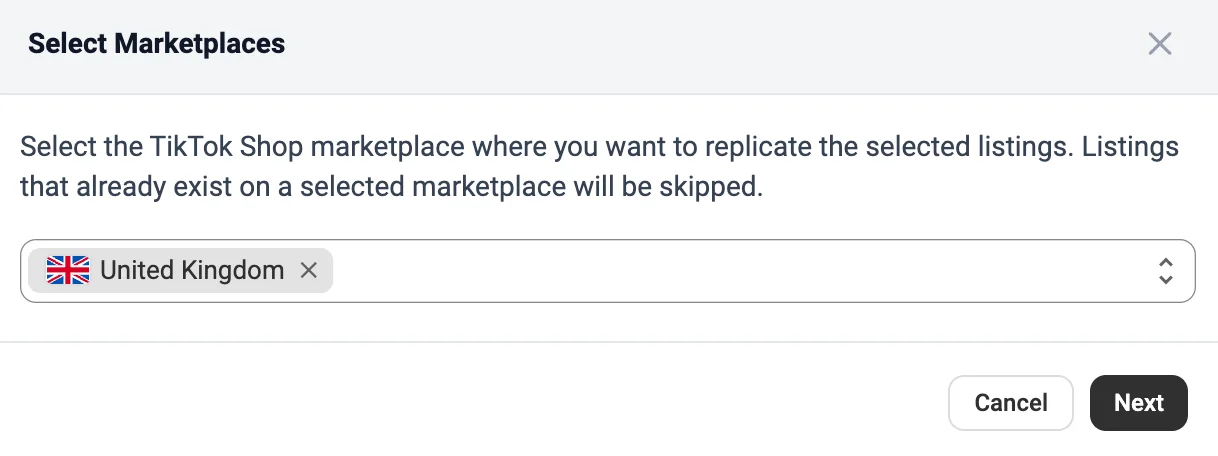
✅ When copying listings from the UK to the EU, the list shows the active marketplaces of your TikTok Shop EU account. If a marketplace you need is missing, turn on Sell Across EU in TikTok Seller Center for that account. With this feature, one EU account can sell in 13 regions.
For the new marketplaces to appear in the list, restore the TikTok Shop account connection in M2E under Settings > Sales Channels.
Step 3. Review the eligible listings #
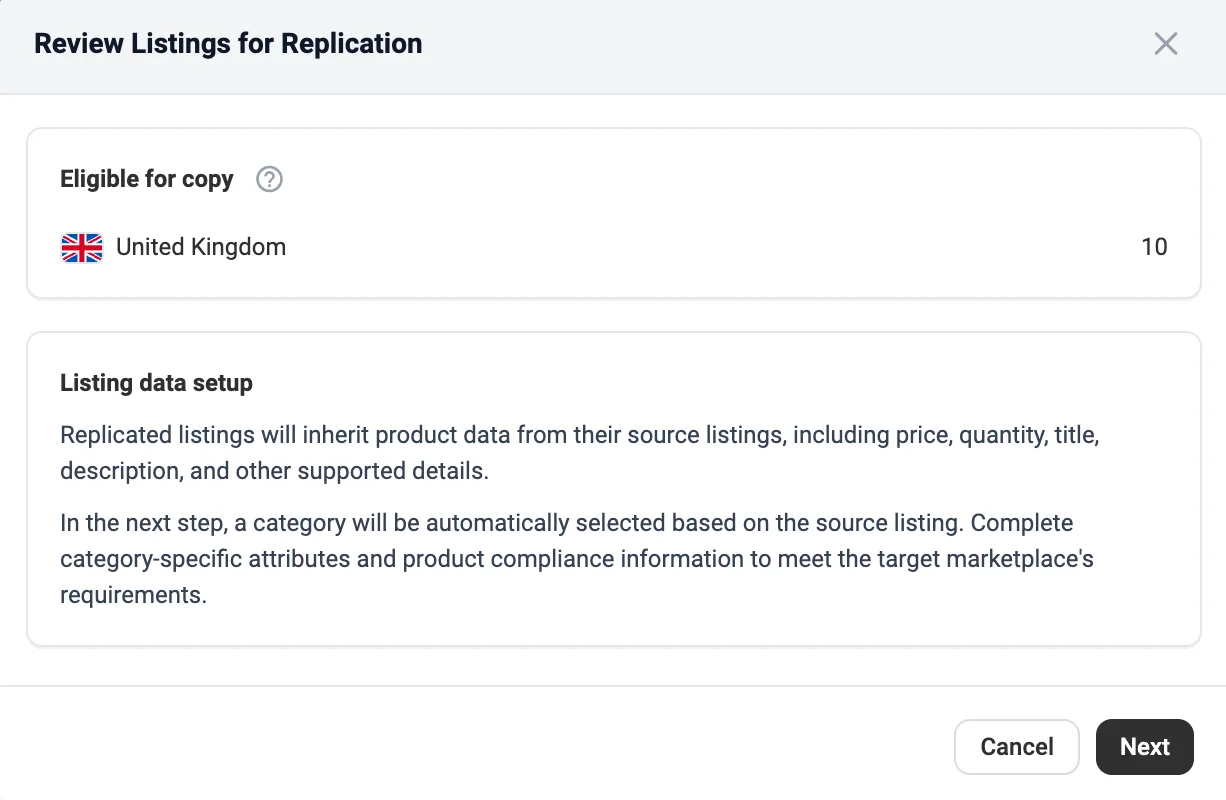
M2E checks which of your selected listings meet the replication requirements.
In the pop-up, review the number of listings eligible for replication and click Next to continue.
Step 4. Provide category attributes and compliance details #
You’ll see the list of TikTok Shop categories assigned to your replicas. For each category, you need to fill in the required category attributes and product compliance information.
Once you've completed the details for all categories, click Replicate.

Step 5. Review the validation results #
The M2E Listings Validator Assistant checks whether each replica meets the requirements of the target marketplace.
The summary shows how many listings M2E validated:
- Replication in progress counts the listings that passed the check and are being created on TikTok Shop.
- Require attention counts the listings that have missing or invalid information and need to be corrected.
If some of the listings require attention, click Review issues. The Validator Assistant highlights the missing or invalid details for each replica, so you can correct the issues and resubmit the listings to TikTok Shop.

If all your listings passed the validation, click View Listings. M2E takes you to the Listings page of the target TikTok Shop account, where you can review your replicas and track their status.
Need help? #
If you have questions about copying listings between UK and EU TikTok Shops, contact our support team.


