
If your products are live on one TikTok Shop EU marketplace, M2E Multichannel Connect lets you copy their listings to other EU marketplaces within the same seller account. These copies, called replicas, reuse product data and policies from the original listings, so you don't need to create each listing from scratch.
This guide explains how to replicate your items and how the replicas stay synchronized with their source listings.
✅ Want to publish new products on multiple EU marketplaces at once? Use the Sell Across EU listing flow instead.
Replication is meant for products that are already listed on TikTok Shop.
What you need to replicate listings #
Replication works between marketplaces within the same TikTok Shop EU seller account. You copy listings from the source marketplace, where they’re already active (for example, Germany), to a target marketplace, where the replicas are created (for example, France or Italy).
Before you start, make sure you meet these requirements:
1) Connect your TikTok Shop EU account to M2E.
Your TikTok Shop EU seller account must be connected to M2E. If it isn’t yet, see our guide on how to connect a TikTok Shop account.
2) Check that your target marketplaces are active.
M2E can replicate listings only to marketplaces that are active in your connected TikTok Shop EU account.
With one EU seller account, you can sell in multiple regions, such as Germany, France, Italy, Spain, the Netherlands, and more. To add marketplaces, enable Sell Across EU in TikTok Seller Center.
To update the list of available marketplaces, restore your TikTok Shop account connection in M2E under Settings > Sales Channels.
💡 To copy TikTok Shop listings from your EU account to the UK marketplace, see this guide.
3) Check that your source listings are eligible for replication.
M2E can copy a TikTok Shop listing only if:
- Its status is Active. Replicas of an Inactive listing would carry over the issue that made it inactive, for instance, a policy violation or zero stock.
- Synchronization is enabled for it. Replicas receive updates according to the Synchronization Policy of the source listing.
- It doesn’t have a replica on the target marketplace yet.
Listings that don't meet these conditions will be skipped during replication.
How to copy listings between EU TikTok Shop marketplaces #
Step 1. Select the source listings #
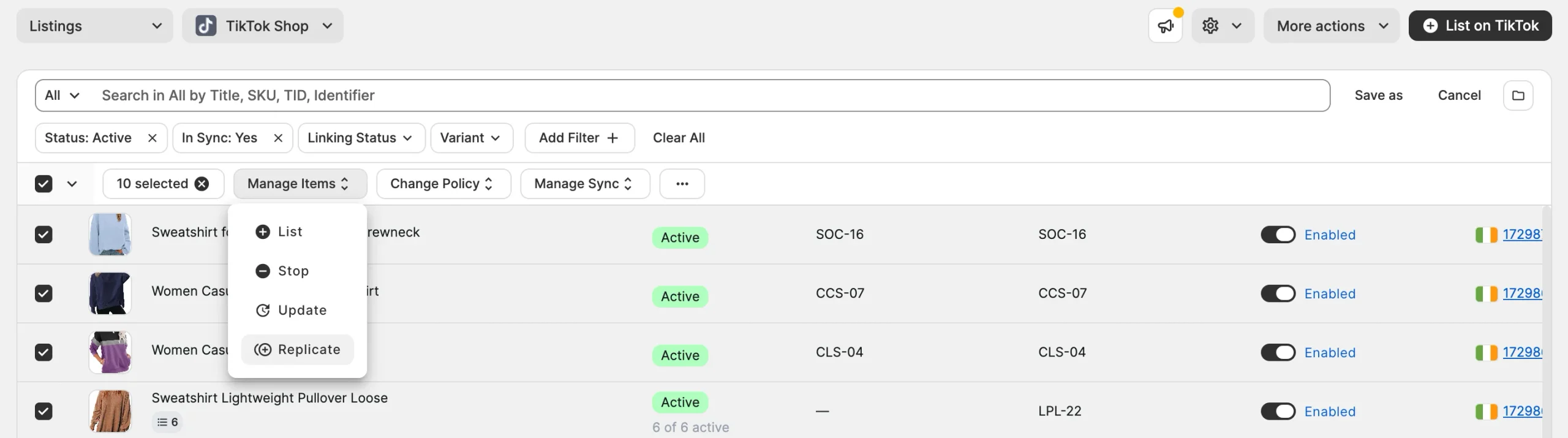
1) Go to the Listings page and select your TikTok Shop EU account.
2) Select the listings you want to copy. All selected listings must belong to the same TikTok Shop marketplace.
ℹ️ To group the listings by marketplace, click Organize by Group (folder icon) in the top-right corner of the grid.
3) In the mass actions menu, click Manage Items > Replicate.
Step 2. Choose the target marketplaces #
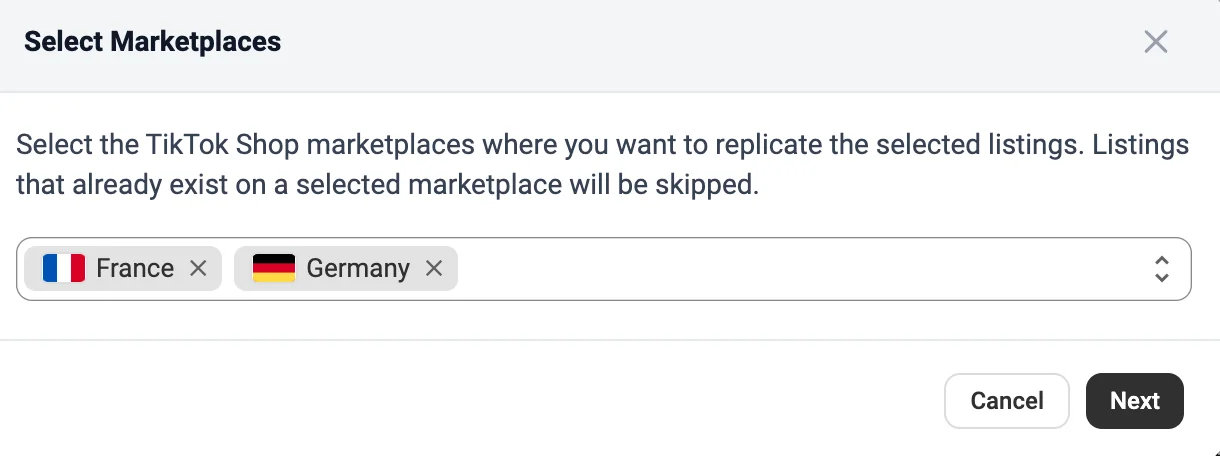
In the pop-up, choose the TikTok Shop marketplaces where you want to create the replicas and click Next.
Step 3. Review the eligible listings #
M2E checks which of your selected listings meet the replication requirements.
In the pop-up, review the number of listings eligible for replication and click Replicate to continue.

M2E starts the replication, and TikTok Shop creates the replicas on the selected marketplaces. Text content is translated for each target marketplace automatically.
How replicas stay in sync with the source listing #
After replication, M2E links each replica to its source listing. Each replica gets its own TikTok Shop product ID on the target marketplace, but you manage most of its product details through the source listing.
- Shared policies. Replicas use the same Selling, Synchronization, Description, and Category Policies as the source listing.
- Automatic updates. When the quantity, title, description, attributes, or other product details of the source listing change, M2E updates all its replicas.
- Separate prices. Price is the only detail you can edit directly on a replica. The change applies to that replica only, so you can set different prices for each marketplace.
Need help? #
If you have questions about replicating TikTok Shop listings across EU marketplaces, contact the M2E support team.


